General
- Question: Is it possible to separate application data (such as configuration files, test cases, and test models) from the binary executables (EXE and DLL files)?
Answer: Yes, this separation is generally mandated by enterprise IT standards. Executable binaries are installed under Program Files, whereas application data must reside in ProgramData or designated user directories. This structure enforces proper access control, improves maintainability, and ensures that data remains intact during software upgrades.
- When installing the tool, the installer provides a built-in option to implement this separation automatically. This ensures that application binaries are placed under Program Files while data is stored in the appropriate data directory, in accordance with enterprise IT requirements. Please refer to the Installation Guide for details.
- Although users can manually implement the separation by modifying APP.init to redirect data to a designated directory, this approach is NOT recommended. Manual configuration increases the risk of misconfiguration, may complicate future upgrades, and can lead to inconsistencies across deployments. Using the installer option ensures a cleaner, more reliable, and fully supported setup.
- Question: ‘Server’ is mentioned in many articles of User’s Guide. Where is the server?
Answer: This is because many articles in the User’s Guide are shared by different versions of the Tool. Keep in mind that the Tool is fundamentally a distributed client/server application. In the desktop version of the Tool, the server is simply hosted inside the client. In other words, client and server are tightly integrated as a single application. Therefore, in the desktop version of the Tool, users can treat ‘server’ as ‘application’.
- Question: Does the Tool support multiple users?
Answer: The desktop version of the Tool is designed for single user. To support your use case, please contact us to upgrade your desktop edition to an enterprise edition. The enterprise edition provides some additional features including:
- Multi-User & Multi-Environment: Enabling past, present, and future models to be shared in a coordinated platform, while allowing users to create unlimited number of modeling environments of their own.
- Authentication & Authorization: Only authenticated users can log into the system to perform the authorized tasks. Both role-based and MAS-based authorizations are supported and can be customized.
- Time-based & Collaborative Modeling: Enabling users from different groups or organizations to work collaboratively on as-built (EMS) model maintenance and future (planning) model build in support of multiple business processes.
oUser & Model Administration: Tools are provided for administrators to manage users & models and customize the system.- Question: Is the Tool a 64-bit application?
Answer: Yes. It runs in any PC/Laptops powered by Windows 10 and above.
- Question: Can I install the Tool on a 32-bit machine, such as Windows XP?
Answer: Yes, but you will have to run a 32 version of the Tool, which is not included in the standard package to avoid confusion. Please contact us to get a patch package.
- Question: Do I need install Python in order to run the Tool?
Answer: It is not required to install Python. Python installation is only needed when you want to leverage the Python support.
- Question: Can I run multiple instances in the same machine?
Answer: Yes, multiple instances of the Tool can be run from the same machines, independent of each other.
- Question: Can different versions of the Tool be installed and run in the same machine?
Answer: Yes, multiple versions of the Tool can be installed and run from the same machines, independent of each other.
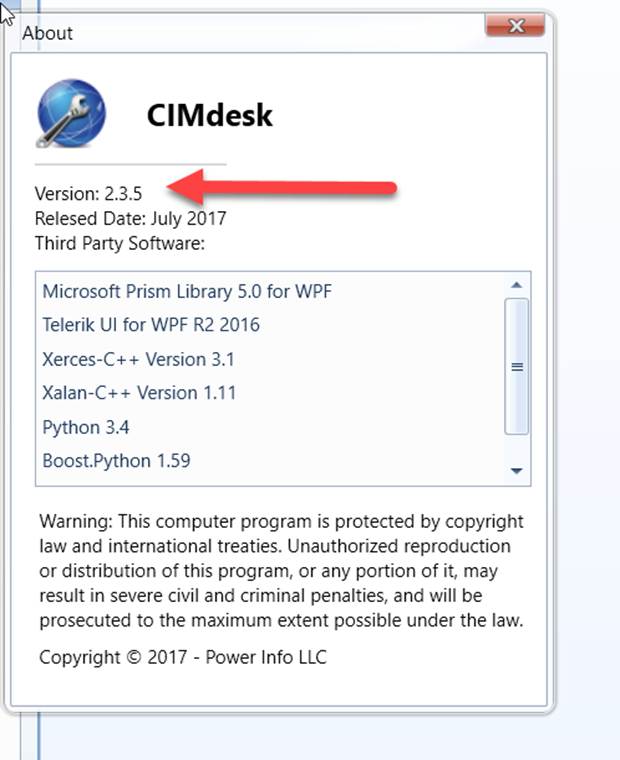
- Question: How do I know what version of the Tool I am running?
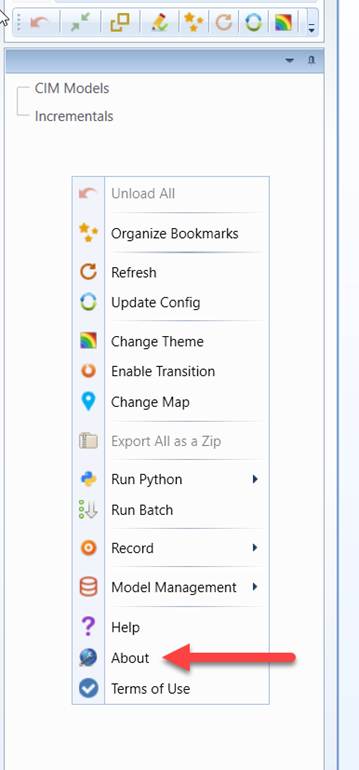
Answer: The version and other information (such as, release date, edition, customization, 3rd-party components, etc.) of the Tool can be found from the About box, as illustrated below.
- Question: Which color theme should I select?
Answer: Color is personal. You will have to try each of the supported color themes before making the decision. The default color theme is Windows7 (derived from Windows 7 theme). Expression Dark is a modern-style theme. But it doesn’t fit everyone. It is a recommended choice if you like something cool.
- Question: How can I see messages as those shown in the server console of the previous version of the Tool?
Answer: You can’t. The desktop version of the Tool is a Windows application. It doesn’t allow us to show those messages in a separate console.
- Question: My CIM/XML file is based on an old version of CIM. It also contains some extensions. Will the Tool work on this file?
Answer: As a data-driven tool, the Tool EE works with any versions of CIM/XML files, standard or extended. However, it is important to note that some of the functions, such as validation and model partition, etc., are driven by model schema specified in an XSD profile document. In order to fully support your extended CIM/XML file, a new XSD meta-file must be created. For more information, please check Supported CIM and Profile Versions. To learn how to create an extended CIM/XSD profile, read Supporting CIM Extension.
- Question: Can the Tool work on my proprietary information model?
Answer: As a data-driven tool, the Tool works with any canonical information models. At its core, the Tool maintains an in-memory RDF-compliant database, which is basically compatible to any data models, hierarchical or relational. However an adapter must be built to support a proprietary information model. This adapter application will convert the targeted proprietary information model into a RDF triplet format compatible to the in-memory database in the Tool.
- Question: How can I extend and enhance the validation?
Answer: The Tool supports two kinds of Model Validation: schema-driven and rule-based. The former is governed by a model schema specification, an extended XSD file, while the later is more involved. It allows the developer to specify validation logic in ad hoc rules, and then relies on an inference engine to apply rules against data. In the Tool, these ad hoc domain-specific model validation rules are specified in the profile as XSD annotations. However the corresponding validation helpers are implemented as helper components embedded in the CIMXML server application. In the future, the Tool will provide a plug-in programming mode in support of extension and enhancement of rule-based model validation by end-users.
- Question: The version of Python installed in my machine doesn’t match the one supported by the Tool. What can I do?
Answer: The Python language does not provide backward compatibility. Only one version of Python can be supported by the Tool. However, workarounds/patching solutions are available, depending on the versions of Python installed. Check Python Environment Setup for Options provided.