Advanced Topics of MQL
This article introduces some advanced concepts in MQL expressions. They are used to construct complicated queries or operations that involve sophisticated object navigations and data manipulations.
Inverse Navigation
The regular MQL object navigation is from child object to parent object. The inverse MQL object navigation is, however, from parent object to child object in a model hierarchy, as illustrated below. Inverse navigation is very useful for finding objects within a certain context, for example, finding Substations belonging to a certain GeographicalRegion.
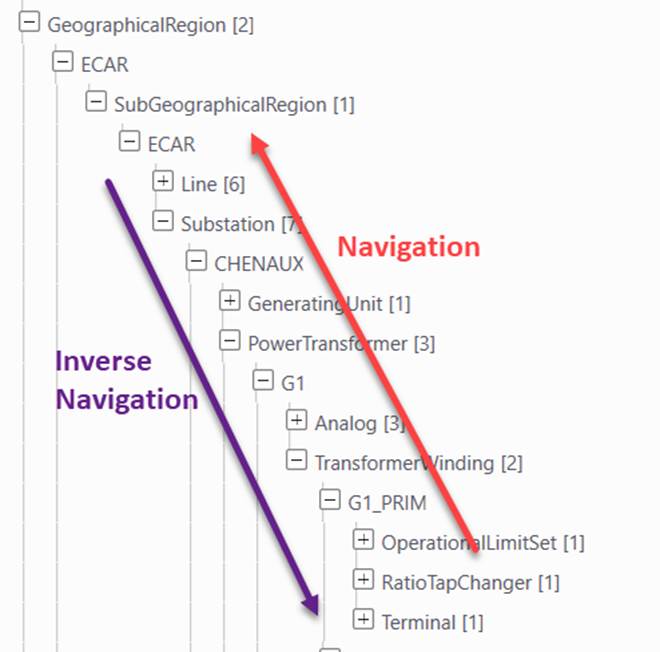
The inverse navigation is expressed as
{Child_to_Parent_Association}
where Child_to_Parent_Association is the association name from child object to parent object. It must be enclosed within {}.
For example, the navigation association from SubGeographicalRegion to GeographicalRegion is “SubGeographicalRegion.Region”. Then the inverse navigation from GeographicalRegion to SubGeographicalRegion is “{SubGeographicalRegion.Region}”. The following example is a property expression used navigate from GeographicalRegion objects to the name property of child Substations
[{``SubGeographicalRegion.Region}->{Substation.Region}->IdentifiedObject.name]
Inverse navigation typically returns multiple objects/values. This is because a parent object normally has multiple child objects. Quite often, filtering is needed during the reverse object navigation. Two types of filtering mechanisms are supported in the inverse navigation:
Index-based Filtering
This filtering mechanism restricts the reverse navigation to a certain child object based on its index. An inverse navigation that supports the index-based filtering is expressed as follow
{Child_to_Parent_Association@Child_Object_Index}
where Child_Object_Index is the index of the child object, starting from 1. The Child_to_Parent_Association and Child_Object_Index must be separated by the ‘@’.
For example, an ACLinSegment object has two child Terminal objects, each referencing a ConnectivityNode. The following MQL property expression can be used to navigate from an ACLineSegment to the ConnectivityNode that the first Terminal reference (called from-node).
[{Terminal.ConductingEquipment@1}->Terminal.ConnectivityNode]
Similarly, the following MQL property expression can be used to navigate from an ACLineSegment to the ConnectivityNode that the second Terminal reference (called to-node).
[{Terminal.ConductingEquipment@2}->Terminal.ConnectivityNode]
Index-based filtering is typically used when the number of the child objects is fixed.
Class-based Filtering
This filtering mechanism restricts the reverse navigation to a certain child object of a specified class. An inverse navigation that supports the class-based filtering is expressed as follow
{Child_to_Parent_Association:Child_Class_Name}
where Child_Class_Name is short or full class name of the child object. The Child_to_Parent_Association and Child_Class_Name must be separated by the ‘:’.
For example, the following property navigates from Substation to VoltageLevel and to Equipment. The specified class-based filtering restricts the Equipment to be SynchronousMachine. It is used to find all of SynchronousMachine contained in a Substation.
[{VoltageLevel.Substation}->{Equipment.EquipmentContainer:SynchronousMachine}]
Class-based filtering is typically used to find the child objects of a certain Class.
MQL-based Filtering
MQL-based filtering is a more generic filtering mechanism for inverse navigation. It enables an MQL logical property expression to be applied to test the child objects. Only the child objects that meet the filtering criteria (i.e. the evaluated result is ‘true’) will be navigated. An inverse investigation that supports the MQL-based filtering is expressed as follow
{Child_to_Parent_Association#MQL_Filtering_Expression}
where MQL_Filtering_Expression is the an MQL logical property expression used to filter the child objects. Its targeted class must be the class of the child objects. The Child_to_Parent_Association and MQL_Filtering_Expression must be separated by the ‘#’.
For example, a PowerTransformer may have up to three TransformerWindings child object. The following MQL property expression can be used to navigate from a PowerTransformer to its primary TransformerWinding.
[{TransformerWinding.PowerTransformer#[TransformerWinding.windingType]=WindingType.primary}
MQL-based filtering is very useful. It enables users to associate an “ad hoc” query with object navigation to limit the search space and find the information of interest.
Property Function
Property functions are introduced for various reasons including reporting, filtering, etc. A property function is treated as a special or dynamical attribute of the object. It takes the object and object attributes as input and performs some operations. The output is dynamically evaluated by the MQL engine at run time. A property function is expressed as follows:
Where MQL_Object_Navigation_Expression is an MQL expression used to navigate to the objects that function will be performed against, and Function_Name is a name of the supported function. It must be prefixed by “%”. Optionally, a property function can take zero or many arguments. Each is an attribute for the navigated object or a constant. The arguments must be separated by “,” and enclosed by “()”. If the function has no arguments, the argument lists including “()” can be omitted. The following property expression samples contain the property functions.
[Equipment.EquipmentContainer->%ShortClassName]
[{Terminal.ConnectivityNode}->%ObjectCount()]
[{VoltageLevel.Substation}->VoltageLevel.BaseVoltage->%Max(BaseVoltage.nominalVoltage)]
[Equipment.EquipmentContainer->%IsMemberOf(IdentifiedObject.name, PARKHILL, KINCARD)]
[{VoltageLevel.Substation}->{Equipment.EquipmentContainer@[%ShortClassName]=SynchronousMachine}->%Total(SynchronousMachine.ratedS)]
The following table lists the functions supported by the Tool. Some of the property functions work on single object, while others on multiple objects. If the function expects single object and evaluation of the property expression returns more than one objects, only the first object will be used as the input object.
| Function Name | Expected Number of Object | Input (Arguments) | Description |
|---|---|---|---|
| ClassName | Single | None | Returns the full class name of the object, including namespace prefix. |
| ShortClassName | Single | None | Returns the class name of the object, excluding namespace prefix. |
| Path | Single | None | Returns the object hierarchical path, excluding class names. |
| FullPath | Single | None | Returns the object hierarchical path, including class names |
| PropExist | Single | (attribute) | Returns “true” if the specified property value exists, otherwise returning “false”. The specified property may or may not include namespace prefix. |
| NthProperty | Multiple | (int, attribute) | Returns nth property if the specified property value exists. |
| Properties | Multiple | (attribute) | Returns all of the properties, separated by ‘/ ‘, if the specified property value exists. |
| UniqueProperties | Multiple | (attribute) | Same as function Properties, except that the duplicate values are removed. |
| ObjectCount | Multiple | None | Returns the total number of the objects |
| Total | Multiple | (attribute) | Returns the accumulated value for the input attribute of the objects |
| Max | Multiple | (attribute) | Returns the maximum value for the input attribute of the objects |
| Min | Multiple | (attribute) | Returns the minimum value for the input attribute of the objects |
| MinMaxOf | Multiple | (attribute) | Returns the minimum of the maximum value for the input attribute of the objects |
| Abs | Single | (attribute) | Returns the absolute value for input attribute of the object |
| AutoGenID | Single | None | Returns an auto-generated GUID |
| SwapID | Single | (int1, int2, int3……) | Returns a swapped GUID based on the passing sequence array. i.e. SwapId(0,4,3,1,2) on “_a3b5c6” will return a new ID “_b53ac6”. For the new ID, the character with index 0 is swapped from the character with index 0 of the original ID. The character with index 4 is swapped from the character with index 1 of the original ID. The character with index 3 is swapped from the character with index 2 of the original ID. The character with index 1 is swapped from the character with index 3 of the original ID. The character with index 2 is swapped from the character with index 4 of the original ID. The rest remains the same as the original ID. |
| UniqueObjectCount | Multiple | None | Returns the number of unique objects in the input collection, |
| VectorSum | Single | (attribute1, attribute2)) | Returns the vector sum value for the input attribute of the objects, i.e. sqrt(attribute1 * attribute1 + attribute2 * attribute2). |
| IsMemberOf | Single | (attribute, string1, string2……) | Returns ‘true’ if the attribute value is one of the listed strings (i.e. string1, string2…), otherwise ‘false’. |
| NthChildOf | Multiple | (attribute) | Returns index of the object in the associated parent object |
| IsFloat | Single | (attribute) | Return ‘true’ if the property is a float. |
| IsInteger | Single | (attribute) | Return ‘true’ if the property is an integer. |
| FloatToInteger | Single | (attribute) | Return the integer value for the input attribute value of the object |
| ToUpperCase | Single | (attribute) | Returns the upper case for input attribute value of the object |
| ToLowerCase | Single | (attribute) | Returns the lower case for input attribute value of the object |
| ToStandardForm | Single | (attribute) | Returns the standard format for input attribute value of the object |
| PropWithLeadingCharRemoved | Single | (attribute) | Returns the input attribute value with the leading character removed of the object |
| PropWithMaxNumbOfChild | Multiple | (attribute) | Returns the input attribute value of the object which has the maximum number of children |
| Format | Single | (attribute, string) | Returns the string based on input format for input attribute of the object, i.e. Format(attribute, %5.3f) |
| TrimmedFloat | Single | (attribute) | Returns the floating-point value of the specified attribute with trailing zeros removed, |
| EncodingForCK | Single | (attribute) | Returns an encoded version of the specified attribute value so the resulting string can be safely used as a key. The function transforms characters that may cause conflicts in key generation or lookup. |
| GetNthPortion | Single | (attribute, separator, index) | Returns the specified portion of the input attribute value after splitting the string using the given separator. This function is typically used to extract key information embedded within identifiers (e.g., retrieving a bus ID from a composite string). |
| Trimmed | Single | (attribute) | Returns the value of the specified attribute with leading and trailing whitespace removed. |
| Length | Single | (attribute) | Returns the length of the specified attribute value as the number of characters. |
| SubStrBeforeFirst | Single | (attribute, token) | Returns the substring of the specified attribute value that appears before the first occurrence of the specified token. |
| SubStrBeforeLast | Single | (attribute, token) | Returns the substring of the specified attribute value that appears before the last occurrence of the specified token. |
| SubStrAfterFirst | Single | (attribute, token) | Returns the substring of the specified attribute value that appears after the first occurrence of the specified token. |
| SubStrAfterLast | Single | (attribute, token) | Returns the substring of the specified attribute value that appears after the last occurrence of the specified token. |
Realizing that the built-in property function support will never be complete or adequate for heterogeneous model querying requirements, the Tool provides Python scripting support, enabling users to define their own custom property functions. These custom script functions can be embedded in MQL, just like the built-in property functions. See an example for more details.
Special Operators
MQL supports two special operators that are not familiar to users. These two special operators, however, are crucial in construct some complicated MQL expressions.
Ternary Conditional Operator
Ternary Conditional Operator, as referred to as Conditional Assignment operator, is used as follows:
Condition ? Value_if_true : Value_if_false
The Condition is evaluated true or false as a Boolean expression. On the basis of the evaluation of the Boolean condition, the entire expression returns Value_if_true if condition is true, but value_if_false otherwise. Usually the two sub-expressions Value_if_true and Value_if_false must have the same type, which determines the type of the whole expression.
The Ternary Conditional Operator is similar to the way conditional expressions (if-then-else constructs) work in most of the programming languages. Furthermore, Value_if_true and Value_if_false can also contain Ternary Conditional Operators, making it possible to the chain conditional expressions (if-else_if- else_if …-else constructs) or the “switch” expressions.
Assuming we want to construct a MQL expression that works on a switching device (Breaker or Disconnector) object. If Attribute Switch.normalOpen is ‘true’, we want to return a string “open”. Otherwise the expression shall return string “closed”. The corrsponding MQL expression can be constructed as follows:
[Switch.normalOpen]=true ? open : closed)
Now, we want to enhance this expression:If Attribute Switch.normalOpen is ‘true’, we want to return “open”.If Attribute Switch.normalOpen is ‘false’, we want to return “closed”.If Attribute Switch.normalOpen is something else or is missing, we want to return “unknown”. The enhanced expression is as follows.
[Switch.normalOpen]=true ? open : ([Switch.normalOpen]=false ? closed : unknown)"
Trial and Error Operator
The Trial and Error operator is an operator works on optional navigation paths. It one expression fails to be evaluated, then the next expression will be evaluated. This process will continue till one of the expression returns a valid value. If all of the expressions are evaluated and none of them returns a valid value, the blank string will be returned. The Trial and Error operator is used as follow:
Expression1 | Expression2 | ….
The Trial and Error operator typically enumerates multiple property expressions separated by “|” in sequence. The number of enumerated property expressions is unlimited. The evaluation will starts from the 1st one. If it succeeds, the result will be returned. If the evaluation fails (typically caused by the invalid navigation path), then the 2nd expression will be evaluated, and so on.
Assuming we want to navigate from an Equipment to its parent Substation to find the name of the parent Substation. This is a little challenging, because different types of Equipment may reside in different containership hierarchy. A PowerTransformers are grouped under the parent Substations directly. But other types of Equipment are grouped under VoltageLevels which belong to Substations. With the Trail and Error operator, we can construct a property expression that works on all types of Equipment.
[Equipment.EquipmentContainer->VoltageLevel.Substation->IdentifiedObject.name] | [Equipment.EquipmentContainer->IdentifiedObject.name]
In the above example, the Trial and Error operator contains two property expressions that describe two various navigation paths from Equipment to Substation. If the equipment is a PowerTransformer, evaluation of the first expression will fail. But the 2nd expression shall work for PowerTransformer.
MQL Alias
The MQL strings could be very long, thus difficult to interpret and debug. In many cases, various MQL expressions share significant portion of the string. MQL aliases are introduced to facilitate the MQL string authoring, enhance the readability of the MQL string, and promote the reuse of the design. It is particularly useful for custom view/report design.
Users can define a collection of aliases in the server configuration file, each representing a MQL sub-string. An MQL alias can embed other MQL aliases, but not itself directly or indirectly. MQL aliases are defined in the MQLAliases element and they are defined as shared resources that can be reused by any functions that use the MQL support. The MQLAliases element contains a collection of child MQLAlias elements. Each MQLAlias element contains two required attributes
- name: an alias name used to representing the a MQL substring. The MQL alias name must be pre-fixed by the “$” character when used in a host MQL string. At run-time, the MQL alias names will be replaced but its represented MQL sub-strings.
- mqlString: the represented MQL sub-string. There is no syntax restriction for the represented MQL sub-string as long as it is meaningful in the host MQL string.
The following example illustrates how 3 MQLAliases are defined and used in definition of a custom tabular display.
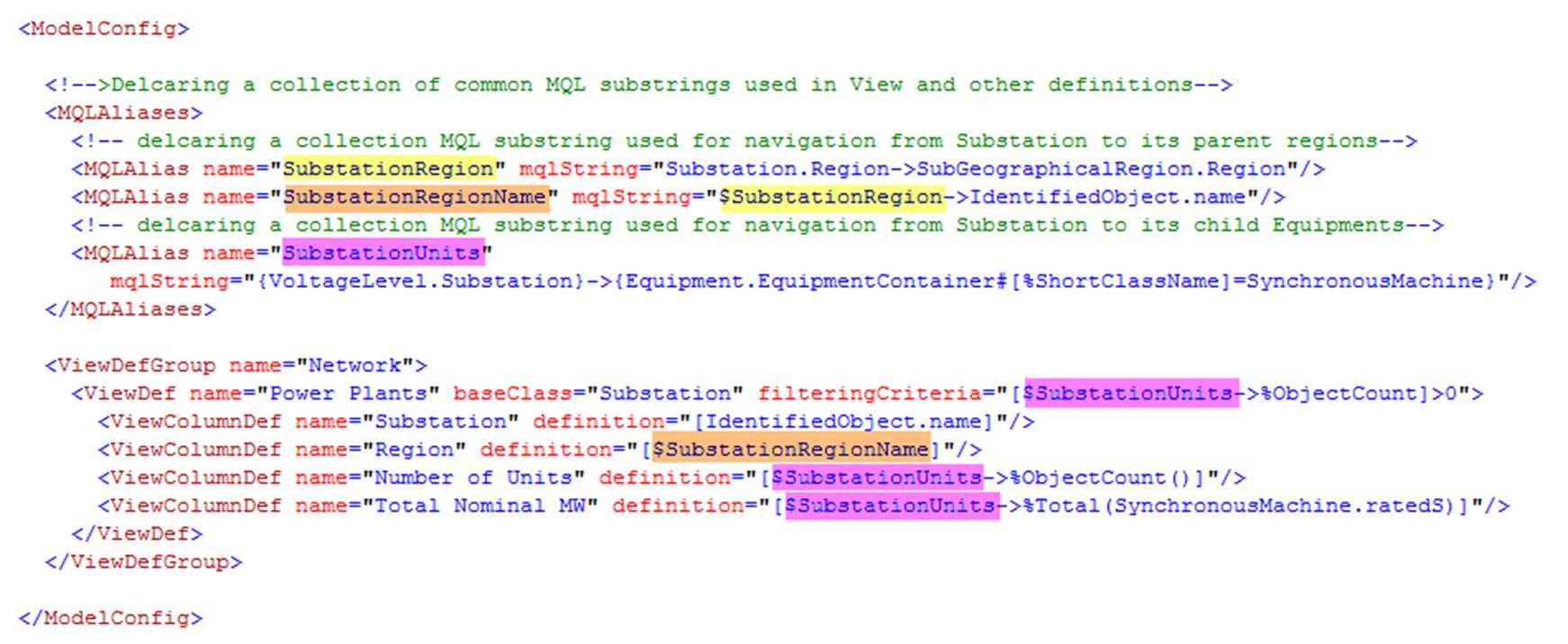
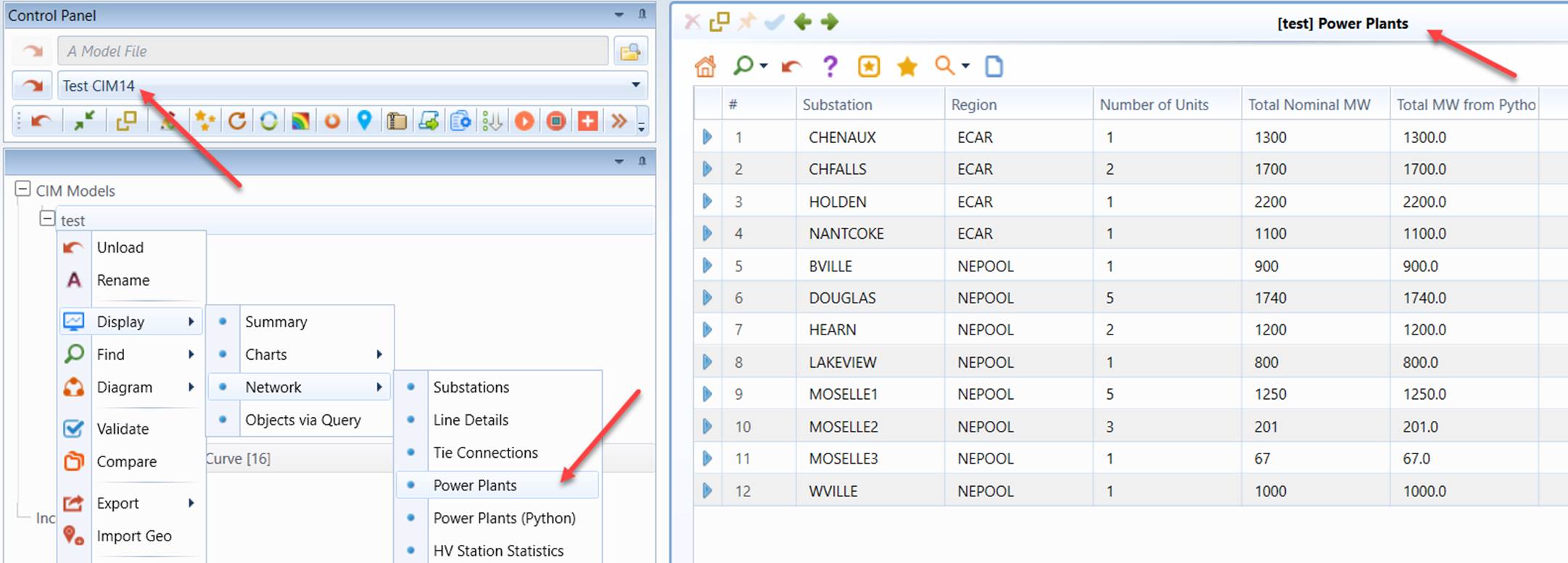
In comparison, without using MQL aliases, the same custom tabular display can be defined as follows:

In summary, use of the MQL aliases facilitates custom tabular design. Most importantly, it significantly promotes reuse of the model query.
More Examples
See Learning MQL by Examples (2).