Case Study 1: Conversion between PSS/E Raw 33 and CIM 16
In this case study, we will show you how a proprietary information model can be converted to CIM and vice versa. This is one of the most important use cases for standard-based model exchange:
- The underlying proprietary information model need to be converted to the standard CIM model so that it can be consumed by other CIM-compliant external systems.
- The received standard CIM model need to be converted to the underlying proprietary information model to perform studies.
More specifically, this case study shows how MTF can be leveraged to support bi-directional model conversion between PSS/E Raw 33 to CIM 16:
- Convert a PSS/E Raw 33 to CIM 16, an assembled model with EQ and SSH model parts. The converted CIM model shall be able to run Power Flow.
- Convert an assembled CIM 16 model with at least EQ and SSH model parts to PSS/E Raw 33, meeting the following requirements:
- The converted model shall be able to be exported as PSS/E Raw file.
- The converted PSS/E Raw file can be used to run Power Flow.
- PSS/E bus numbers, if contained in the CIM model, must be retained in the converted PSS/E Raw model whenever possible.
PSS/E Raw is selected for this case study, because:
- PSS/E Raw is a popular proprietary information model supported by many tools/systems.
- PSS/E Raw heavily depends on the concept of bus. Its modeling philosophy is quite different from CIM, making it a good example for tackling a challenging case.
However, it is important to note that the samples provided for this case study are not out-of-the-box solutions. They primarily server as the starting points for end-users to build their own custom solutions.
Hands-on
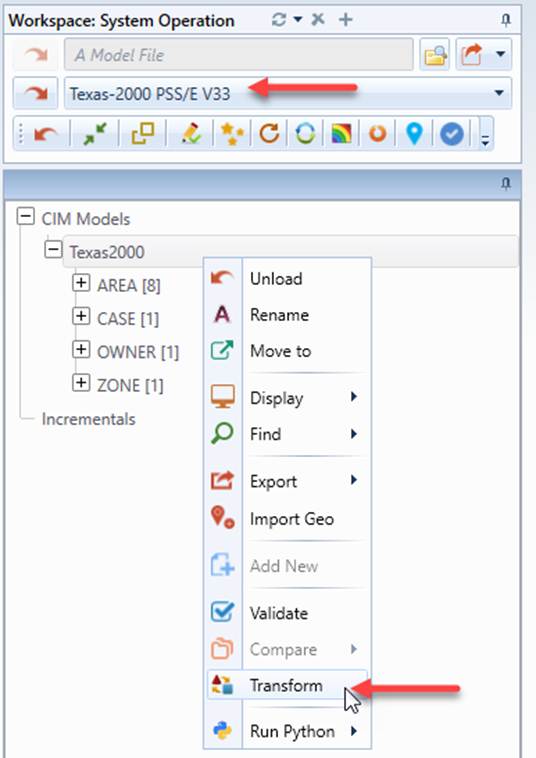
- Load Texas-2000 PSS/E V33 from the drop-down list and invoke the Transformation function from the context menu associated with the loaded model.
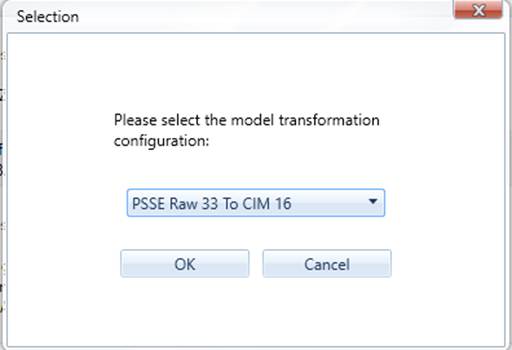
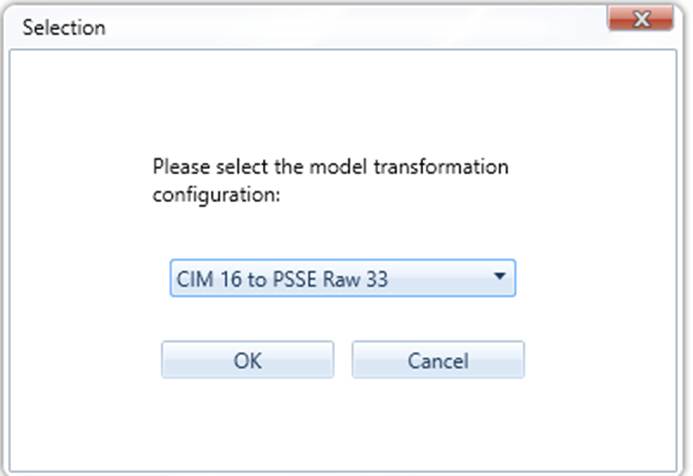
- A popup will appear, displaying all of the transformation configurations defined in the configuration file. Select “PSS/E Raw 33 to CIM 16” from the drop-down list, and then click OK to invoke the model transformation process.
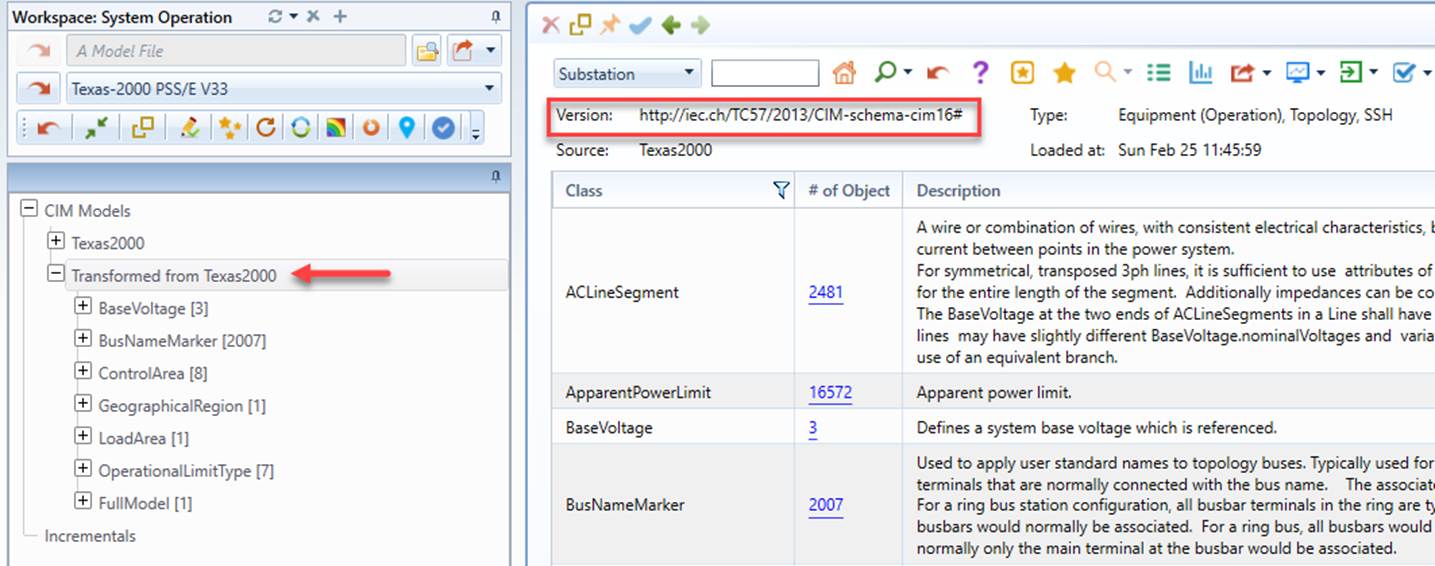
- After the transformation process is completed, a new model will be created. It is the target model, a CIM-16 based model converted from PSS/E Raw.
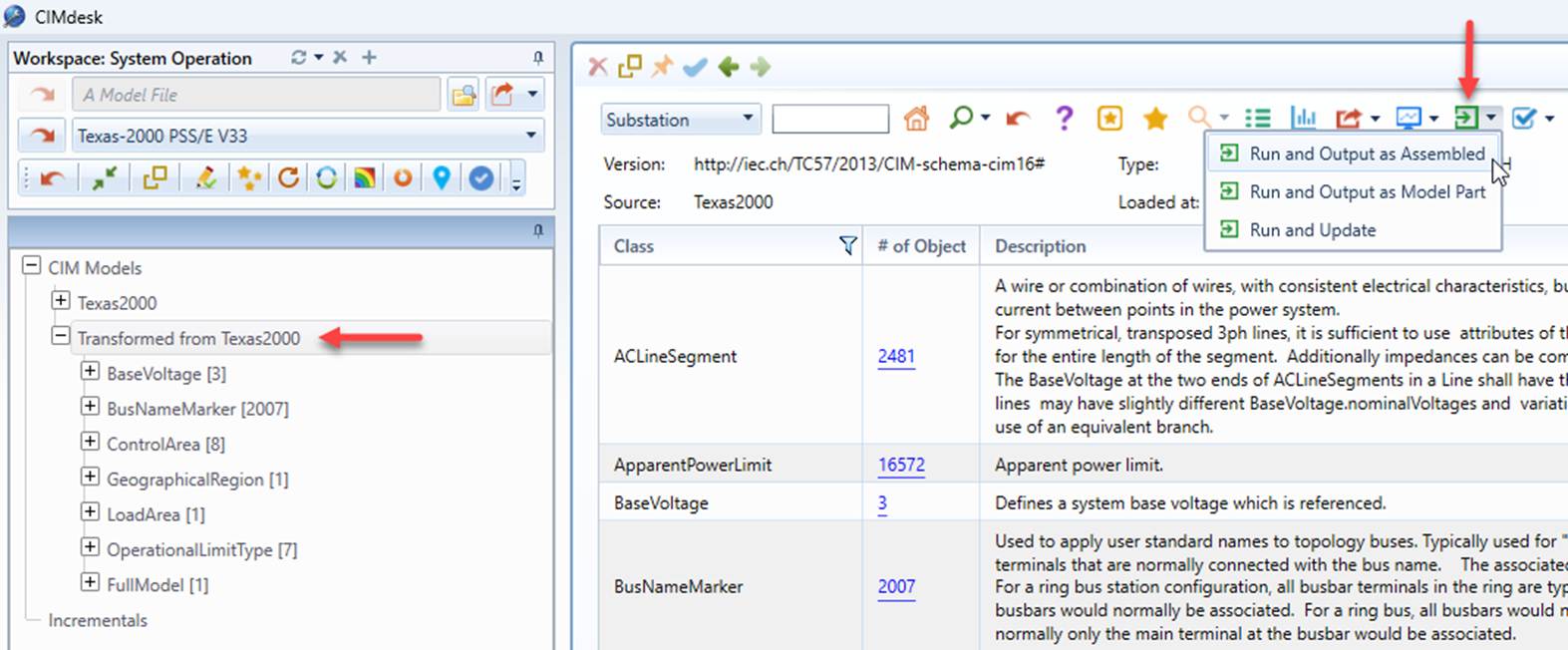
- Run power flow for the transformed CIM-16 model.
- Convert the transformed CIM-16 model back to PSS/E Raw 33.
- Export the converted PSS/E Raw 33 model as a PSS/E Raw 33 file and save the exported file as IEEE_118_V33_Roundtrip.raw.
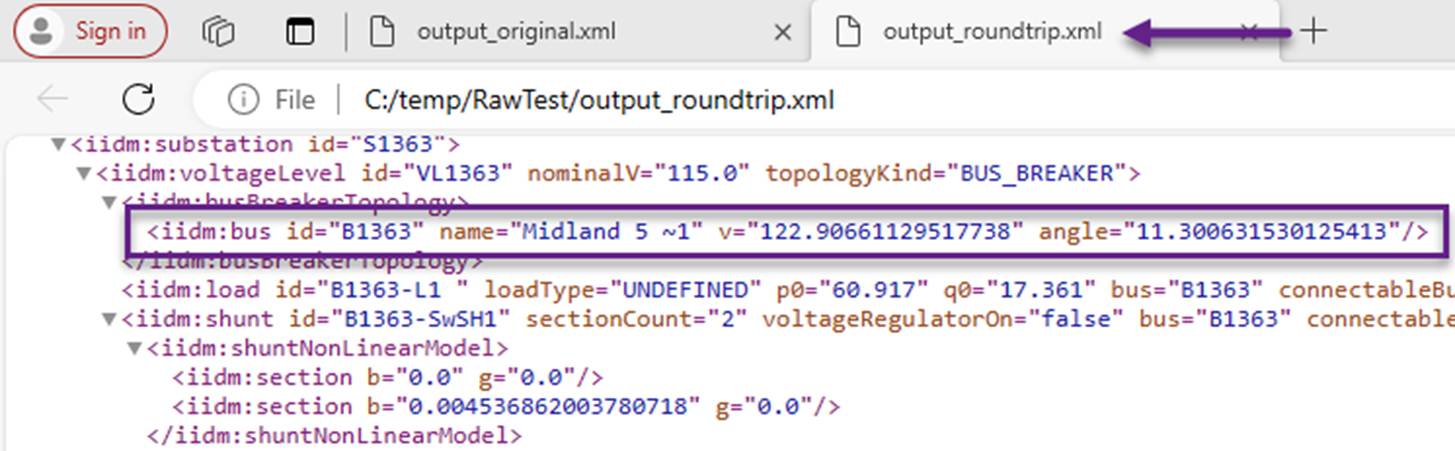
- Run power flow using the exported PSS/E Raw 33 file, named Texas2000_Roundtrip.RAW. This can be done by running Script RunRaw.bat from folder CIMSpy\powerflow, as illustrated below. The results can be found at folder \CIMSpy\powerflow\cases\PSSE. Also run power flow using the original PSS/E file.

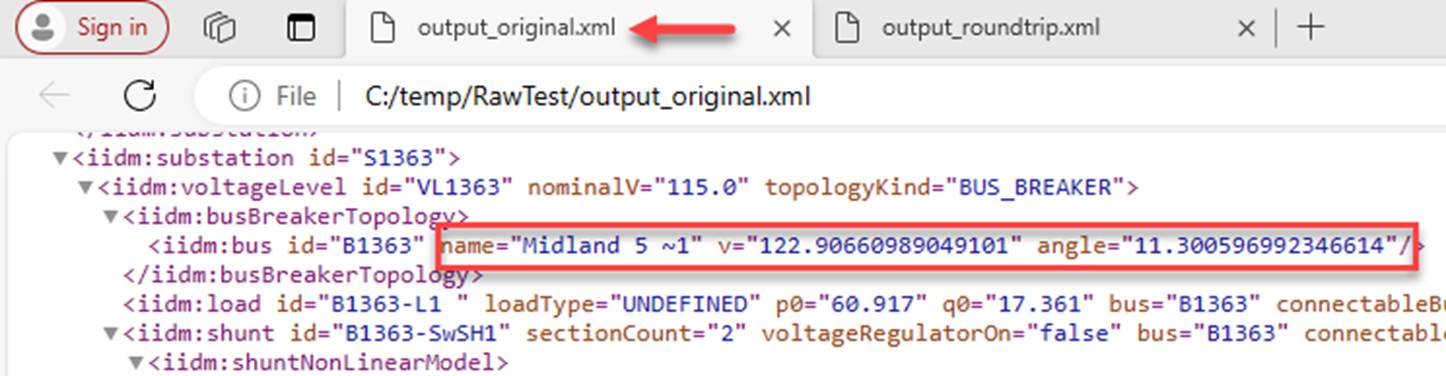
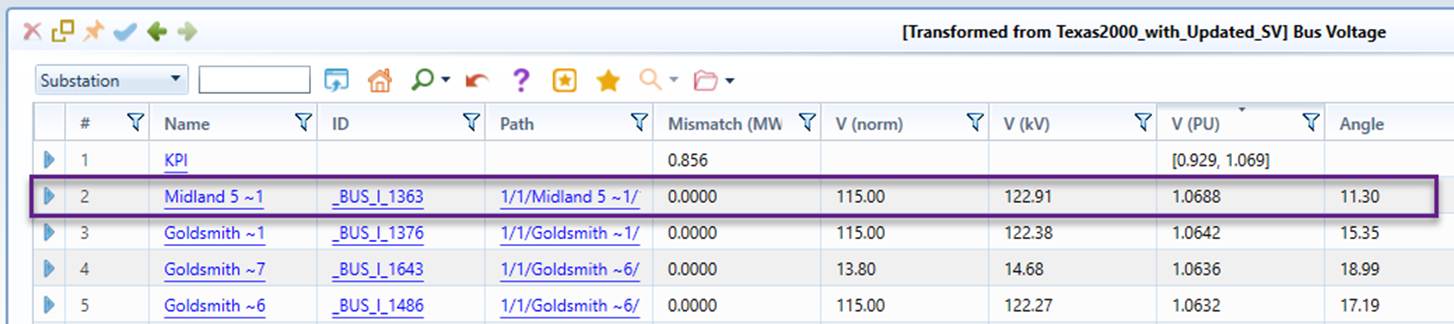
- Compare the power flow results from original PSS/E file with those from the converted CIM and the converted PSS/E.
About PSS/E Raw
A PSS/E RAW file contains a collection of data segments that specifies a Bus/Branch network model for the establishment of a power flow working case. It is equivalent to an assembled CIM model that contains at least Equipment (EQ) and Steady State Hypotheses (SSH) model parts. But the two models are not 100% compatible. In general, CIM is designed to support a wide range of applications, thus containing more reality-based information, while PSS/E Raw is a reduced/processed model designed primarily to facilitate a power flow study. In comparison, CIM is rawer or more realistic.
PSS/E Raw model heavily depends on the concept of Bus. Although the new versions, i.e. PSS/E Raw 34 and later, can be extended to represent a node/breaker model, PSS/E Raw is fundamentally a bus/branch model. Bus is required in any versions of PSS/E Raw. This is different from CIM where Bus (TopologicalNode) is not required. It can be derived from EQ and SSH.
In general, bus in PSS/E Raw is equivalent to TopologicalNode in CIM Topology (TP) profile. However, they are not exactly the same concept. TopologicalNodes are transitory modeling entities introduced for exchanging a Bus/Branch power flow study case, while PSS/E Buses are normally required to be persistent. A PSS/E bus is a node group (a collection of ConnectivityNodes interconnected with closed Switches). Its identifier, i.e. bus number, shall be persisted/retained whenever possible. PSS/E buses, however, depend on switch statuses. They could be split or merged when switch statuses are changed. Traditionally, PSS/E bus numbers are stored in ConnectivityNode/TopologicalNode objects as CIM extensions. In CIM 16 or later, a new class, referred to as BusNameMarker, is introduced to support persistence of buses. This new class, however, is rarely used.
Because of the above, model conversion between PSS/E Raw and CIM is more challenging. To facilitate this challenging model transformation:
- A working copy of the input model is introduced to facilitate the model transformation process. This working copy is cloned from the source model and extended to facilitate model transformation.
- Helper functions are introduced primarily to support PSS/E Bus.
PSSE/Raw 33 → CIM 16
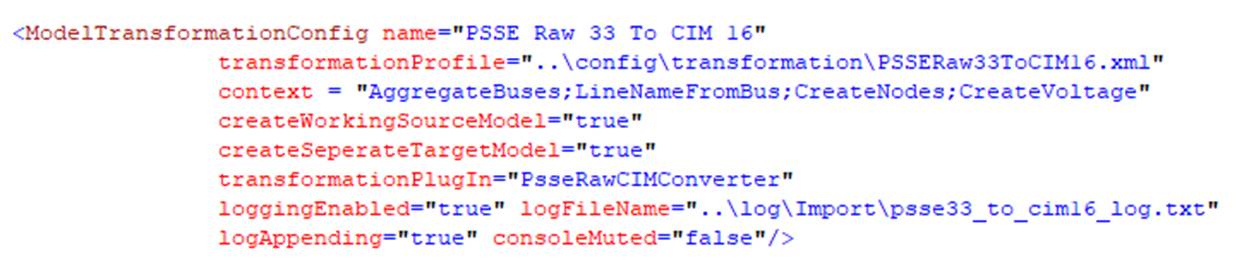
The model transformation configuration used for PSS/E Raw 33 to CIM 16 conversion is contained in config\StandardConfig.xml and illustrated as below. The model transformation process is governed by a transformation profile defined in file \config\transformation\PSSERaw33ToCIM16.xml. To support the transformation, a working copy of the source model is created. This typically means the source model could be manipulated. For example, additional objects/properties may be added to the working copy of the source model to facilitate model transformation.
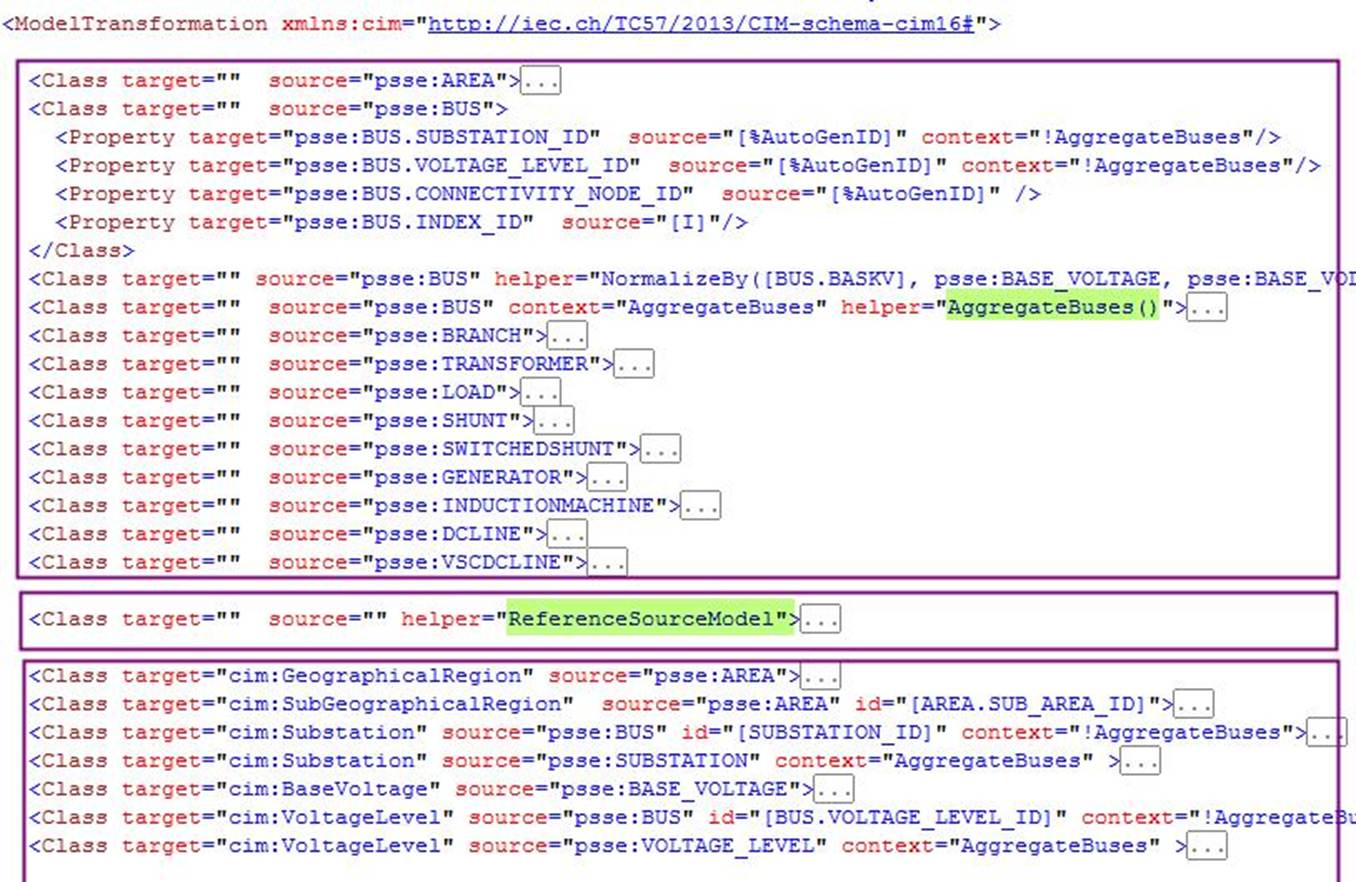
The transformation profile used to convert PSS/E Raw 33 to CIM16 is shown below. As illustrated, the transformation process consists of three sequential stages:
- Adding additional objects/properties to the working copy to facilitate PSS/E raw to CIM transformation. For example, new properties, such as SUBSTATION_ID, VOLTAGE_LEVEL_ID, CONNECTIVITY_NODE_ID, are added to BUS objects. These ID properties contain the auto-generated rdf:IDs that will be later used for mapping from BUS in PSS/E to Substation, VoltageLevel, and ConnectivityNode in CIM.
- Referencing the working copy of the source model by triggering helper function ReferenceSourceModel. Because the source model has been changed, it needs to be rereferenced to support navigation.
- Populating CIM from the working copy of PSS/E Raw.
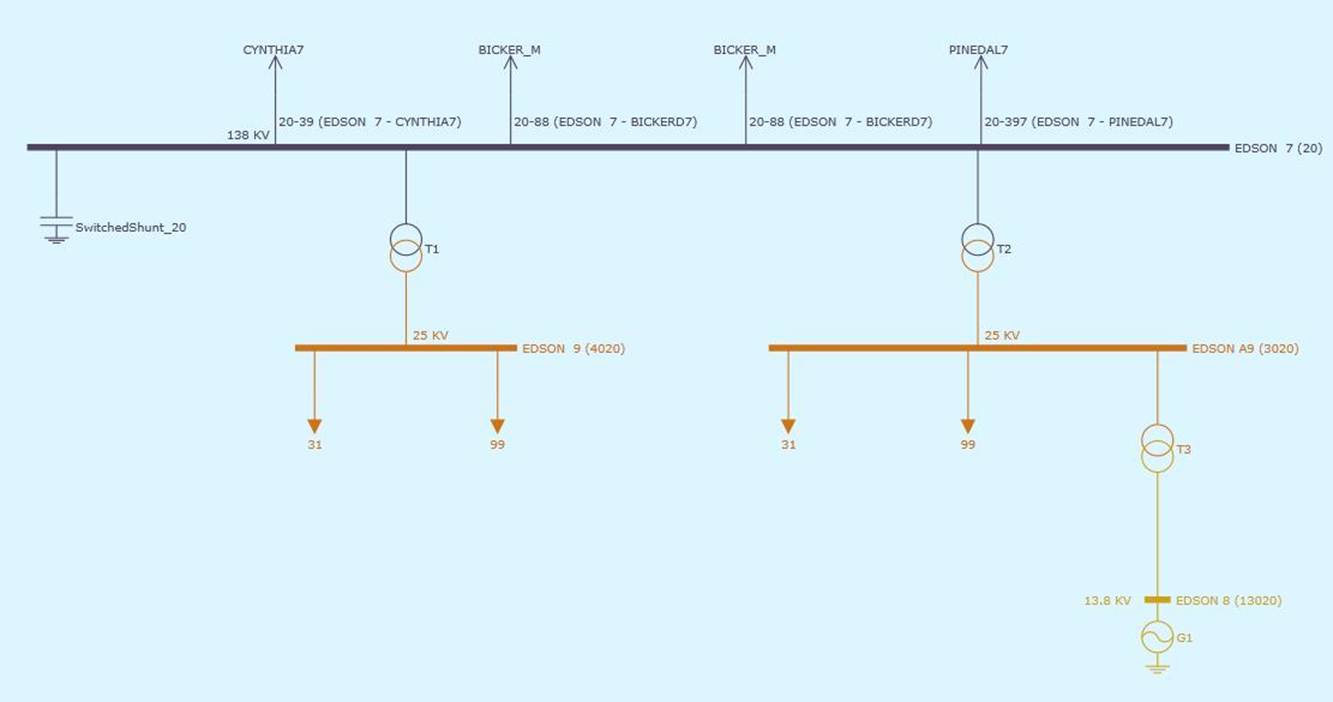
One of the helper functions is called AggregateBus. This function is used to aggregate buses that are connected by transformers to introduce Substation concept in PSS/E. The motivation behind this is to map PSS/E bus-oriented model to Substation-based CIM models. In the following example, four buses connected by 3 transformers are aggregated (or grouped) to form a Substation. Aggregation of buses also facilitates model visualization, since most of the one-lines generated by the Tool are Substation based.
Note:
- The resulting CIM 16 model is an assembled Bus/Branch model (EQ + SSH + TP). A ConnectivityNode can be optionally created for each Bus, making the resulting a ‘pseudo’ node/breaker model.
- Bus numbers can be optionally stored in a dedicated BusNameMarker object and/or as IdentifiedObject.description in the corresponding TopologicalNode.
CIM 16→ PSSE/Raw 33
In order to be converted to PSS/E Raw 33, the CIM 16 model must an assembled model containing the following model parts:
- EQ + SSH: for a node/breaker model
- EQ + SSH + TP: for a bus/branch model
The above requirements are fully met for European users. For most of North American users, only EQ model parts are exchanged. Unfortunately, most of the exchanged EQ models don’t contain the required power flow input information, such as switch status, generation/load injection, etc.
The model transformation configuration used for CIM 16 to PSS/E Raw 33 conversion is contained in config\StandardConfig.xml and illustrated as below. The model transformation process is governed by a transformation profile defined in file \config\transformation\ CIM16ToPSSERaw33.xml. To support the transformation, a working copy of the source model is created.
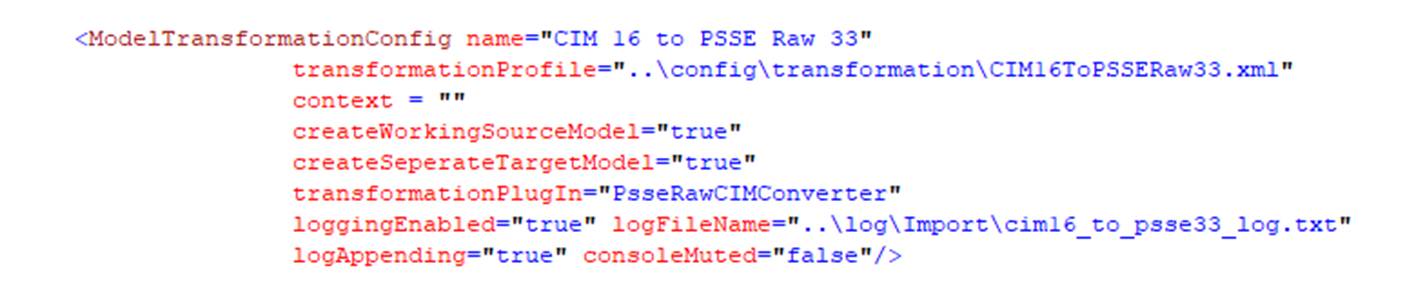
The transformation profile used to convert CIM 16 to PSS/E Raw 33 is shown below. As illustrated, the transformation process consists of three sequential stages:
- Adding additional objects/properties to the working copy to facilitate CIM to PSS/E Raw transformation. For example, new properties, such as BUS_NAME, BUS_NUMB, RETAINED, are added to TopologicalNode objects.
- Referencing the working copy of the source model by triggering helper function ReferenceSourceModel. Because the source model has been changed, it needs to be rereferenced to support navigation.
- Populating PSS/E Raw from the working copy of CIM.
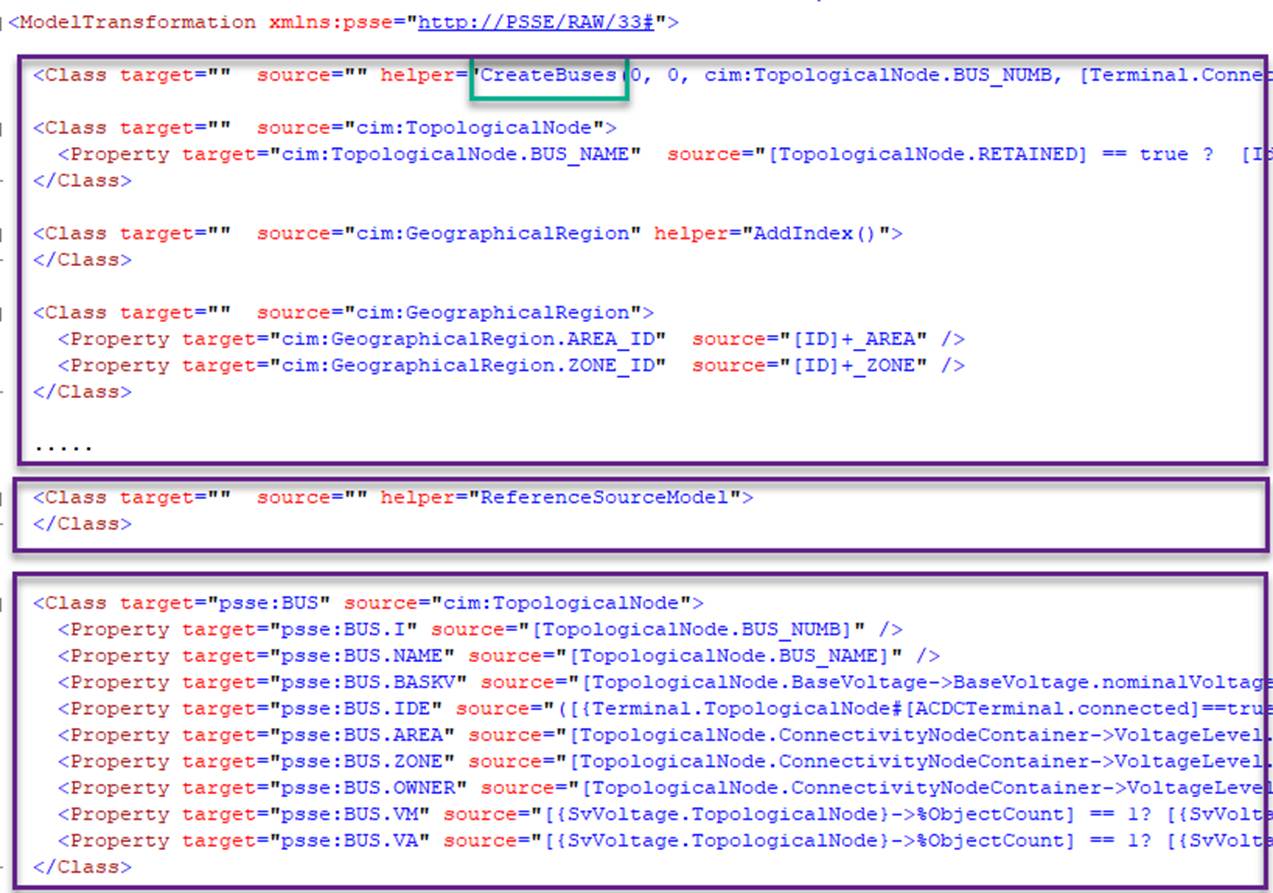
In order to support PSS/E Bus related requirements, helper function CreateBuses is introduced. This function is used to
- Perform Network Topology Analysis (NTA) to create TopologicalNodes as needed.
- Assign bus numbers to TopologicalNodes. Depending on the specifications,
- Existing bus numbers can be retained;
- New bus numbers can be auto-generated as needed;
In case that new TopologicalNodes are created and the existing bus numbers shall be retained, the following rules are used to assign bus numbers to newly-created TopologicalNodes:
- If the connected Terminals of a newly-created TopologicalNode match those of the existing bus, then the corresponding bus number is assigned to this newly-created TopologicalNode.
- If the connected Terminals of a newly-created TopologicalNode don’t exactly match those of the existing bus (due to bus splitting or bus merging), then bus number of the best-matching bus is assigned to this newly-created TopologicalNode. The best-matching bus maintains the maximum number of Terminals shared with the newly-created TopologicalNode.
- If no matching bus is identified, an auto-generated bus number will be assigned to the newly-created TopologicalNode.
- If an existing bus number is assigned to a newly-created TopologicalNode, it is marked as TopologicalNode.RETAINED = true.
In case the existing bus numbers are not available, new bus numbers will be auto-generated. Before assigned auto-generated bus numbers, TopologicalNodes will be sorted by PATH.
Additionally, to meet different requirements, this helper function is highly customizable with the following syntax
CreateBuses (tpNodeGenMode``, retainBusNumbMode, outputBusNumbProp, inputBusNumbMQLFromTerminal, inputBusNumbMQLFromTpNode, switchClosedMQL, startingBusNumbForAll, startingBusNumbForNew)
where:
Parameter |
Type |
Description |
Example |
|---|---|---|---|
|
|
|
0 |
|
|
|
0 |
|
|
|
cim:TopologicalNode.BUS_NUMB |
|
|
|
[Terminal.TopologicalNode->IdentifiedObject.description] |
|
|
|
[IdentifiedObject.description] |
|
|
|
![Switch.open]==true |
|
|
|
0 |
|
|
|
9000 |
Assuming the input model is a CIM node/breaker model with EQ + SSH + TP model parts, the above example specifies:
- Always create new TopologicalNodes by running network topological analysis based on Switch.open status.
- The existing bus number stored in the existing TopologicalNodes as IdentifiedObject.description will be retained whenever possible.
- If no existing TopologicalNodes can be identified to match newly created TopologicalNodes, new bus numbers will be auto-generated with starting number as 9000.
- The retained or auto-generated bus numbers will be stored as TopologicalNode.BUS_NUMB in newly created TopologicalNodes.
As a result, the existing TopologicalNodes will be removed and fully replaced by newly created TopologicalNodes with retained/auto-generated bus numbers.
Numerous variations can be derived by changing the related parameters. For example, assuming bus numbers are stored in BusNameMarker as IdentifiedObject.name in the input model, parameter inputBusNumbMQLFromTerminal can be changed to[ACDCTerminal.BusNameMarker->IdentifiedObject.name].
Export PSS/E Raw 
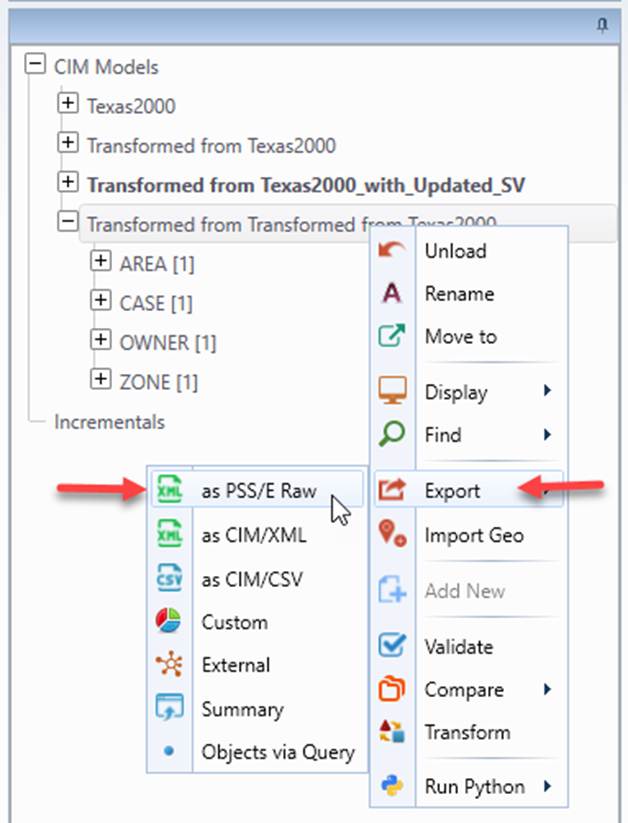
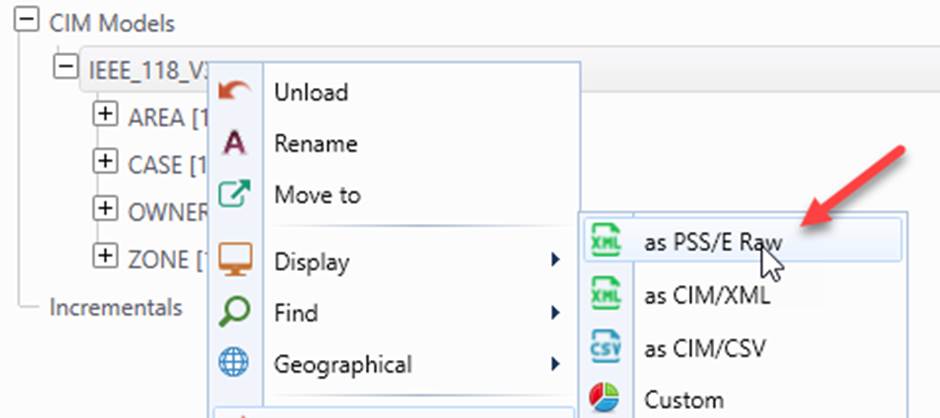
The PSS/E Raw 33 model loaded in the workspace or converted from the CIM model can be exported as a PSS/E Raw 33 file. This function can be invoked from the context menu, as illustrated below.
This function is meta-data driven. More specifically, the exported file is driven by
- PSS/E Raw Profile in XSD, which can be found in profile\psse\raw33\ psse_raw33.xsd
- PSS/E Raw Format in CSV, which can be found in config\style\psse\raw33\psse_raw33_export_config.csv
The PSS/E Raw Format must be specified for the supported PSS/E Raw version in \config\StandardConfig.xml, as illustrated below

The Format is specified in a CSV file, as shown below.
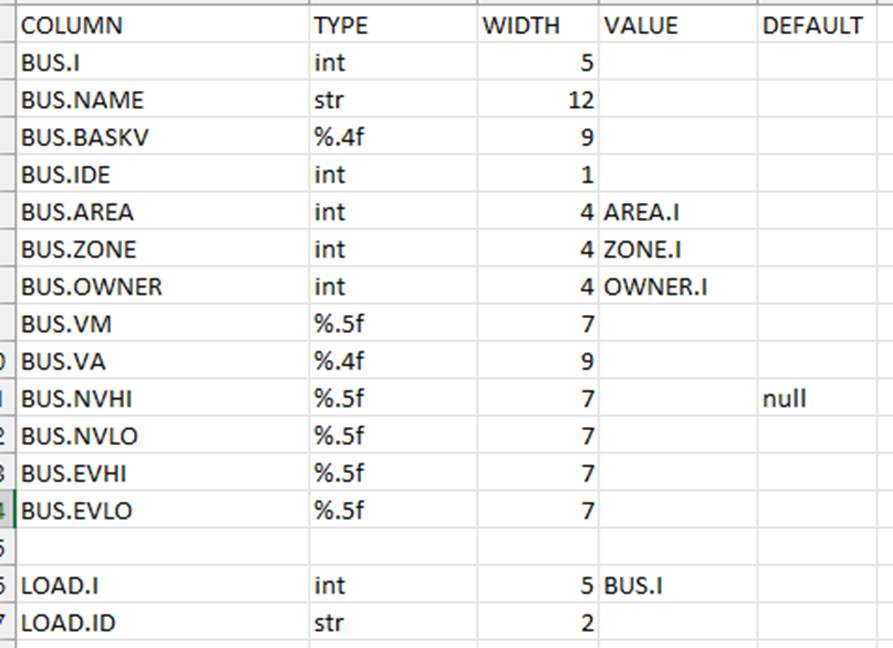
It contains the following:
- COLUMN (required): the corresponding property name from the profile.
- TYPE (required): type of the property, as listed below
- str: string value quoted with char ‘.
- Int: integer value
- %m.n: float value of the specified width (m) and precision (n). It can also be other format string of C function sprintf (https://www.w3resource.com/c-programming/stdio/c_library_method_sprintf.php), for example, a float format in exponential notation (3.1415E+00).
- WIDTH: width of the column. String is left aligned, while int/float are right aligned.
- VALUE (required for association): the property value of the associated object to be exported for the column;
- DEFAULT (optional); the default value if missing. A null value means the remaining columns will be ignored if this column is missing.
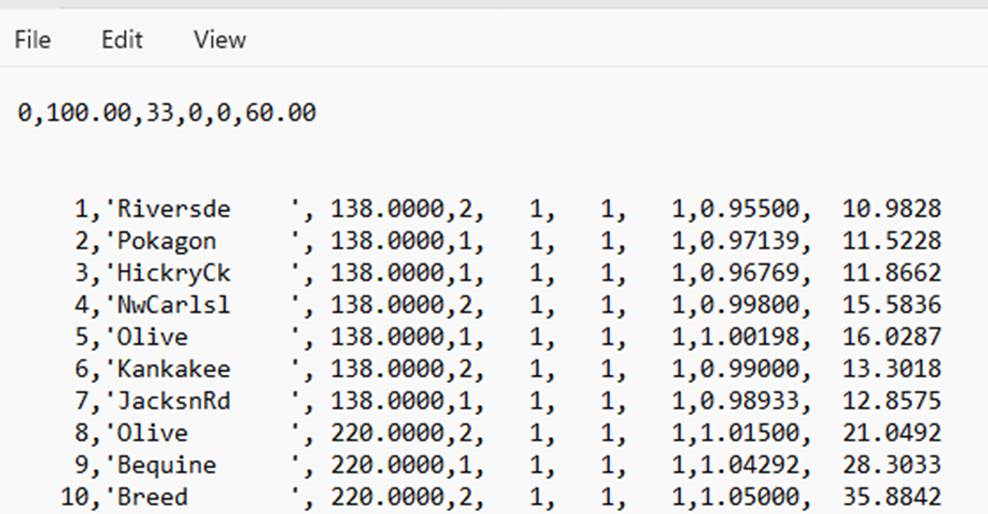
The exported PSS/E Raw file strictly follow the format declaration, as shown below.
Notes
It is important to note:
- The samples provided in this case study are not the out-of-the-box features. They are not production-ready either. These samples are provided at the request of end-users. The goal is to provide a starting point for end-users to derive their own custom solutions.
- The samples cover only the base cases and were tested with only the PSS/E Raw sample files published at https://icseg.iti.illinois.edu/power-cases/. The samples don’t handle some of the complicated modeling cases, such as three-winding transformers, phase shifters, and DC components, etc., primarily due to lack of the test data.
- While the samples provided are not under the standard support of the Tool, users are welcome to contact us for technical support when building their own custom solutions.