Bulk Model Processing
The Tool provides some bulk model processing functions, enabling users to process loaded models in a bulk mode. These processes were used in some projects and then generalized to help users process their models for various purposes. Mode processing functions can be invoked from the model context menu, as illustrated below.
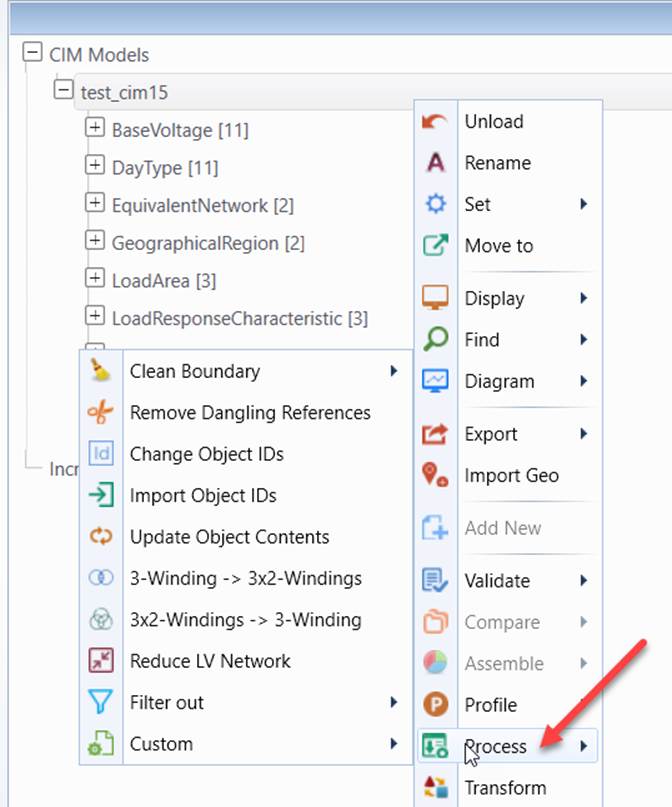
More specifically, the following bulk model processes are supported:
| Process | Description |
|---|---|
| Clean Boundary | This process is used to clean boundary injections after two or more Individual Grid Models (IGM) are assembled based on commonly-agreed boundary definitions. EquivalentInjections are normally added at the boundary nodes for each IGM. After IGMs are assembled, these EquivalentInjections shall be either removed or reset to 0 injections. This process provides two options for users to clean boundary. |
| To Node/Breaker | This process is only available for bus/branch model. It automatically generates ConnectivityNode for each TopologicalNode, making the model conform to node/breaker. This process is designed to support mixed modeling practice where both bus/branch and node breaker are allowed. The assembled model could be mixed bus/branch and node breaker. The process is used to convert a mixed model to a uniform model where both bus/branch and node/breaker modeling information is fully contained. |
| Remove Dangling Reference | This process removes all of the dangling references. Normally, for dangling references, the associated objects don’t exist in the same model part, but in other model parts. Models with dangling references are incomplete. The process allows users to remove these dangling references, creating a complete model for various purposes. |
| Change Object IDs | This process changes object IDs with a user-specified object property. The process is designed to synchronize two models with different object IDs, making them comparable. For example, users can change object ID to its hierarchical PATH. Users can also create an additional property (using Python) that can be used to uniquely identify an object, such as a composite key, and then change object IDs to the property. |
| Import Object IDs | This process changes existing object IDs with new object IDs from a CSV file. The CSV file must contain two columns titled “Old ID” and “New ID” respectively. Additional columns can be included in the CSV file, but will be ignored during the process. This process is also targeted at synchronizing two models with different object IDs. |
| Auto-gen Object IDs | This process replaces existing object IDs with auto-generated Universally Unique Identifier (UUIDs) and saves the mapping between original object IDs and auto-generated UUIDs in a CSV file. The process changes object IDs to meet the requirement that each object ID (i.e. rdf:ID) must be represented as a UUID. |
| Synchronize Object IDs | This process works with process Auto-gen Object IDs, enabling auto-generated UUIDs to be reused for updated models. It uses the ID mapping CSV file generated during process Auto-gen Object IDs as input and replaces object IDs with either imported UUIDs or newly-generated UUIDs depending on whether the object ID is found in the mapping file. This process is to meet the requirement that object ID/rdf:ID must be persistent from one model export to the next model export. |
| Update Object Contents | This process changes/adds object properties based on definition from a CSV file. This process is designed for users to patch the loaded models with additional information from other sources. The CSV file must contain an “ID” or “rdf:ID” column for object ID. Other columns define properties. Each property column title defines property name, such as IdentifiedObject.name. CIM extensions can also be imported using the following conventions: 1) attribute names are declared as “AttributeName”; 2) association names are declared “[AssociationName]”; 3) enumeration names are declared as “{EnumerationName}” in the column title. |
| Delete Objects in Bulk | This process enables users to clean the loaded models based on the predefined rules. It provides a quick way to remove unneeded information from the model, such as external portion of the network. |
| 3-Winding -> 3x2-Windings | This process is only available for node/breaker model. It decomposes a three-winding transformer to 3 equivalent two-winding transformers. The process is designed to convert a node/breaker model to an equivalent one consumable by tools that don’t handle three-winding transformers. |
| 3x2-Windings -> 3-Winding | This process is only available for node/breaker model. It consolidates 3 interconnected two-winding transformers into a three-winding transformer. A three-winding transformer is modeled as 3 equivalent two-winding transformers in some tools. The process is designed to convert the models produced by these tool to a reality-based node/breaker model. |
| Reduce LV Network | A highly-configurable process used to remove low-voltage sub-networks and replace them with equivalent injections. The process is designed to generate a reduced network model for building a regional model, an external model, or a planning model. |
| Model Conversion from CGMES 2.4.15 to 3.0 | One-step process used to convert Individual Grid Model (IGM) and Boundary Set (BS) from CGMES 2.4.15 to CGMES 3.0, with all model changes logged as CIM difference models. Note: this function is only available when the loaded models are a valid IGM with model dependencies properly set. |
| Filter out | This process is used to remove unneeded information, such as unknown CIM extensions (or Undeclared), sub-profiles (such as ShortCircuit) modeling information. |