Scripting for Model Validation
While the built-in profile-based validation support and MQL-based validation extension enable uses to author most of the validation rules, there are certainly cases where the validation rules cannot or cannot easily be covered by these built-in support. These validation rules are normally too special or too sophisticated to be generalized as built-in support. For these special custom validation rules, the Tool provides Python scripting support to enable users to create their own special validation rules through scripting. More specifically, the Tool enables users to plug-in validation scripting functions at both model and instance object levels. This is accomplished by embedding Python validation script functions in the profiles that drive the model validation functionality.
In this article, we will use an example to show users how Python scripting support can be leveraged to author custom validation rules.
Hands-on
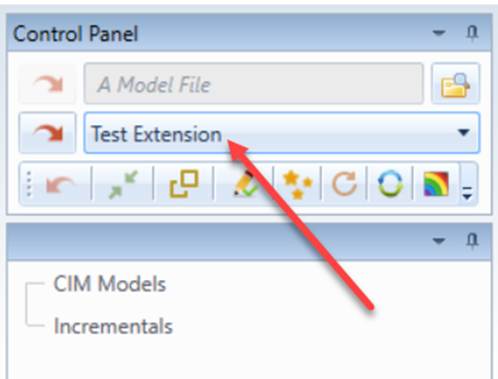
- Load the “Test Extension” sample model that comes with the Tool from the data source dropdown list, as illustrated.
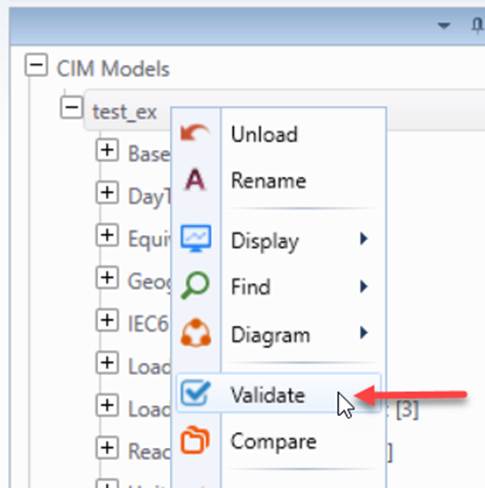
- Run the validation from the context menu.
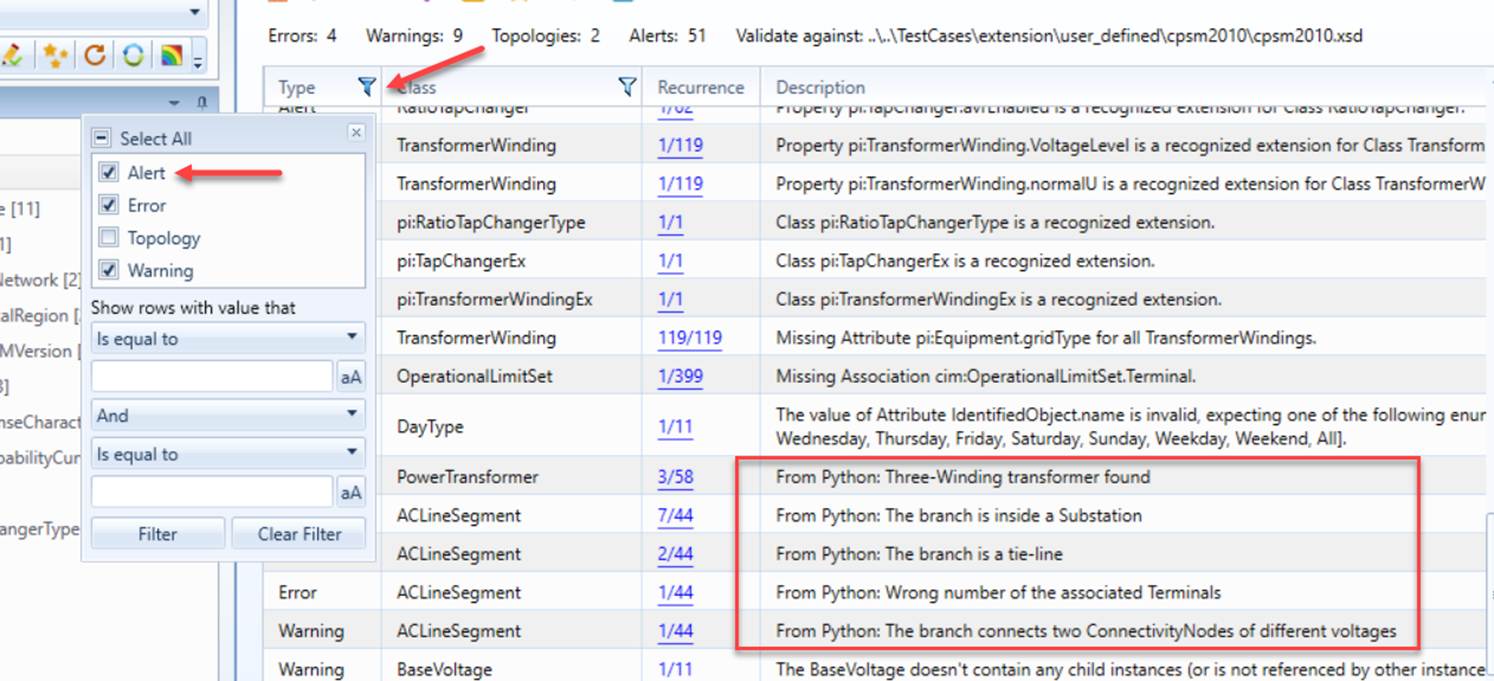
- Inspect the validation report, and change the filter of the report to make sure the Alert type of incidents is displayed. Find the reported incidents with the description messages started with “From Python: …”
How to Plug-in Script Validation Functions?
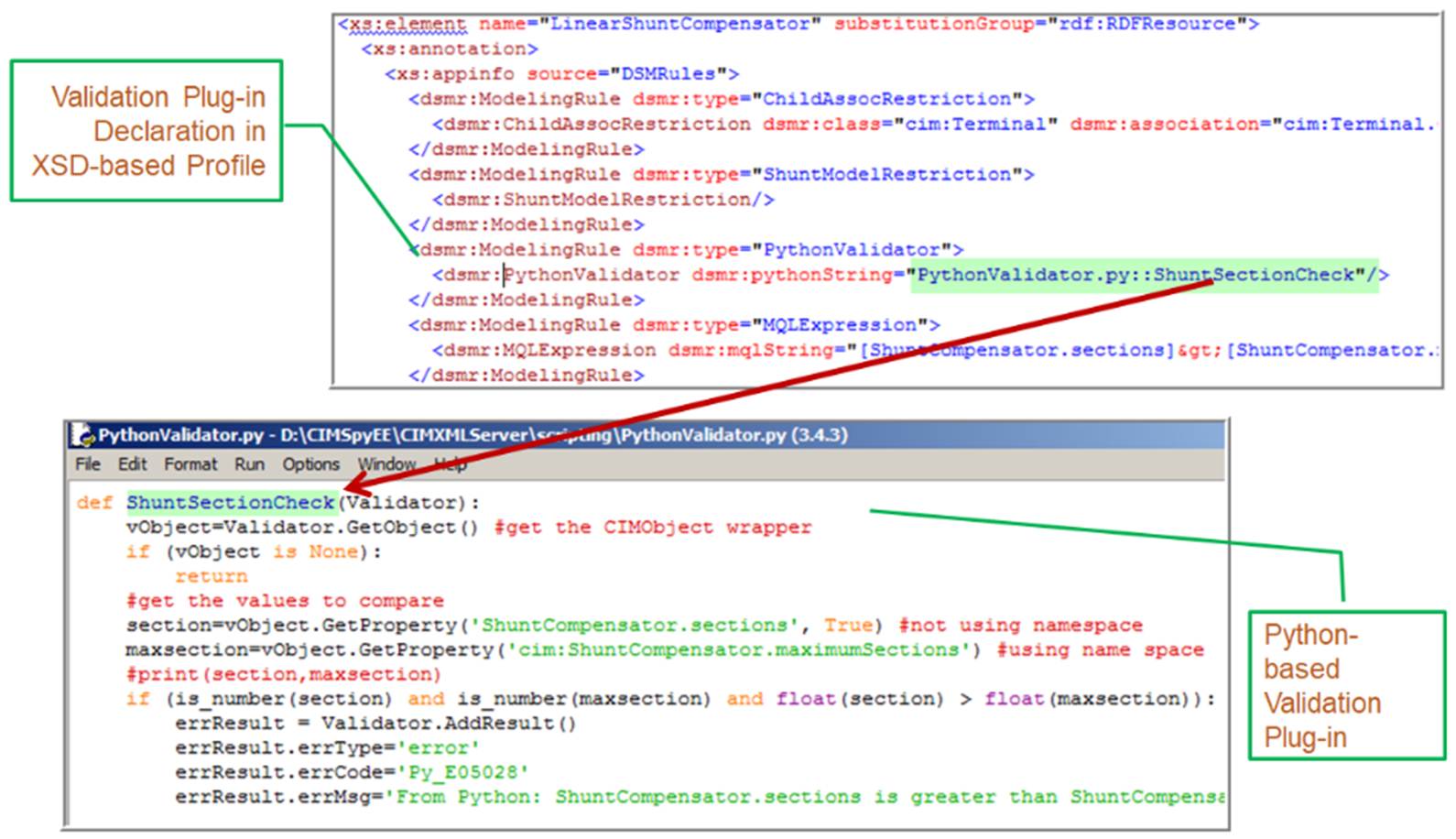
The script validation functions are embedded in the profiles that drive the model validation functionality, as illustrated below.
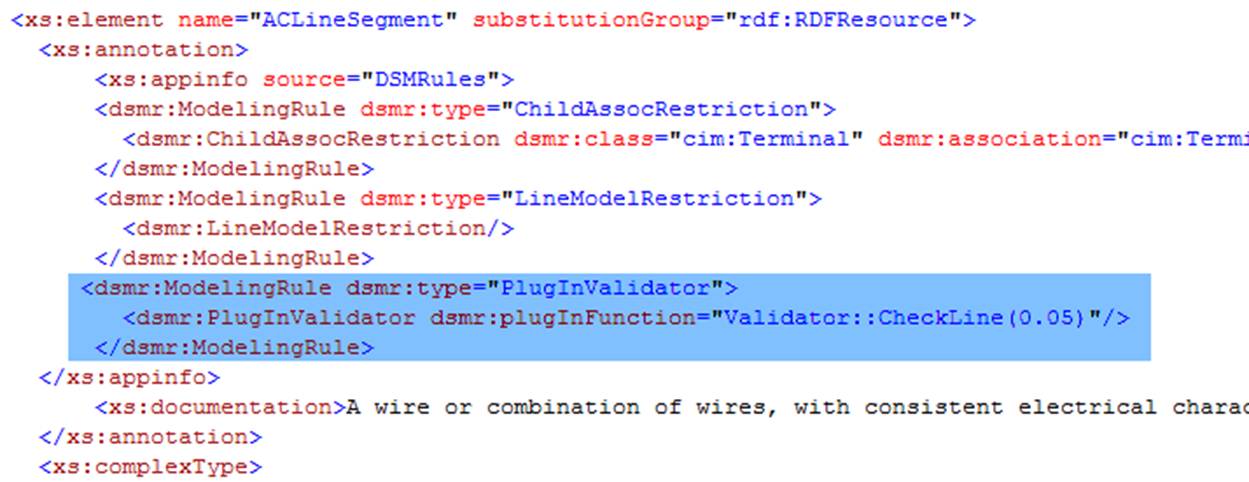
In the above example, the highlighted validation rule is a script-based validation function. The plug-in script function is specified with script function convention. It consists of a module and a function (with user-defined parameters optionally) separated by ‘::’.
Object-based Custom Validation
Most of the script-based custom validations are associated with a type of instance objects. They are plugged in the class definition of the profile. For example, the above example shows how a custom script function is plugged into the schema definition of ACLineSegment in the profile, which can be found under \TestCases\extension\user_defined\cpsm2010\cpsm2010.xsd.
When the validation engine executes the object-based plug-in validation function, it will prepare an ObjectValidationContext object and pass the information to the triggered script function. Once the execution is completed, it will extract the validation results if any from the same ObjectValidationContext object for reporting. The exposed APIs of the ObjectValidationContext object are summarized below:
Class
ObjectValidationContext
Description
Class ObjectValidationContext defines a context object used to exchange information between the validation engine and the object-based custom validation function scripted in Python.
Function
Details
Description
GetParameters
Syntax
GetParameters()
The function returns a sequence of user-defined parameters.
Returns
StringVector
The returned string vector includes all of the user-defined function parameters in the exactly same sequence.
Parameters
none
AddMessage
Syntax
AddMessage(msg)
The function stores a new message, which will be prompted to users in the UI in the same sequence as it is stored.
Returns
none
Parameters
msg: string
String message to be presented to users
GetObject
Syntax
GetObject()
The function returns a reference to the instance object where the validation rule is plugged.
Returns
Object
The function returns a reference to the instance object where the validation rule is plugged.
Parameters
none
AddObjectValidationResult
Syntax
AddObjectValidationResult (type, code, message)
Called to report an incident to be included in the validation report
Returns
none
Parameters
type: IncidentType (enum)
Type of the incident, i.e. error, warning, or alert
code: str
Code used to uniquely identify the type of incident
message: str
Validation description message presented to users
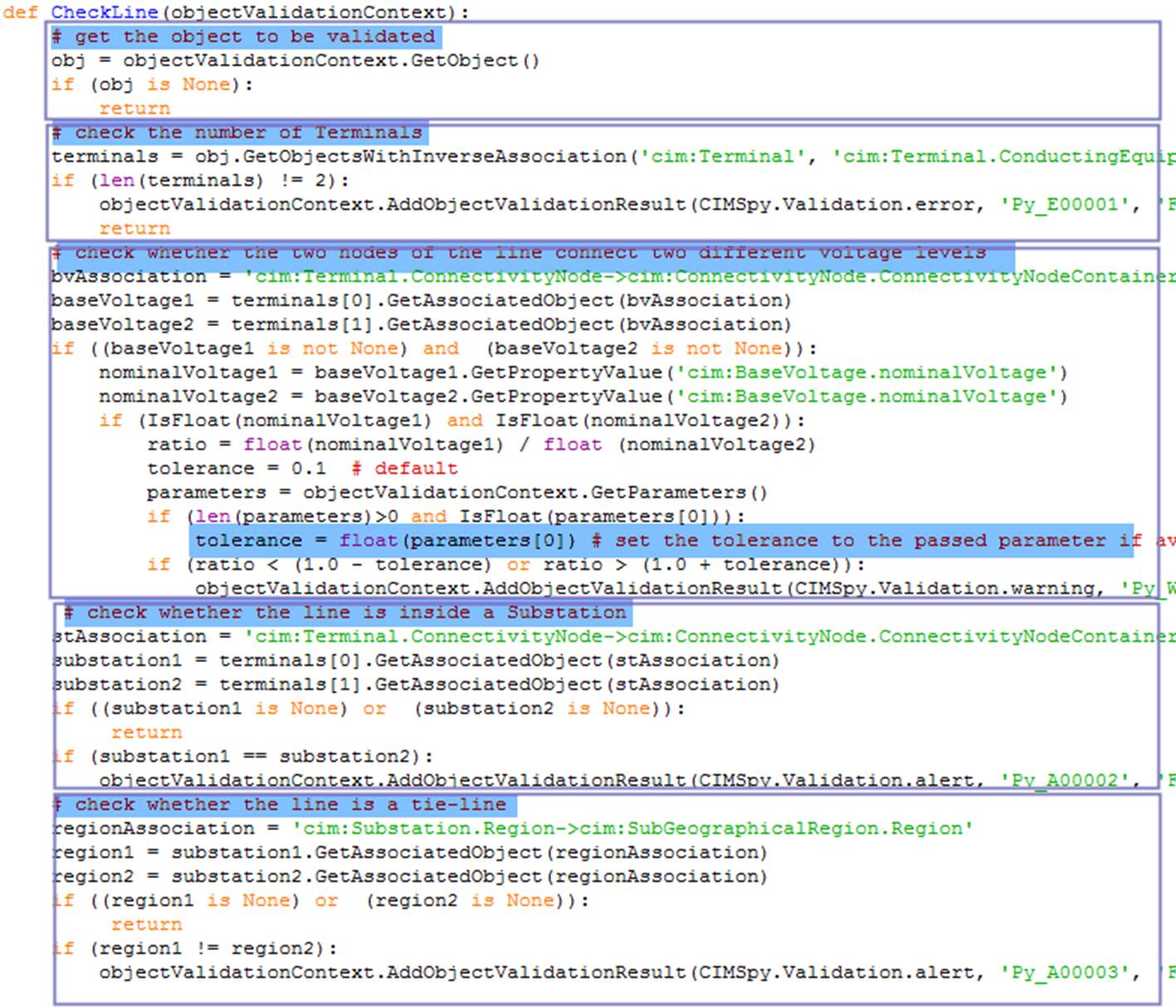
The object-based custom validation function in the above example can be found in module \CIMSpy\scripting\Validator.py. The function is described as follows:
Note:
- The module file path doesn’t need to be specified if the module file is under the default scripting folder according to convention. Otherwise the full file path must be specified, for example:
dsmr:plugInFunction=" ..\scripting\Validator::CheckLine(0.05)". It is important to use a unique code for incident type. It is recommeded that the incident code starts with the reserved string “Py_X”, where X is ‘A’ or alert, ‘E’ for error, ‘W ‘ for warning. The numeric code used must be unique application-wise. It is user’s reponsibility to enforce this rule.The description message shall be geneic, not specific for an instance or a model.
Model-based Custom Validation
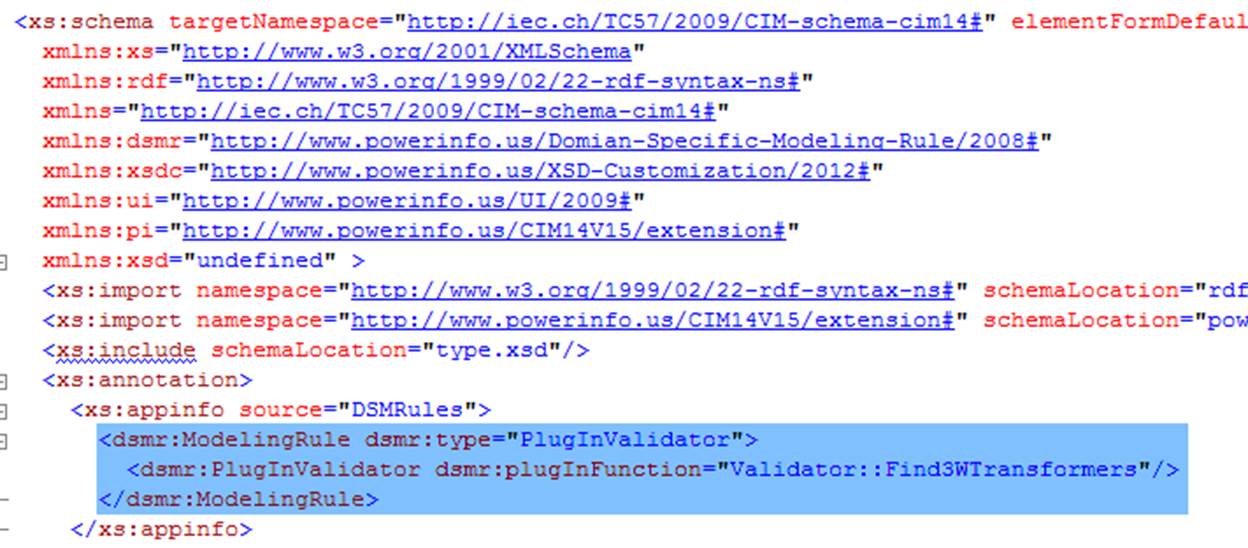
This type of custom validation is quite similar to object-based custom validation. The only difference is the validation is performed for the whole model, not for a certain type of objects. The purpose of this type of custom validation is to check the model in a broader context, i.e. in a context of the whole model. So the validation rule shall be declared at the top level of the profile, as declared in \TestCases\extension\user_defined\cpsm2010\cpsm2010.xsd and illustrated below:
The context object for the model-based custom validation, as shown below, is similar to that of the object-based validation. The major difference is that the FullModel, rather than the instance object, is exposed to the custom function. The other difference is that more information is needed to report an incident, including name of the class and related property (optional), as well as rdf:ID of the reported instance object. Such information is used to construct a unique key that can be used to group the reported incidents.
Class
ModelValidationContext
Description
Class ModelValidationContext defines a context object used to exchange information between the validation engine and the model-based custom validation function scripted in Python.
Function
Details
Description
GetParameters
Syntax
GetParameters()
The function returns a sequence of user-defined parameters.
Returns
StringVector
The returned string vector includes all of the user-defined function parameters in the exactly same sequence.
Parameters
none
AddMessage
Syntax
AddMessage(msg)
The function stores a new message, which will be prompted to users in the UI in the same sequence as it is stored.
Returns
none
Parameters
msg: string
String message to be presented to users
GetFullModel
Syntax
GetFullModel()
The function returns a reference to the FullModel object to be validated.
Returns
FullModel
The function returns a reference to the FullModel object to be validated.
Parameters
none
AddObjectValidationResult
Syntax
AddModelValidationResult (type, code className, propName, objectId, message)
Called to report an incident to be included in the validation report
Returns
none
Parameters
type: IncidentType (enum)
Type of the incident, i.e. error, warning, or alert
code: str
Code used to uniquely identify the type of incident
className: str
Name of the class of the reported instance object
propName: str
Name of the related property
objectId: str
rdf:ID of the reported instance object
message: str
Validation description message presented to users
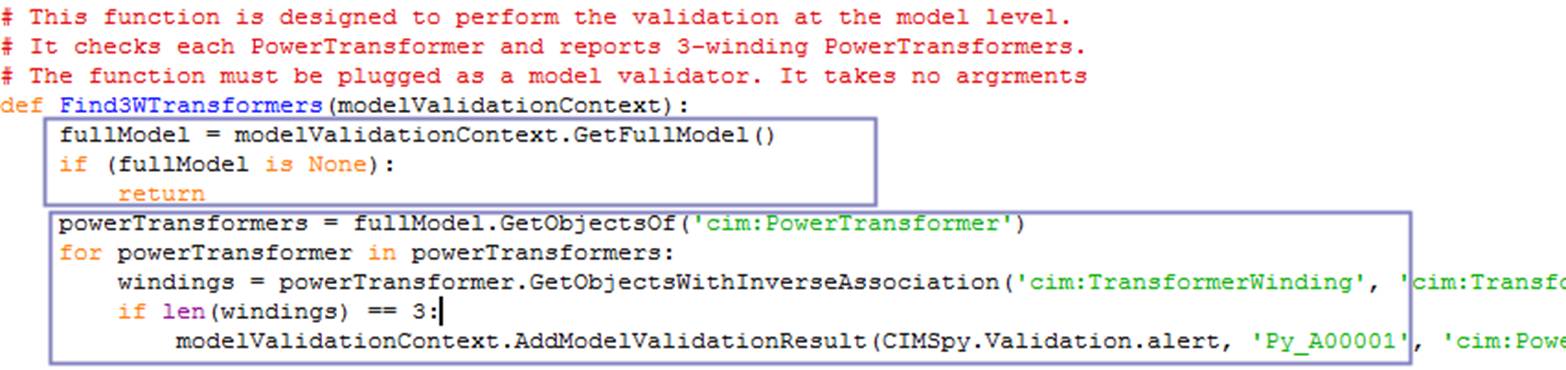
An example of model based validation function can be found in module \CIMSpy\scripting\Validator.py, and described below.
Extended MQL-based Custom Validation
This type of custom validation is not explicitly declared in the governing profile. Instead, it is constructed as an MQL-based validation extension. Please find out how to embed a plug-in script function in MQL.
Debugging & Logging
It is important to note that if there are syntax or run-time errors detected when running the validation script function, the error messages are not presented to the users in the UIThis is because the mode validation is executed in a muted mode. The error messages are typically overwhelming for displaying in the UI.
Users can also enable the error/message logging by setting attribute loggingEnabled to ‘true’ in the ScriptingConfig element of the CustomConfig.xml, as shown below. When this flag is set to ‘true’, the errors encountered and script-generated messages will be saved in a log file specified by attribute loggingFile. Attribute maxDisplayedMsgs specifies the max number of errors/messages. If attribute maxDisplayedMsgs is 0 (default), all of the errors/messages will be displayed in the server prompt session and logged in the log file. Otherwise, only the first maxDisplayedMsgs will be displayed and logged. For example, only the first 10 errors will be displayed and logged (if enabled) according to the following configuration. Note: the errors/messages will be logged in appending mode until the server is shut down. Then a new logging session will started, overwriting the previous logged messages.
