Model Transformation Framework (MTF)
Model Transformation Framework (MTF) is designed to provide a framework from which users can derive their own model transformation solutions with minimal engineering effort. It is a combination of methodologies, software architectures, algorithms, meta-data specification, programming mode, and plug-in components.
Architectural Overview
Model Transformation Framework (MTF) is based on the following technical approaches:
- Resource Definition Framework (RDF)– This is what CIM/XML is based on. RDF is a generic information model that maps well to almost all of the canonical information models. The idea is converting any information models to RDF-based before they can be converted from one to the other. For any versions of CIM-based model, this is already in RDF. Conversion of any other information models to RDF-based is also straightforward, as demonstrated in our conducted case studies.
- Model Query Language (MQL) – MQL is a model query and manipulation language natively supported by the Tool.
- Metadata-Driven Methodology – With MTF support, you DECLARE, rather than program, how one model shall be converted to the other. Yes, this requires you to understand both models and how one can be mapped to the other.
- Dynamic Dependency Injection – Metadata-based model mapping is not going to be 100% adequate to support sophisticated model conversion. MTF enables you to dynamically inject your custom model transformation helpers through DLL plug-in or Python-based scripting. As MTF matures, a rich set of built-in helpers will be provided to assist dealing with the complicated model transformation processes.
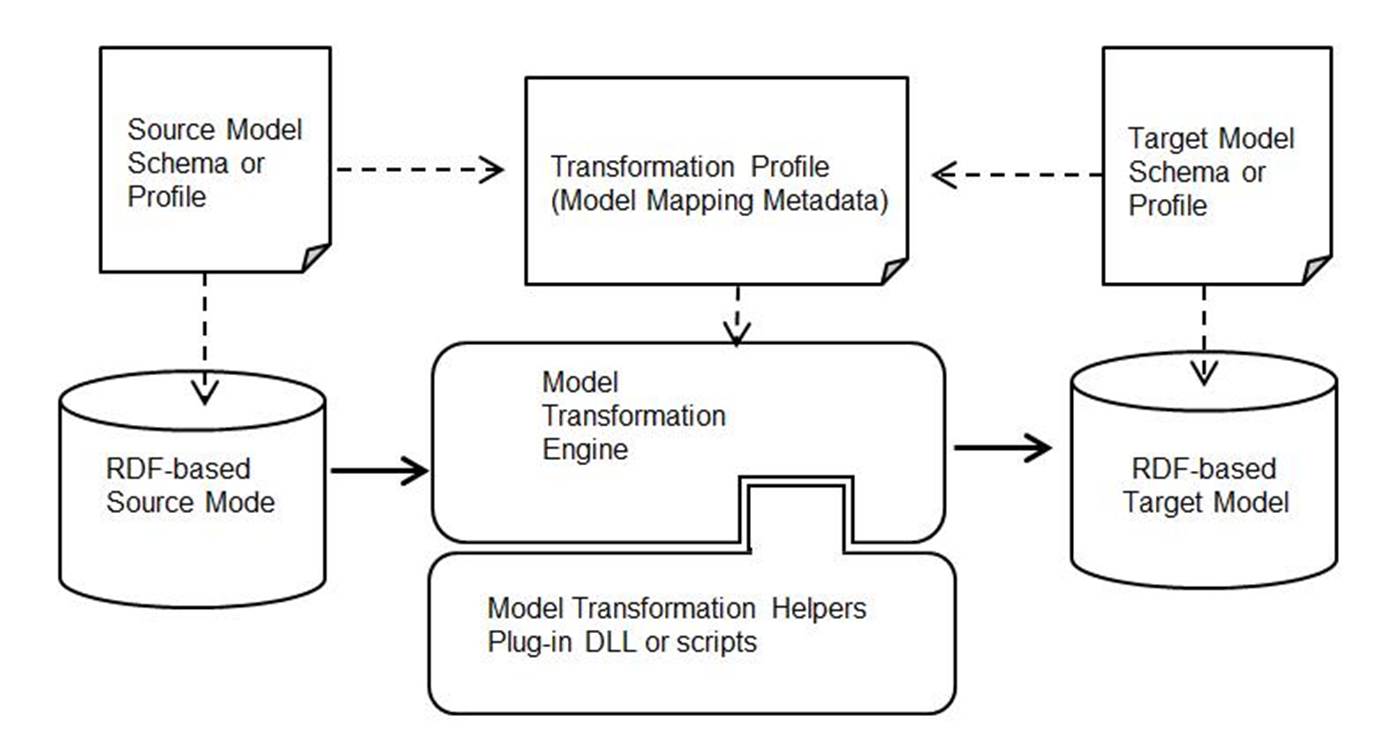
The following figure illustrates how source model is transformed into target model in MTF. The mapping logics used to map source model to target model are specified in a model mapping metadata file, called transformation profile. Guided by the mapping logics specified in the transformation profile, the model transformation engine converts the source model to the target model. In cases where mapping logics are too complicated or too exceptional to generalize, model transform helpers may be developed to assist the model transformation. These model transform helpers can be plugged into the model transformation engine through a dynamically injected DLL or scripts. The metadata-driven implementation of CIM importer/exporter makes it extremely easy to maintain. When a new CIM version needs to be supported, all you need to do is creating a new specification of mapping profiles. Minimum programming changes may be involved to modify the model transform helpers.
Model Transformation Engine
Model Transformation engine is the heart of MTF, though users don’t explicitly deal with it. The engine is designed to populate the target model from the source model based on the specification of model mappings declared in the model transformation profile. The interpretation algorithm is quite simple itself, consisting of the following steps:
- Parse the governing transformation profile to build a roadmap to guide the model transformation.
- Based on the mapping declarations in the parsed transformation profile, populate the target objects/properties from the source objects/properties. If a helper is encountered, the helper function/script will be invoked.
- After the target model is fully populated, it prepares the target model and adds it to the in-memory RDF-based model depository. Users will be able to browse and validate the populated target model.
Model transformation engine is in general fault-tolerant. When errors are encountered, it will log the identified errors and continue, unless a fatal error is identified. In that case, the model transformation fails.
Model Transformation Profile
Transformation profile is a key component of MTF. It specifies how a source model is converted into a target model. A transformation profile is an XML document. In its container element, i.e. ModelTransformation, a list of the namespaces, including prefix and URI, are declared, as illustrated below. These namespaces will be for the target model. By default, the target model will inherit the namespaces from the source model. However, if different namespaces will be used, they must be declared here to overwrite the namespaces inherited from the source model. If a namespace is used, but not declared, MTF will auto-generate a namespace with assigned URI. This is to avoid cases where users forget to declare namespaces, but used them in the target model.

A transformation profile is composed of a sequence of class mappings. Each class mapping contains a sequence of property mappings. Based on the class mapping declarations, the transformation engine will create a target object from the source object, and subsequently adding properties to the newly-created objects based on the property mappings. The following sample illustrates a class mapping.

A class mapping declaration contains the following optional attributes.
- target: target class, the class in the target model. The goal is to populate the objects of this class in the target model. If not defined, the source object will be manipulated.
- source: source class, the class in the source model. It serves as data source for the target objects. If not specified, the target object will be manipulated.
- id: optional, when defined, it declares how rdf:ID should be generated for target objects using MQL. If not specified, the rdf: ID of the target object will be copied from the source object.
- context: the trigger or precondition. If not specified, the mapping declaration will always be executed. This attribute is used to configure the transformation process. A transformation profile could be used for multiple purposes. The context parameter is composed by a collection of keywords separated by “;”. Only when all of the context keywords defined in a class/property mapping appear in the configuration contexts, it will be triggered. Otherwise, the corresponding mapping will be ignored during the model transformation process. At run time, the model transformation engine will compare the context of a class mapping with the context in model transformation configuration to determine whether this mapping shall be executed.
- filteringCriterior: optional, a MQL based filtering. At run-time, the model transformation engine will evaluate the filter criteria using the source object. If the evaluation result is false, the source object will be skipped.
- helper: a predefined helper function used to intercept the model transformation process. If specified, the corresponding helper function will be executed and any property mappings declared in this class mapping will be ignored.
- partial: a flag indicating whether the class is partial. The object of partial class is identified using rdf:about rather than rd:ID. For example, class Terminal is a partial class in TP profile.
- autoGenID: optional, if ‘true’, the rdf:ID will be auto-generated. By default, rdf:ID of the target object will be the same as that of the source object.
Example 1 below defines how to create a cim:ConnectivityNode (target) from a psse:BUS (source) object, which typically maps to cim:TopologicalNode. However, users may want to model each psse:BUS as a cim:ConnectivityNode so that they can treat PSS/E Raw as a physical model. This mapping will be triggered only if context “CreateNodes” is included in the transformation context.

Example 2 shows how a psse::BaseVoltage is created from psse:BUS through built-in helper function NormalizeBy, which creates new objects in the source model by normalizing the related objects based on a specified attribute. In this case, this function will create a new class called psse:BASE_VOLTAGE. All psse:BUS who share the same BUSKV values will be associated with the same psse:BASE_VOLTAGE object.

Example 3 below defines how to create a cim:PowerTransformerEnd (target) from a tertiary winding of psse:Transformer (Source). A filtering criteria is added to only create it when K value of a PSS/E tansformer is not empty.

A property mapping contains the following optional attributes.
- target: property name of the target object.
- source: a MQL based expression specifying how to set the value of the target property from the source object.
- type: type of the property. If not specified, the type of the specified property is an “attribute” by default. Otherwise, type is either “association” or “enumeration”.
- context: the trigger or precondition. If not specified, the mapping declaration will always be executed. This attribute is used to configure the transformation process. A transformation profile could be used for multiple purposes. The context parameter is composed by a collection of keywords separated by “;”. Only when all of the context keywords defined in a class/property mapping appear in the configuration contexts, it will be triggered. Otherwise, the corresponding mapping will be ignored during the model transformation process. At run time the model transformation engine will compare the context of a class mapping with the context in model transformation configuration to determine whether this mapping shall be executed.
- helper: a predefined helper function used to intercept the model transformation process. If specified, the corresponding helper function will be executed.
- modelParts: type of the models that the mapping applies to. If specified, the mapping rule will be enabled only when all of the model parts are contained in the source model. Valid model parts types are declared as Profile/name in \config\profile\ Standard.xml. Multiple model part types can be declared and separated by ‘+’. For example EQ + SSH, means the rule will be enabled only when the source model contains both EQ and SSH model parts.
Example 4 below shows how to set properties to newly created cim:ConnectivityNode from psse:Bus. “IdentifiedObject.name” (target) of ConnectivityNode will come directly from Name (source) of psse:BUS. Association for “ConnectivityNodeContainer” (target) comes from “VOLTAGE_LEVEL_ID” (source).

Example 5 below shows how to set “IdentifiedObject.name” (target) for cim:ACLineSegment from a psse:Branch based on context. When “LineNameFromBus” is not set in the transformation context, ACLineSegment’s name will be generated from the value of CKT (source). Otherwise, it will be created based on a MQL expression that translates to “append I bus index to J bus index with a dash in between”.

Example 6 shows how to remove obsolete properties from target model by marking them with a helper function, i.e. RemoveProperty.

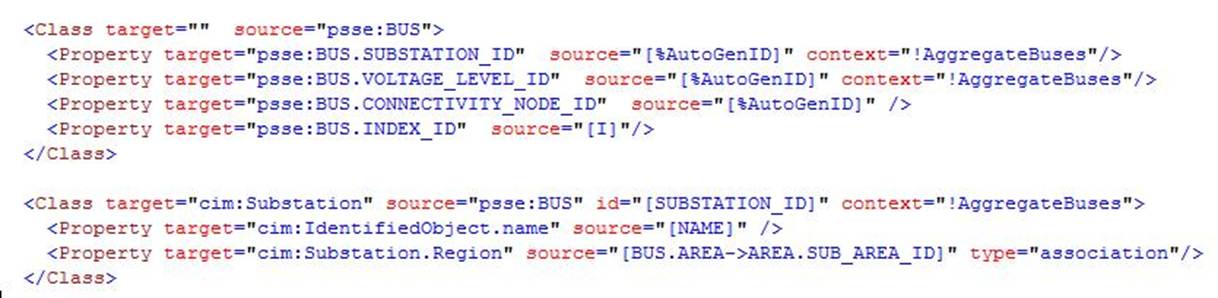
It is important to note that sequence in either class mapping or property mapping matters. The transformation engine will sequentially execute the mappings as declared. Sometimes, pseudo objects/properties need to be populated to facilitate the mapping. These objects/properties must be created before they can be used. Example 7 shows how a pseudo property called SUBSTATION_ID is created for each psse:BUS and later used to create cim:Substation.
By default, the mappings declared in the transformation profile will be executed sequentially from the beginning to the end. When execution is completed, the target model will be fully populated. This default execution mode, called full-model mapping, normally applies to the case where a full model is converted to a different type of model, such as from proprietary information models to CIM, or vice versa. However this full –model mapping is not suitable for version conversion. Difference between two versions of CIM, for example, is limited if not trivial. It will be desirable to declare the mappings that only describe the differences between two versions of CIM. This mapping mode is call by-exception. Model transformation engine interprets the by-exception mappings with the following two sequential stages:
- Executing the mappings declared in the transformation profiles. Here only the exceptional cases are handled. Typically the exceptional cases deal with the differences between two versions. New classes/properties could be added, while some of the existing classes/properties are marked for deletion using helper functions, i.e. RemoveClass and RemoveProperty.
- Executing the implicit mappings not explicitly declared in the transformation profile. Any classes/properties that are not declared in the transformation profile will be assumed to be the same in the target model. Most of the classes/properties belong to this category in version conversion. During this stage, the transformation engine will copy each object/property from the source model to the target model. Any classes/properties that have been already handled or marked for deletion in the transformation profile will be skipped during this implicit mapping execution stage.
By-exception execution mode minimizes the effort needed to map two versions of model. Otherwise, each class/property must be explicitly mapped. The following example shows how Breaker class is mapped from CIM 14 to CIM 16. It only specifies the property difference between two versions. The rest properties will be copied implicitly AFTER all of the declared mappings are executed, handling all of the differences. Note if a class or a property is marked for deletion, the corresponding objects/properties will NOT be implicitly copied to the target model. In other words, they are ‘removed’.

Transformation profile is normally designed for either full-model mapping or by-exception mapping, but not for both. The model transformation configuration, which will be described later, must indicate which mapping mode is used.
Model Transformation Helpers
Ideally, model transformation can be accomplished through mapping declaration. But in reality, this is impractical. Utility information models are heterogeneous. Different modeling techniques were used, ranging from index-based, hierarchical, relational, to object-oriented. Modeling styles also vary, bus-branch vs. node breaker, station-based vs. bus-centered. While model transformation profile can be used to cover majority of the mappings, there are many scenarios that require special handling. This is inevitable.
To deal with this challenge, MTF was designed to enable users to dynamically intercept the model transformation process through plug-in, called helpers. A helper is simply a function or step that is designed to handle special case. It can be defined at either class mapping or property mapping. At run-time, the model transformation engine will invoke this function or script when it is encountered. A helper has the highest priority. The model transformation engine will ignore the normal declarations and invoke the helper function immediately once it is identified. This is called interception. So if a helper is declared at a class level, the property mappings shall not be declared, because any property declarations will be ignored. The normal execution process has been intercepted.
Helpers are needed typically when models are badly mismatched. Let’s use one example to illustrate this kind of scenario.
In PSS/E Raw, each bus has an attribute called BASKV. It represents the base KV for this bus. In CIM, base KV level is represented using an object called BaseVoltage. This object is referenced by many objects, including ConnectivityNode, TypologicalNode, VoltageLevel, ACLinesegment, etc. This is a better design, since the base KVs of various modeling entities are normalized. The challenge is how to build a mapping between PSS/E Raw to CIM, i.e. how to populate the BaseVoltage from BUS which carries the voltage information. The idea is to create a new class BASE_VOLTAGE in the working copy of source mode, i.e. PSS/E Raw, and then add an association or reference between BUS and BASE_VOLTAGE. In other words, the source model is manipulated to make it compatible with the target model. This is done through a built-in helper function called NormalizeBy, as illustrated below

Helper function NormalizeBy is a generic built-in function that serves for more than above purpose. It is designed to scan the specified source objects, create new objects to contain the normalized values, and then add associations between the scanned objects and the new objects. In the above example, the function will scan all of the BUS objects (source), group them by the value of BASKV (first parameter), and then create new BASE_VOLTAGE objects (2nd parameter), each with a distinct attribute called BASE_VOLTAGE.BASKV (3rd parameter). Finally, it adds an associations between BUS and BASE_VOLTAGE, called BUS.BASE_VOLTAGE (4th parameter). The last parameter is a flag indicating whether the normalized value is a numeric.
Once new class BASE_VOLTAGE is added to the working copy of the source model, mappings can be declared to support PSS/E Raw to CIM conversion. The following example shows how an association can be added to ACLineSegment using the MQL navigations, i.e. BRANCH→BUS→BASE_VOLTAGE.

In general, helpers provide users an ability to intercept the transformation process to handle complicated cases where direct mappings are impossible or not easy to achieve. Helpers can be implemented in two ways
- DLL: Users write helper functions in the same programming language that server uses, i.e. C++. A set of APIs will be provided for model manipulation. The helper functions will be compiled as DLL which can be dynamically loaded by the server as needed.
- Script: Users write a helper function using a scripting language, such as Python. MTF will interpret the scripts to perform the script model manipulation.
None of the above is currently supported in this initial release of MTF. The preferred solution is, as MTF matures, it will provide a rich set of built-in helpers to enable users to perform majority of the needed model manipulations if not all. The existing built-in helpers are summarized below:
| Helper Name | Type | Description |
|---|---|---|
NormalizeBy |
Class helper | This helper function is used to normalize a class in the source model based on a specified property. It will pupulate a pseudo class in the source model and add pseudo association from the original class to the pseudo normalized class. The normalized value will be an attribute of the pseudo class. |
ReferenceSourceModel |
Class helper | This helper function is used to re-reference the source mode. If pseudo assoications are added to the source model, this function must be called to enable MQL navigations. This helper is typically needed if the working copy of the souce model is mainpulated. |
RemoveClass |
Class helper | This helper function is used to mark objects of the classes that shall be removed from the target model during by-Exception model transformation. |
CreateSingleObject |
Class helper | This helper function is used to create a single object of the specifed class and set the optional association from all of the objects of a specified class to it. |
AggregateNodes |
Class helper | This function is used to aggregate or group ConnectivityNodes based on the specified criteria (such as closed status of a switching device). It creates pseudo class of the aggresgated TopologicalNodes. The goal is to convert a node-breaker model to bus-branch model to support model conversion for network analysis. |
AggregateBuses |
Class helper | This function is used to aggregate PSS/E buses based on their connections. It creates pseudo class SUBSTATION and VOLTAGE_LEVELS to contain the aggresgated buses that are typically connected by transformers. It is designed to map PSS/E bus oriented model to station-oriented model that matches CIM conatinership and supports station-based visualization. |
ChangeName |
Class helper | This helper function changes the names of classes/properties model wise. |
RemoveObject |
Class helper | This helper function remove all of the objects that meet the selection criteria. This function require an logical MQL expression to be providered as parameter. |
EnableQuickAccess |
Class helper | a helper function that enables quick access to specified objects to improve lookup efficiency during transformation. |
RemoveProperty |
Property helper | This helper function is used to mark a property that shall be removed from the target object during by-Exception model transformation. |
AssociateObject |
Property helper | This helper function is used to create association between objects if the specified matching criteria is met, i.e. a MQL-based logical expression is evaluated as ‘true’. |
AssociateObjectOnCondition |
Property helper | This helper function creates an association between objects by retrieving candidate objects via MQL paths and establishing the association when specified property values between the source and candidate objects match. |
AssignEndNumber |
Property helper | A very special helper function used to assign endNumber to a TransformerEnd based on the nominal voltage of the TransformerEnd. |
CreateParameterAttributes |
Property helper | This helper function creates parameter attributes on the target object by copying property values from the source object starting at a specified property index. Each copied property is stored as a sequential parameter attribute (parameter1, parameter2, …). |
CopyParametersFromSource |
Property helper | This helper function creates parameter attributes by copying property values from the source object starting at a specified property index. The copied properties are added to the target object as attributes, optionally using a specified namespace, while allowing certain properties to be excluded from the copy operation. |
ConvertLimitType |
Property helper | This helper function creates parameter attributes by copying property values from the source object starting at a specified property index. The copied properties are added to the target object as attributes, optionally using a specified namespace, while allowing certain properties to be excluded from the copy operation. |
MigrateLimitValue |
Property helper | This helper function migrates limit values from the source model to the target CGMES 3.0 object. The value is copied when the source model contains SSH data and the limit value is valid. |
AddAssociatedObjectIfMissing |
Property helper | This helper function creates and associates a new object of a specified class with the target object when the expected association is missing. The newly created object can optionally inherit the name of the source object. |
Realizing that the built-in helper function support will never be complete or adequate for heterogeneous model transformation requirements, the Tool provides Python scripting support, enabling users to define their own custom helper functions. These custom helper functions can be embedded in the mapping profile, just like the built-in helper functions. See an example for more details.
Context-Based Conditional Execution
The Model Transformation Framework (MTF) supports contexts, which allow transformation rules to be conditionally enabled or disabled based on model conditions. Contexts provide a flexible mechanism to control when certain transformation rules should be applied.
Purpose of Contexts
Contexts are used to:
- Enable or disable transformation rules based on model conditions
- Avoid creating duplicate objects
- Control different transformation behaviors depending on model content
- Simplify complex transformation logic by separating conditions from mapping rules
Defining Contexts
Contexts are declared under the Contexts element, a child element of ModelTransformation. Each context contains:
- name – the identifier of the context
- enabled – a logical MQL expression that determines whether the context is active
Example structure:

The enabled expression is evaluated during transformation. If the expression evaluates to true, the context is considered active.
Using Contexts in Transformation Rules
Contexts can be referenced by transformation rules such as Class mappings.
When a rule specifies a context, the rule is executed only when the context condition is satisfied.
Example:

In this case, the class mapping will only be executed if ContextName evaluates to true.
Contexts can also be negated using the ! operator:

This means the rule will be executed only when the specified context is not active.
Performance Optimization
The Model Transformation Framework (MTF) provides several mechanisms to improve performance when processing large models or complex transformations. One of the key features is the Quick Access mechanism, which accelerates object lookup and association operations.
The EnableQuickAccess helper initializes internal indexes for model objects, allowing the transformation engine to quickly locate objects during property evaluation and association resolution. This is particularly useful in transformations that involve frequent object searches or complex navigation paths.
To enable this feature, include the following declaration at the location where you want the optimization to be triggered in the transformation:

When this helper is invoked, the framework prepares optimized data structures that allow faster access to objects during transformation execution. Enabling quick access can significantly improve performance when processing large models or when transformation rules rely heavily on object lookup operations.
It is recommended to enable Quick Access when:
- The transformation processes large models with many object and propertiess.
- Transformation rules frequently perform object lookups or associations.
- Complex MQL navigation paths are used in mapping expressions.
- Enabling this feature early in the transformation configuration ensures that subsequent transformation rules can benefit from the improved lookup performance.
Alias Support in Model Transformation
During model transformation, it is common that certain values or identifiers need to be referenced multiple times across different mapping expressions. In many cases, the required value may also need to be constructed or derived before it can be used in the transformation. To support this requirement, the transformation framework provides alias support, which allows intermediate values to be defined once and reused throughout the transformation process.
An alias is defined using the $ prefix and represents a temporary variable created during the transformation process. The alias is evaluated once and can then be referenced by subsequent transformation rules.
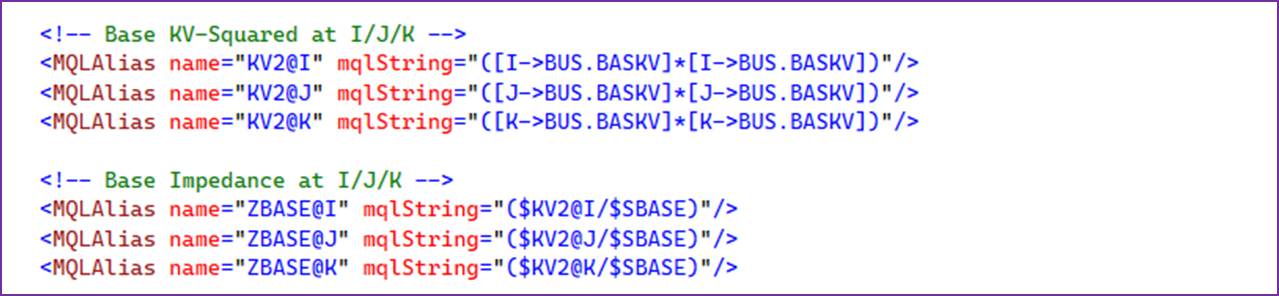

In the above example, aliases are first defined to represent the squared voltage at ends I, J, and K. These intermediate values are then reused to compute the base impedance at the corresponding ends, simplifying the transformation expressions and avoiding repeated calculations. The resulting base impedance aliases are subsequently used to convert the per-unit (PU) impedance and admittance values into engineering units during model transformation. The same aliases can also be reused elsewhere in the transformation where the same base impedance is required.
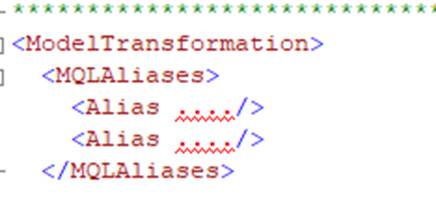
All aliases are grouped under MQLAliases, which is defined as a child element of ModelTransformation. Aliases declared in this section are available throughout the entire transformation definition and can be referenced by any mapping or expression within the transformation.
Aliases help simplify transformation rules and improve maintainability. Without aliases, complex expressions or repeated values would need to be written multiple times in the mapping definitions. This can make transformation templates harder to read and maintain. In general, aliases provide several advantages:
- Avoid repetition of frequently used expressions.
- Improve readability of transformation templates.
- Provide intermediate variables that can be reused across multiple properties.
Template Support in Model Transformation
Templates provide a mechanism for defining reusable mapping patterns that can be used repeatedly in model transformations. By encapsulating commonly used mapping structures, templates help reduce duplication, improve readability, and simplify maintenance of transformation definitions.
Purpose of Templates
In many transformation scenarios, similar mapping logic needs to be applied to multiple objects with only minor differences, such as identifiers, source types, or terminal positions. Templates address this need by allowing the mapping structure to be defined once and instantiated multiple times with different parameters.
Using templates offers several benefits:
- Centralized mapping logic for commonly used patterns
- Reduced duplication in transformation declarations
- Improved consistency across transformation rules
- Simplified maintenance, since changes only need to be made in one place
Template Definition
Templates are declared within the Templates element. Each template contains a reusable mapping pattern consisting of one or more class mappings. Within a template, placeholders are used to represent parameters that will be supplied when the template is instantiated. Placeholders are written using the syntax:
{{ placeholder }}
These placeholders are replaced with actual values when the template is used. For example:
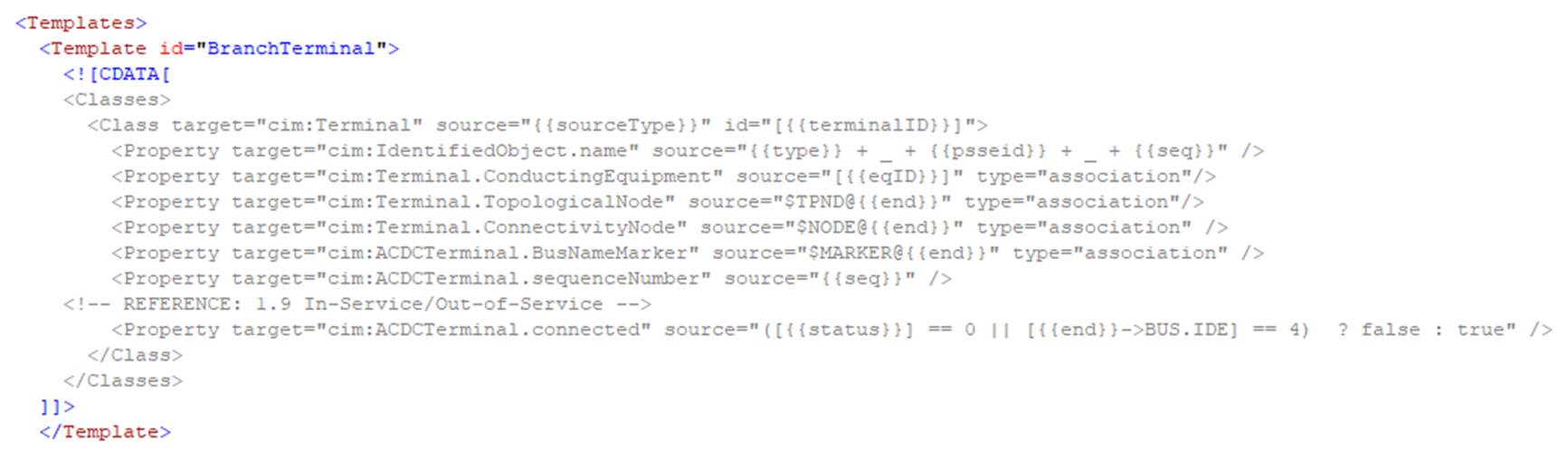
In this example, placeholders such as {{ sourceType }}``, {{ terminalID }}, and {{ end }} are dynamically replaced when the template is instantiated.
Templates are grouped under the Templates element within ModelTransformation. All template definitions are declared in this section and can be referenced throughout the transformation configuration.
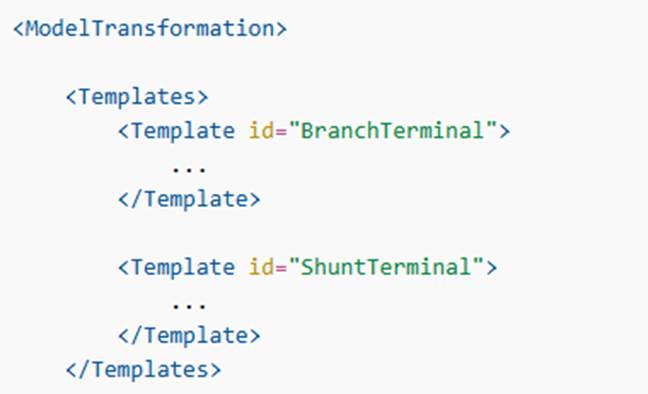
Template Instantiation
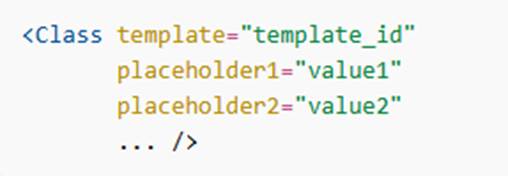
A template is instantiated by referencing it in a class mapping using the template attribute. Placeholder values are provided as attributes in the instantiation declaration.
The general syntax is:
For example,

During transformation execution, the system expands the template by replacing all placeholders with the provided values and generating the corresponding mapping declarations.
Template Overriding
Templates are overridable, meaning their definitions can be replaced or extended during runtime or in derived transformation configurations. This enables flexible customization of transformation behavior without modifying the original template definition. In this sense, a template behaves similarly to a base or abstract class, allowing transformation patterns to be extended or specialized when needed.
Model Transformation Configuration
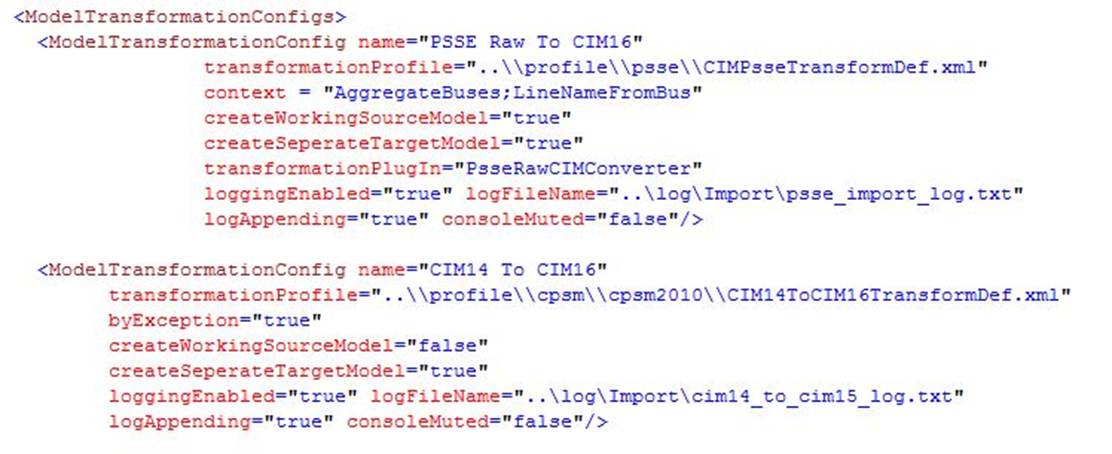
Model transformation requirements are varied case by case. MTF provides a custom configuration support to meet different, and sometimes conflicting, requirements. These configurations are defined in the configuration file. Each transformation configuration defines a certain type of model transformation so that it can be reused for different models. The following shows a sample of model transformation configuration used to convert a CIM 14 based model to version CIM 16.
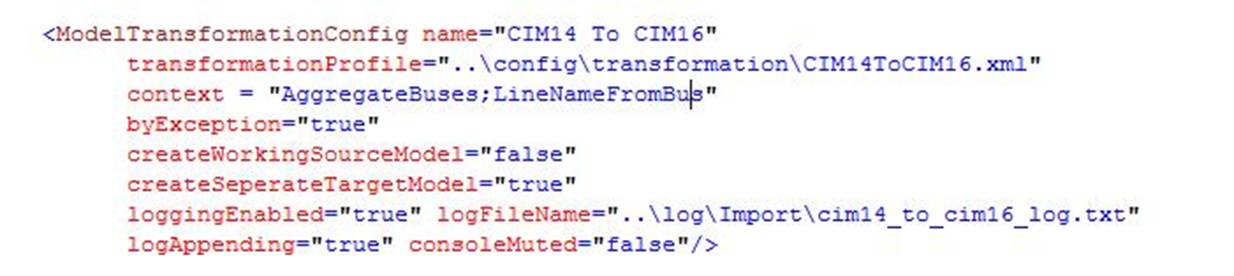
A model transformation configuration has the following attributes as shown by the two example transformation configurations defined below:
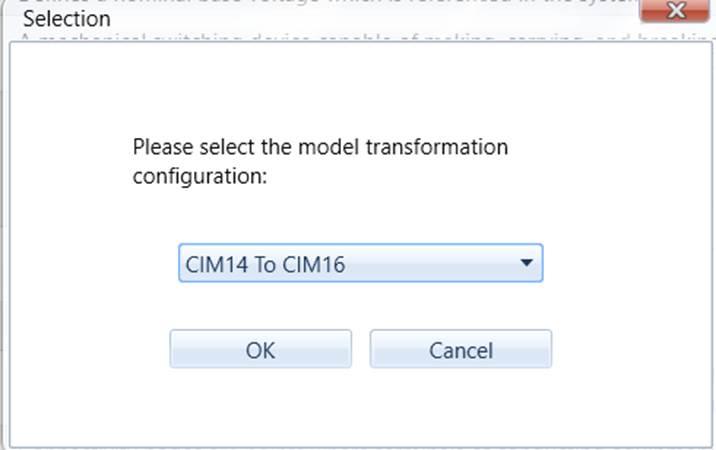
- name: name of the transformation. It must be unique. When users invoke a model transformation process, all of the configuration names will be displayed, prompting users to select a transformation configuration. Once selected, the defined configuration parameters will be sent to the transformation engine to guide the entire process.
- transformationProfile: full path of a meta-data file where the governing transformation profile is defined. This parameter is required.
- context: optional, when set, the context will be compared against context defined in transformation profile. If a transformation profile is designed for different purposes, this parameter is used to select which mappings shall be triggered. The context parameter is composed by a collection of keywords separated by “;”. Only when all of the context keywords defined in a class/property mapping appear in the configuration contexts, it will be triggered. Otherwise, the corresponding mapping will be ignored during the model transformation process. Abbreviation of model parts (, i.e. EQ, SSH, TP, SV, etc.) are by default the contexts. They are used to define transformation rules that are only applicable or not applicable to the model that contain or not contain the specified model parts. Model part contexts are built-in and do not need be specified in ModelTransformationConfiguration.
- createWorkingSourceModel: when true, a working copy of the source model will be created. Some of the model transformations, particularly the transformation between different types, involve creating objects of pseudo (or dummy) class or pseudo properties in the source model. In this case, this flag shall be set to ‘true’. The transformation engine will then make a working copy of the source model so that the source model will not be ‘polluted’. After the model transformation is completed, the created working copy will be deleted to recycle memory. If the model transformation will not alter the source model, this flag shall be set to ‘false’. The default value is ‘true’, meaning the working copy will be created for model transformation and recycled after the transformation is completed.
- createSeperateTargetModel: The source model can also server as target model. In this case, additional objects/properties will be added directly to the source model. If not specified, this flag is true. By default, a separate target model will be created.
- createDiffModel: if true, create a diff model showing difference between target and source model, applicable only when createSeperateTargetModel is true. The flag is false by default.
- transformationPlugIn: optional, when defined, the model transformation will trigger this custom transformation, typically used in plug-in mode. The custom transformation provides more flexibility for users to perform the custom steps. Users shall ignore this at this moment, since MTF is not fully open for this release.
- byException: optional, when set to true, the model transformation engine will perform the specified model transformation by exception. See the above Model Transformation Profile for details. This flag is set to false by default, meaning the full-model transformation shall be performed. It is normally set to true if users perform model version conversion.
- loggingEnabled: flag indicating whether model transformation process shall be logged.
- logFileName: full path of the log file name.
- logAppending: flag indicating whether the new loggings shall be simply added to the existing one. If false, the loggings of the previous transformation will be cleared.
- consoleMuted: if false, all of the loggings will also be displayed on the sever console.
The following samples show two model transformation configurations. The first one is used to guide model transformation from PSS/E Raw to CIM 16, while the second is used to convert a CIM 14 based model to version CIM 16.
Model Transformation Execution
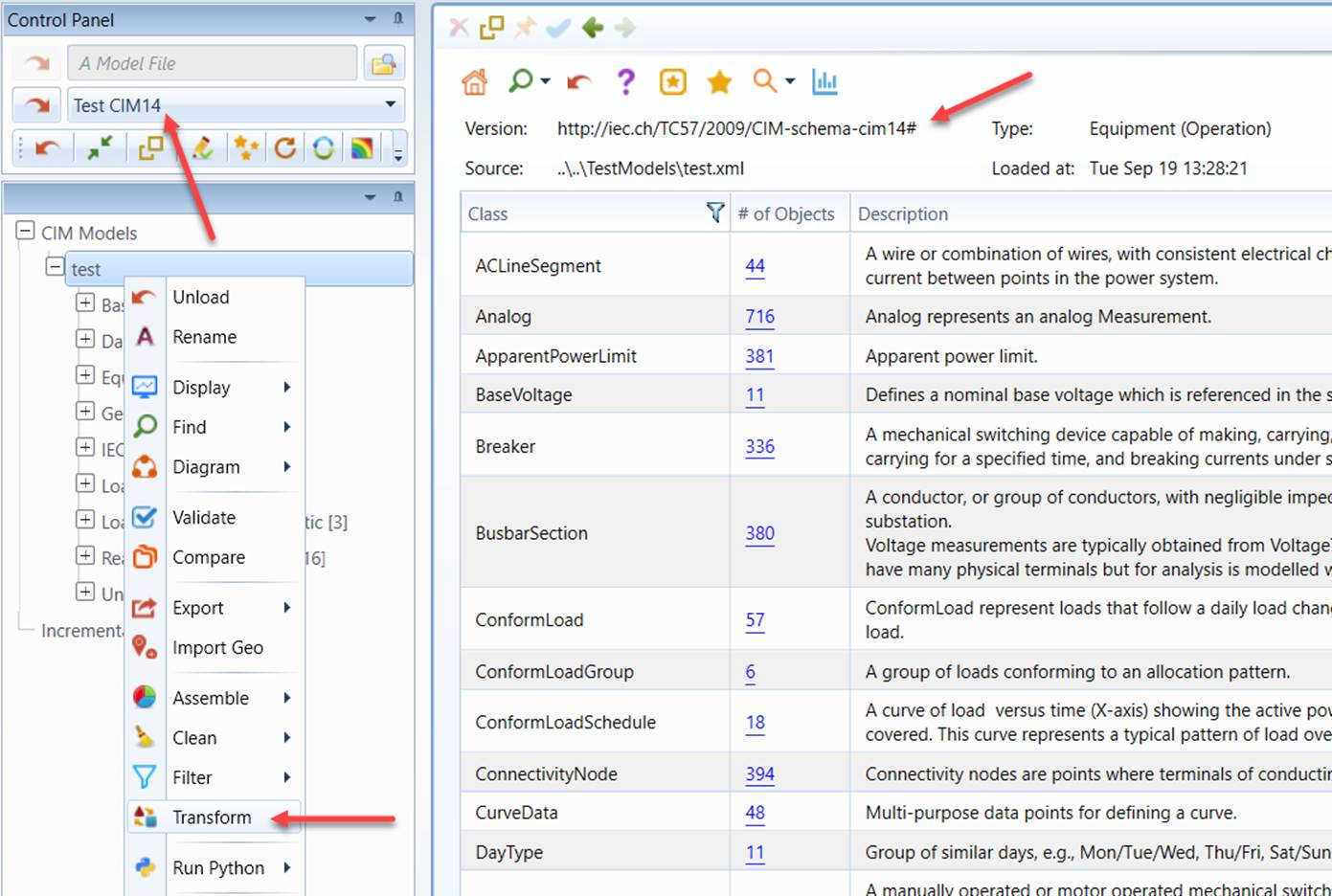
Once a model transformation configuration is defined and the corresponding model transformation profile is declared, users are ready to trigger the model transformation process. This can be achieved from the context menu associated with the source model, as shown in the following example.
- Load a CIM 14-based model into the Tool and invoke the Transformation process from the context menu associated with the loaded model.
- A popup will display, showing all of the transformation configurations defined in the configuration file. Select the “CIM14 to CIM16” configuration and click ‘OK’ to start the transformation process.
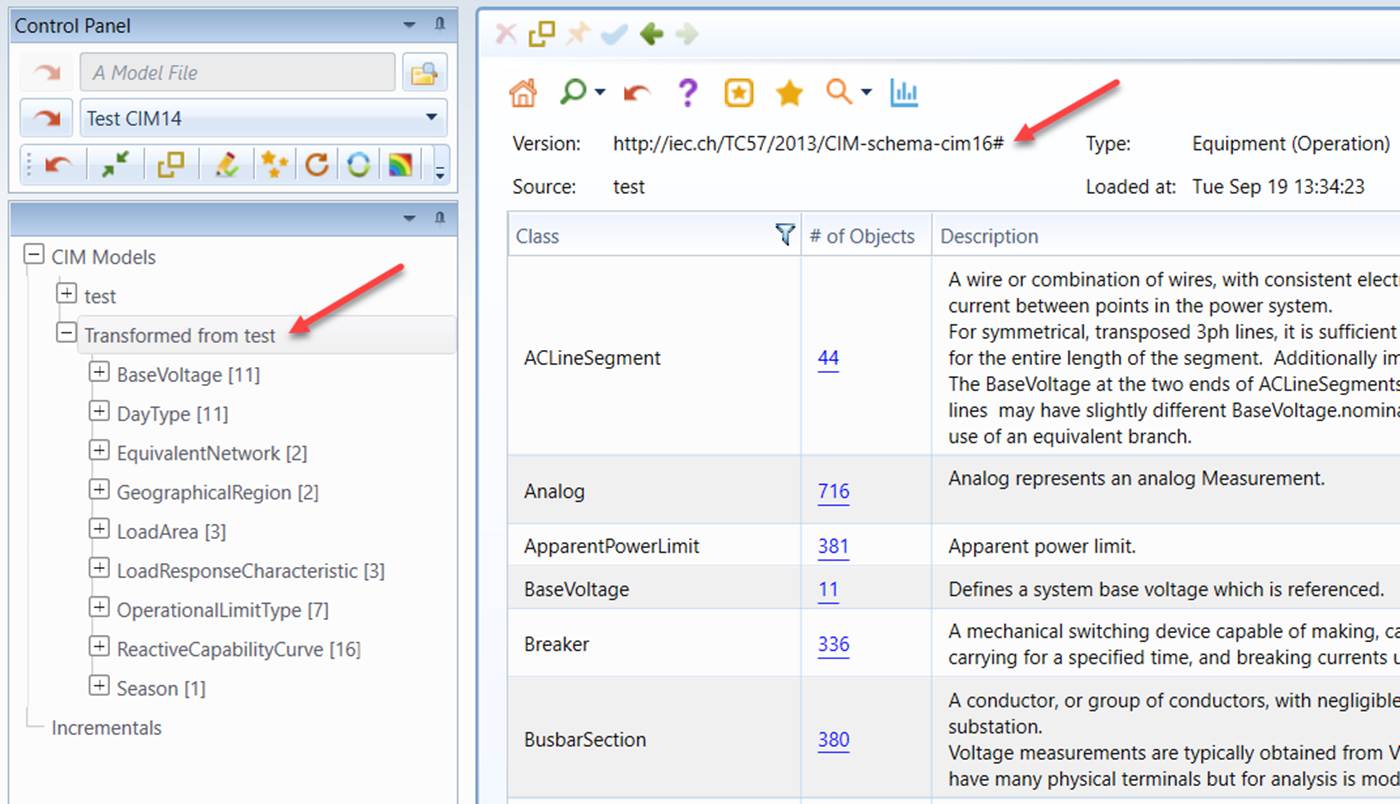
- Once the transformation is completed, the target model will be loaded into the Tool and displayed in the navigation tree.
Validation of Transformation
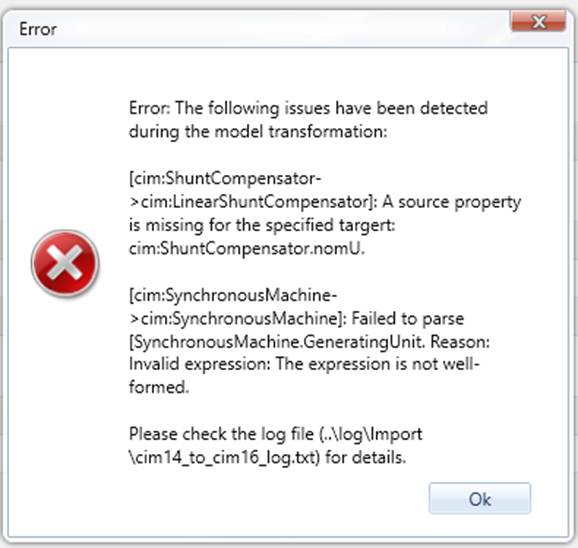
During model transformation, the transformation profile is automatically evaluated. Any detected issues are reported to users through a popup notification and recorded in the log file for further review and troubleshooting.
Next Step
Too much conceptual?
Hands-on the performed case studies included in the release to gain some concrete insight.