Exporting as Self-Contained Package
The feature allows users to package a file together with all of its required external dependent files into a single ZIP archive. This is useful when transferring or sharing files that rely on additional resources. In many cases, a file may reference external components that are required for it to function correctly. For example, a CIM model may reference external DLL files or other supporting resources. If only the main file is exported, the model may not function properly when opened on another system.
Using this feature, the Tool automatically:
- Scans the selected file for referenced external dependencies.
- Collects the required files (such as DLLs or other referenced resources).
- Packages the main file and all detected dependencies into a single ZIP package.
This ensures that the exported package contains everything needed to reopen or deploy the file in another environment.
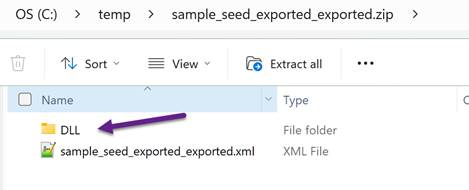
Output: The result is a ZIP archive containing:
- The selected file
- All detected dependent files required by the file
The package can then be transferred and extracted on another system while preserving the necessary file relationships.
Note:
- Only dependencies referenced by the selected file are included.
- The relative directory structure of the files is preserved within the ZIP archive when applicable.
Usage:
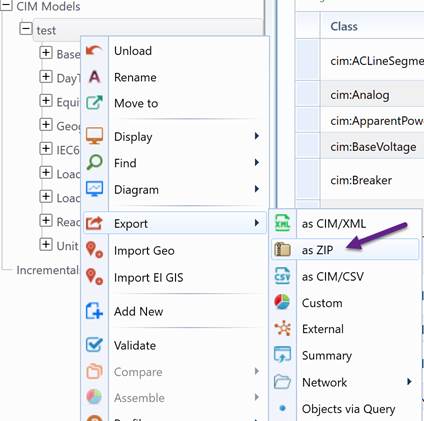
- Right-mouse click the selected model tree item in the Model Explorer navigation tree. Then Select Export →as ZIP in the context menu.
The CIM/XML export function can also be invoked from the icon command in the model summary display, as illustrated below.

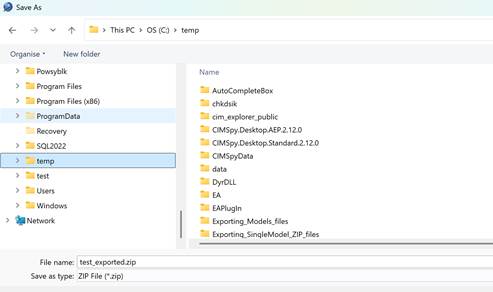
- To export ZIP file to a local directory, users must specify the path of the directory where the ZIP file will stored. This is accomplished through a dialog box, as illustrated below.
- While the exporting process starts, the UI will be locked from any other activities. Once the exporting is completed, a message will popup, notifying the status.
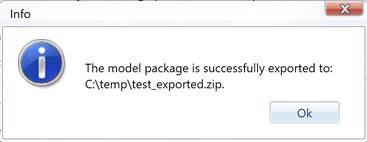
Note the model exported is not removed from the Tool. The tool simply create a new file to persist the current model as a ZIP file.
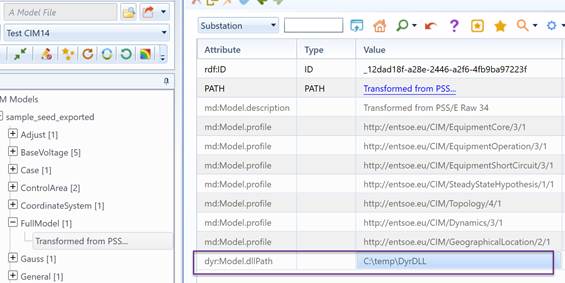
- If the dyr:Model.dllPath property of the FullModel object is specified, all DLL files located in that directory will be included in the DLL folder of the exported ZIP file.