CSV-based Scripting
There are many scenarios in which a model must be modified — for example, to add missing information or extension, correct validation issues, or clean up inconsistent data. Performing repetitive or large-scale modifications manually — such as creating objects, deleting objects, updating attributes, — can be time-consuming and error-prone.
To address this challenge, a CSV-based model scripting capability is introduced. This feature enables users to modify loaded models quickly and efficiently — without writing C++ or Python code. CSV-based scripting is particularly well suited for:
- Large-scale model patch
- Profile migration
- Scenario generation and cloning
- Automated data cleanup
- Structured model transformation
Instead of implementing custom transformation logic in C++ or Python or building transformation process, users define model changes in a structured CSV file. Each row in the CSV file represents an executable instruction. The system interprets these instructions and applies the changes directly to the in-memory model.
This approach combines the simplicity of spreadsheet-based editing with the power of a structured scripting engine.
For more advanced and flexible automation requirements, please refer to Python Scripting. Python scripting enables users to implement fully customized model-processing logic beyond the capabilities of structured CSV or batch workflows. It is particularly suitable for complex algorithms, specialized transformations, multi-source data integration, and the development of model-driven applications that require programmatic control over the Tool’s internal APIs.
Hands-On
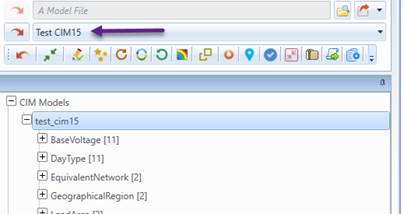
- Load model Test CIM15 from data source dropdown as illustrated.
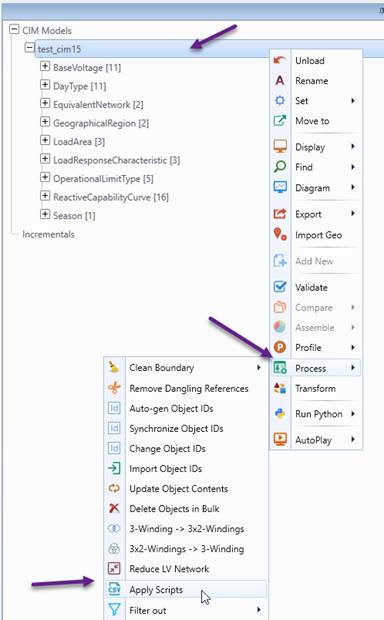
- Right-click the model node in the navigation tree to open the context menu, then select Process → Apply Script, as illustrated below.
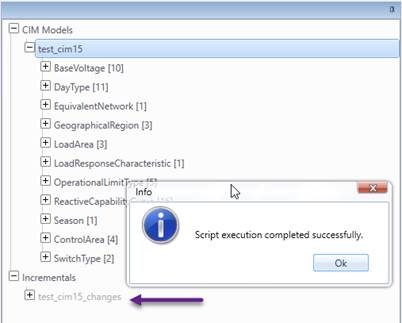
- Choose patch_test_cim15.csv from directory \TestCases\csv_scripting to apply the script
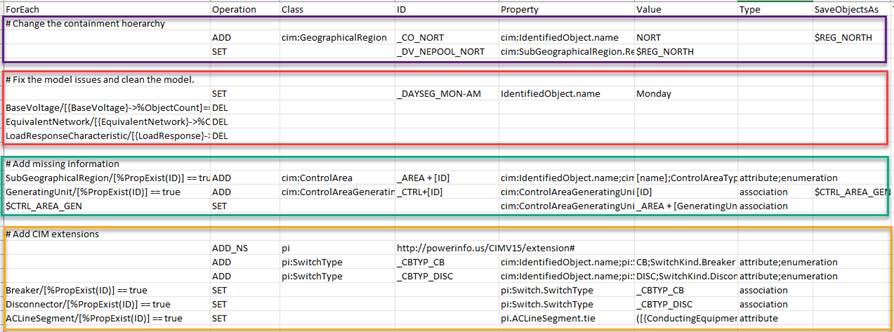
Code Review: The script performs four primary functions:
- Change the Containment Hierarchy:Creates a new GeographicalRegion (NORT) and reassigns the corresponding SubGeographicalRegion to it.
- Fix and Clean the Model:Corrects invalid data and removes unused or unreferenced objects to improve model consistency.
- Add Missing Information:Generates required operational objects (ControlArea and ControlAreaGeneratingUnit) and establishes proper associations based on containment relationships.
- Add CIM Extensions:Introduces custom namespace extensions, defines extended SwitchType objects, assigns them to switches, and adds a tie-line indicator attribute to ACLineSegment.
Architectural Overview
The CSV-based scripting engine is a domain-specific interpreter designed to apply structured modifications directly to an in-memory CIM Full Model through its internal model manipulation APIs. Each row in the CSV file represents a discrete, executable instruction.
During execution, the engine parses the CSV file, interprets each row according to its specified Operation, and applies the corresponding modification atomically. All changes are executed in a controlled manner to maintain data integrity throughout the process, and all model modifications are systematically tracked. More specifically, the engine supports object creation, modification, deletion, duplication, namespace management, query-driven selection, and variable-based pipelines. All changes made during execution are accumulated and recorded as a CIM incremental model, enabling the modifications to be reviewed, validated, versioned, or exported independently of the original Full Model.
The CSV-based scripting engine supports two execution modes: instance-specific and pattern-driven, allowing users to choose between precise control and scalable automation.
In instance-specific mode, operations target the objects explicitly defined by ID values. This approach is used when the exact objects to be modified are known in advance and controlled, deterministic updates are required. It is particularly suitable for correcting known data errors, adding missing information, or applying carefully managed patch updates. The following shows such an example.

In contrast, pattern-driven mode dynamically selects objects using MQL expressions in the ForEach fields. Rather than specifying exact IDs, users define selection criteria, enabling bulk transformations based on model patterns. This mode is ideal for updating all objects that meet certain property conditions, such as cleaning models, performing large-scale updates, and normalizing data across extensive datasets. The following shows such an example.

Script Structure
The CSV-based script is composed of a sequence of rows, each representing a single operation to be executed on the loaded model. Each row describes what to do, which objects to target, and how to modify them, using a predefined set of columns.
Operation:
Operation is a required column in every row of a CSV-based script. It defines the action to be executed on the model.
| Operation | Category | Behavior Summary |
| ADD / NEW | Creation | Creates new objects, optionally with specified ID and properties. |
| ADD_NS | Creation | Add a new namespace. |
| SET | Modification | Updates property values for existing objects. |
| GET | Selection | Selects objects and stores them in a variable for reuse. |
| DELETE / DEL | Deletion | Removes objects by ID, variable, class, or query. |
| PURGE | Deletion (Cascading) | Deletes objects and associated descendants. |
| COPY | Duplication | Creates shallow copy of an object. |
| CLONE | Duplication | Creates deep copy including associated descendants. |
| CHANGE_ID | Modification | Renames object IDs while maintaining referential integrity. |
| REMOVE_CLASS | Cleanup | Removes all objects of specified class(es). |
| REMOVE_PROP | Cleanup | Removes specified properties from objects. |
| REMOVE_NS | Cleanup | Removes namespace elements. |
| REMOVE_DANGLING | Cleanup | Removes dangling references. |
| IMPORT | Script Control | Dynamically loads and appends another CSV script. |
| EXIT | Script Control | Stops further script execution. |
Variable
Variables allow intermediate results to persist across script rows. Objects retrieved using GET or created via ADD/NEW can be stored and reused in subsequent operations, enabling multi-stage transformation workflows.
Variables, once defined, represent a collection of objects.
Variable names must be unique.
It is recommended to add a prefix, such as $, to variable names in order to clearly distinguish them from literal values and MQL expressions. This improves readability and helps prevent ambiguity during script execution.
The following shows an example of Variable and its usage.
 
Column
Each operation consists of a fixed set of columns. Except for the Operation column, the other columns may be empty (and ignored if specified), optional, or required, depending on the operation and its usage mode (e.g., instance-specific or pattern-driven). These columns are defined in the table below.
| Column | Description |
|---|---|
| ForEach | Defines source objects using MQL or a previously saved variable. This column is required for pattern-driven operation. If started with ‘#’, the row is regarded as a comment and ignored. |
| Operation | Specifies the action to perform (ADD, SET, DELETE, etc.). This column is always required. |
| Class | Target CIM class for object creation or class-level operations. This column is also used for prefix of the namespace. Required for ADD/NEW, REMOVE_CLASS, ADD_NS, REMOVE_NS operation. |
| ID | Target object ID(s) or MQL-based dynamic ID expression. It is also used for file path for IMPORT Operation and namespace URI for ADD_NS. Required for instance-specific operation and IMPORT and ADD_NS operation. The only exception is the ADD/NEW operation: if ID is not provided, an ID will be automatically generated. Multiple IDs can be specified, separated by semicolons. |
| Property | Property name(s) to modify (semicolon-separated multi-value supported). Required for Operation SET and REMOVE_PROP. For the ADD/NEW operation, the Property column normally applies to the newly added object. There is one special case: if the Value is empty, the Property is treated as an association from the source object (specified in the ForEach column) to the newly added object, and the value is implicitly set to the ID of the source object. |
| Value | Property value(s) or MQL expression for dynamic evaluation, (semicolon-separated multi-value supported). Value must be provided if Property is specified for Operation ADD/NEW and SET. Also required for Operation CHANGE_ID. The Value column can also be specified using a variable. In this case, the object ID stored in the variable is used as the actual value. |
| Type | Specifies the explicit property type: attribute, association, or enumeration. This column is optional. If provided as semicolon-separated multi-values, the number and order must correspond to those in the Value column. If not specified, the property types will be inferred automatically from the model. |
| SaveObjectsAs | Stores resulting objects into a named variable for reuse. Must be unique. Required for Operation GET and optional for Operation ADD/NEW |
| Tag | Reserved for flags or future extensions. |
| Comment | Comment for the script, ignored by the parser. |
Modularization
The IMPORT operation enables modularization and reuse of scripting logic by loading another CSV script and appending its contents to the current execution sequence. Instead of creating one large monolithic script, users can split complex workflows into smaller, focused, and reusable script files.
When executed, the engine reads the referenced CSV file and inserts its rows immediately after the current IMPORT instruction. Execution then continues sequentially, treating the imported content as if it were part of the original script. Nested imports are supported (with a safe depth limit to prevent circular loops).

Logging and Error Handling
The CSV-based scripting engine includes a structured logging mechanism to ensure safe and traceable execution of model updates. Instead of stopping at the first error, the engine follows a “collect and continue” strategy: most issues are recorded while valid instructions continue to execute. This makes the framework suitable for batch processing and large-scale model transformations.
All execution issues are captured by a centralized logger. Errors are categorized and tracked with their corresponding line numbers. Logged issues include:
- Missing required columns
- Unknown or invalid operations
- Undeclared or duplicate variables
- Invalid or duplicate rdf:ID values
- Property type mismatches
- Invalid or failed MQL expressions
- Invalid command structures
- Import failures or excessive nested imports
Note:
- Required columns are validated before execution. If mandatory information is missing, the row is skipped and logged. Similarly, unsupported operations or malformed instructions are recorded without interrupting the overall process.
- MQL expressions are validated in two stages: syntax validation and runtime evaluation. Parsing errors and evaluation failures are logged separately for clarity. Variable usage is also validated to prevent referencing undefined variables.
- The IMPORT operation includes safeguards such as maximum nesting depth to prevent circular dependencies. The reported line numbers are cumulative within the overall execution context, rather than relative to the individual imported CSV file.
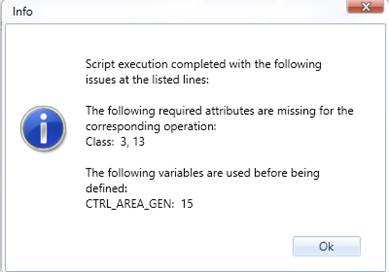
- At the end of execution, all logged issues are consolidated into a structured summary message. If no issues are found, a success message is returned. Otherwise, a categorized report listing affected line numbers is presented to users as a popup message, enabling efficient troubleshooting. The following shows an example of reported error message.
This design ensures robustness, transparency, and controlled execution while maintaining flexibility for complex automation workflows.