CGMES Validation
CGMES model validation is designed to support the CGMES model exchange process where self-descripted model parts are exchanged individually.
About CGMES
The Common Grid Model Exchange Specification (CGMES) is an IEC technical specification based on the IEC Common Information Model (CIM) family of standards. It was developed to meet ENTSO-E requirements for TSO data exchanges in the areas of system development and system operation.
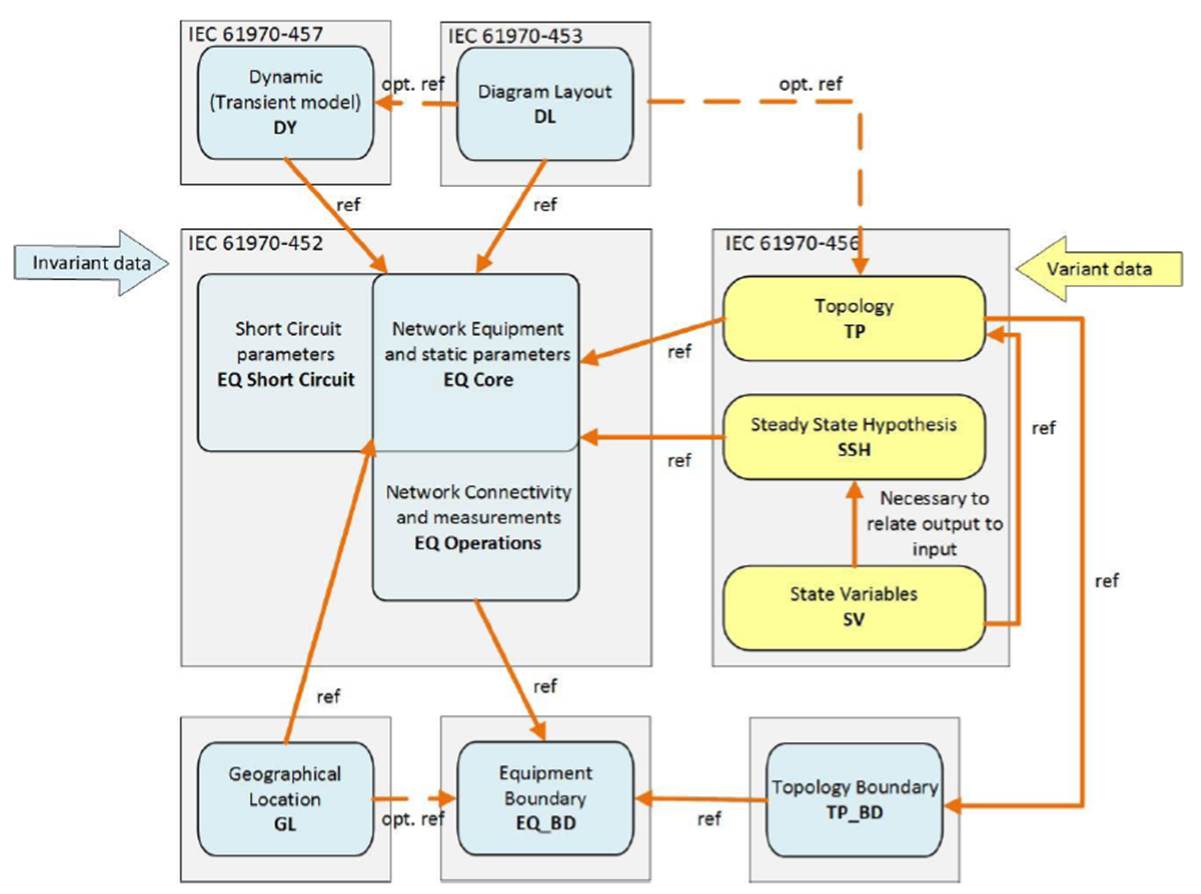
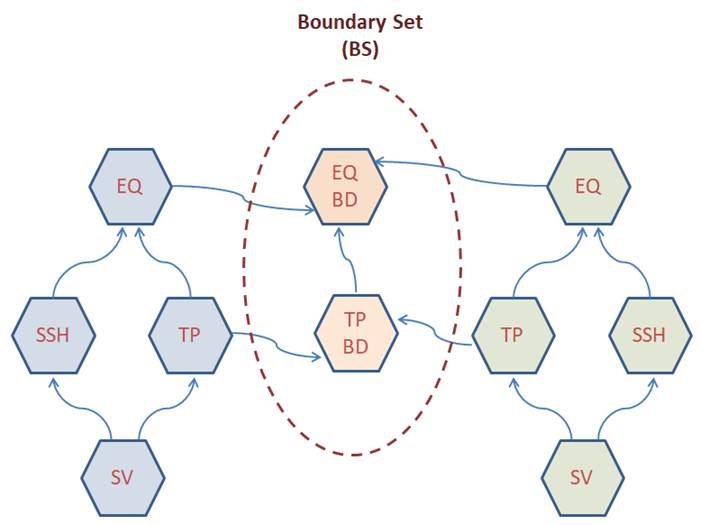
In CGMES, models are split into different data groups, referred to as model parts. The main motivation behind this is that model parts have different update frequency. For example, EQ is relatively static, while SV is required to be updated daily or even hourly. Model parts are self-descriptive. Each model part contains a header which contains the meta-data describing the model authority, profile conformed, scenario time, and dependency to other model parts. The dependency among model parts is illustrated below:
Terminology
This section summarizes the data set concepts according to Common Grid Model Exchange Specification (CGMES) and introduces Tool-specific data set concepts. It mainly serves as background and defines terminologies/concepts to be used in this document.
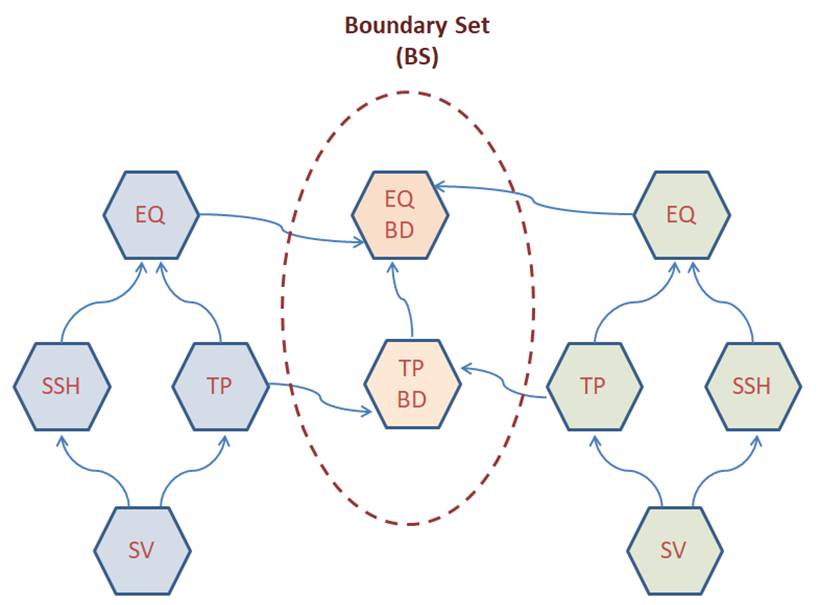
Boundary Set (BS)
Boundary Set (BS) defines the tie-connections among TSOs. BS is prepared and maintained by grid coordination organization, such as ENTSO-E.
Individual Grid Model (IGM)
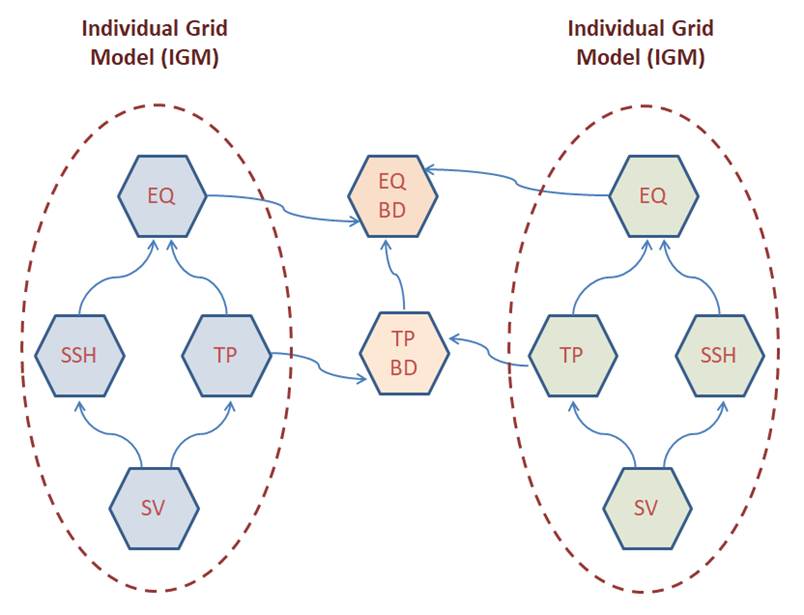
Individual Grid Model (IGM) is a collection of related model parts prepared by each Model Authority (MA), i.e. TSO in the context of CGMES, as illustrated in the following figure.
The required model parts of IGM include EQ, TP, and SSH. SV is not mandatory, but highly recommended. The rest (i.e. DY, GL, and DL) are optional.
- IGMs are prepared by TSOs following different modeling practices. For example, some IGMs use node-breaker representations, and the others are bus-branch models. Short circuit modeling data may also be included in some IGMs.
- Combing with BS, each IGM must be a complete data set supporting power flow. In other words, power flow shall converge for each BS+IGM data set (referred to as Extended IGM or EIGM). External networks are typically modeled as EquivalentInjections at boundary points.
- The model parts of an IGM may be exchanged at different rates. For example, EQ doesn’t change frequently, but TP/SSH shall be exchanged for different time horizons (or scenarios).
- Some of the model parts, such as EQ, can be updated incrementally (with CIM difference model), while others (such as TP/SSH) must be exchanged as a whole (i.e. FullModel).
Extended Individual Grid Model (EIGM)
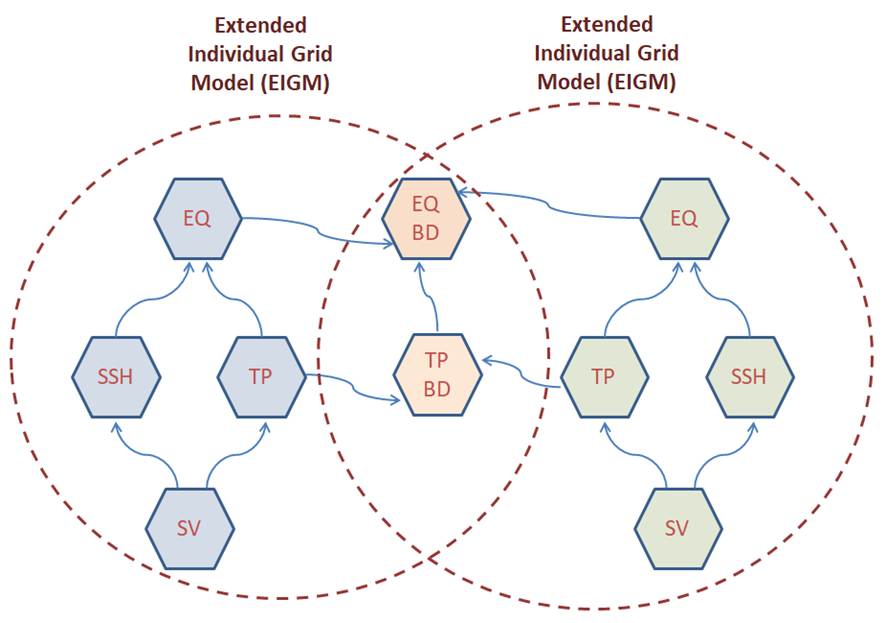
Extended Individual Grid Model (EIGM) is a Tool concept. It is a variation of IGM. An EIGM consists of a single IGM and the BS it depends on, as illustrated in the following figure. The motivation of introducing EIGM is to facilitate IGM validation. IGM is not a complete data set in terms of power flow study. It depends on the BS. When validating a standalone IGM, dangling references will be reported. Most importantly, some of the important information, such as BaseVoltage, is not available in IGM. Many validations rules will never be triggered with incomplete information. The idea is creating a model group consisting of a single IGM and the BS it depends on. The resulting EIGM is a complete dataset, supporting full validation of IGM.
Common Grid Model (CGM)
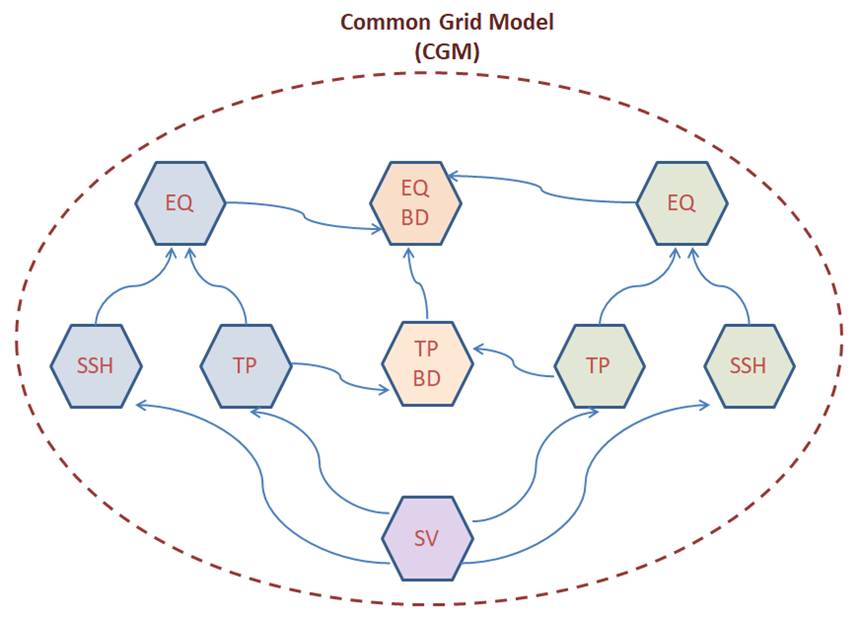
Common Grid Model (CGM) is made up of interconnected BS and IGMs representing a specified scenario. CGM is a complete data set. It is used to calculate a power flow solution of the entire region for a specified time or time duration. CGM can exist in different formats:
- BS + IGMs: Each data set, in its original format, corresponds to the same (or the nearest) scenario. This is typically the input for CGM-based power flow study.
- BS + IGMs + Shared CGM Model Parts: The results of the CGM power flow study (i.e. a single SV model part) are combined with the input, creating a simulation snapshot of CGM for a time horizon, as illustrated in the following figure. This is the official format of CGM shared with TSOs. Note: SV is not the only shared model part of CGM. Others, such as shared GL and DL could also be included in the CGM. But they are not required and most likely will not be available in a foreseeable future.
- Assembled: Model parts of CGM in the above formats are assembled as a single and complete model. This format is typically to facilitate consumption of CGM, for example, to prepare for power flow simulation, or for analysis of power flow results. While the Tool supports arbitrary model assembling, certain rules must be observed to ensure a valid output. For example, SV from IGMs must not co-exist with SV from CGM during model assembling, etc.
Workspace
Workspace is NOT a CGMES concept. It is instead a Tool concept. A workspace is in-memory model depository where different kinds of model parts can be loaded. The Tool relies on its model discovery algorithm to group model parts into BS/IGM/CGM based on model dependency description of the loaded model parts.
In workspace, model parts are grouped based on the following rules:
- Priority 1: CGM Formation – creating CGMs if discovered. A CGM contains a BS and at least 2 IGMs. If a model part is discovered to be part of CGM, it will then belong to the CGM, but nothing else. A CGM is uniquely identified by an EQ_BD.
- Priority 2: Extended IGM (EIGM) Formation – creating a model group consisting of a single IGM and the BS it depends on. A single IGM can’t form a CGM. However a single IGM and a BS can form an Extended IGM (EIGM). The reason of formation of EIGM is to facilitate IGM validation.
- Priority 3: IGM Formation – Model parts are grouped as IGMs if they don’t belong to any of grouped CGMs or EIGMs. An IGM is uniquely identified by an EQ.
- Priority 4: BS Formation – if no IGM model parts depend on the loaded BS model parts, the loaded model parts will be grouped as standalone BS. This is mainly for BS validation. A BS is uniquely identified by an EQ_BD.
- Priority 5: Marking of Ungrouped Model Parts – Model parts will be marked as ungrouped if they don’t belong to any of the above. Ungrouped model parts could be caused by invalid model dependency description. Note: in some cases, the Tool will repair the identified broken model dependency so that the validation/assembling could be continued. In such cases, an Error message will be issued to notify users, as shown in the following sample:

It is important to note that the model groups are primarily mutually exclusive. That means a model part can only belong ONE of the 5 groups in model space. The only exception is EIGM where BS model parts are shared by all EIGMs.
Gap Analysis
Profile-based model validation is primarily designed for users to work on model parts and assembled models. It doesn’t fully support the CGMES model exchange processes, as detailed below:
- In order to validate the model (IGM/BS/CGM) comprehensively, model parts must be assembled into a single model. This is because many of the validation rules are cross-profiles. These validation rules check the consistency of the modeling data belonging to different model parts. In CGMES, model parts are exchanged individually. While they can always be assembled to support more comprehensive model validation, the resulting validation results are not directly related to model parts. In other words, validation is performed for an intermediate data sets, rather than raw data sets. As a result, it is not straightforward for users to analyze the validation results.
- While most of the modeling errors/incidents can be detected by validating the assembled model, there are some issues that can be missed due to model assembling. For example, duplicate rdf:IDs in model parts are not be reported in an assembled model. To find these issues, validation shall also be performed for model parts individually. It is a complicated process, resulting in more steps and additional effort to analyze the validation results due to the redundancy of reported incidents during two rounds of validation. Additionally, some of the issues are reported during model assembling.
- While the above two are mainly usability problems, there is also a functionality delinquency identified for CGM validation. Because different modeling practices are permitted, the assembled CGM could be a mixed node/breaker and bus/branch model. Existing profile-based model validation assumes either node/breaker or bus/branch, but not both. As a result, false alarms will be generated for the bus/branch portion of the assembled model.
- Profile-based model validation requires human users tightly in the loop. A comprehensive IGM model validation, for example, requires users to validate each individual model part, assemble model parts, and validate the assembled model. To identify all of the modeling issues, users much check validations reports generated during model part validation, model assembling, and assembled model validation, and sort through the generated validation results with duplicity and overlapping.
Design Goal
CGMES model validation is designed to conform to the CGMES model exchange process where self-descripted model parts are exchanged individually. The fundamental design philosophy includes:
- Model parts shall be validated individually AND together with other related model parts.
- The reported validation incidents shall be a union of the three validation processes (i.e. model part validation, model assembling, and assembled model validation)with redundant validation incidents eliminated.
- While the model parts are assembled to support model validation in a broader context, the process is automated and end users don’t even see the intermediate assembled models. Additionally, the validation incidents are directly related to the model parts.
In summary, CGMES model validation is an automation process that
- Streamlines three validation steps and provides one-step solution for comprehensive model validation in a broader context ;
- Improves the usability of model validation by facilitating analysis of model validation results.
How to Run CGMES Validation?
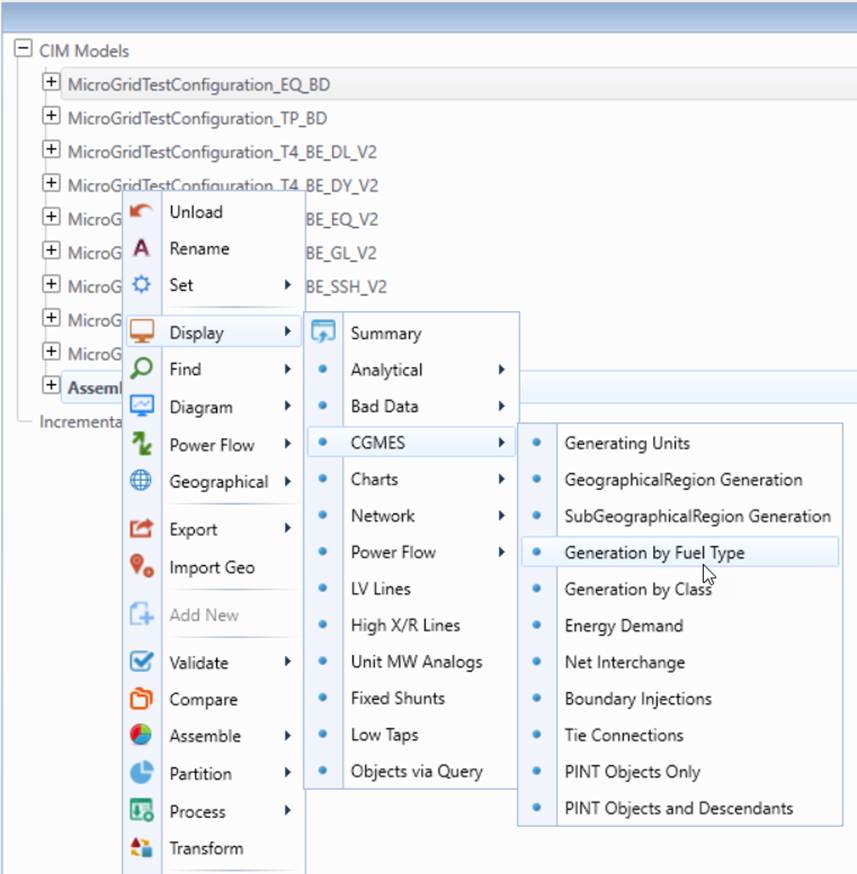
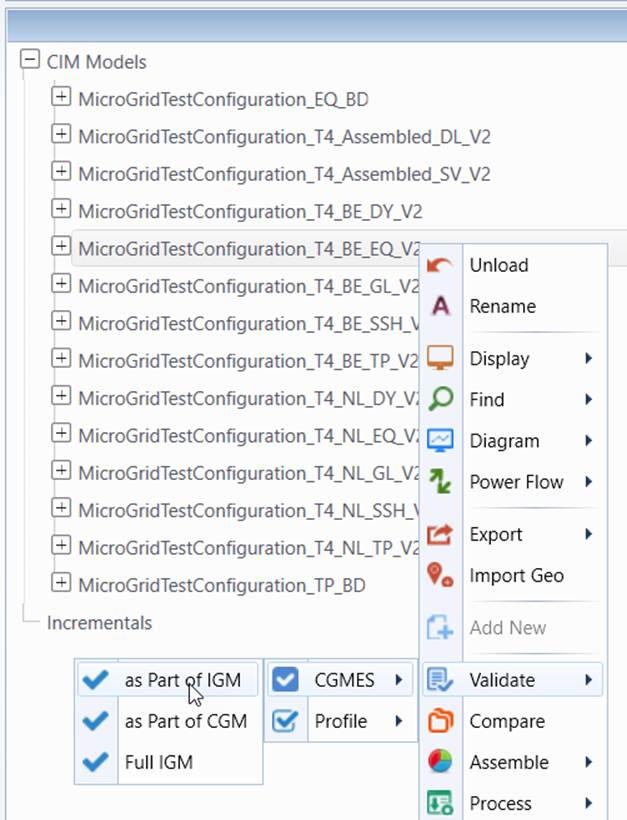
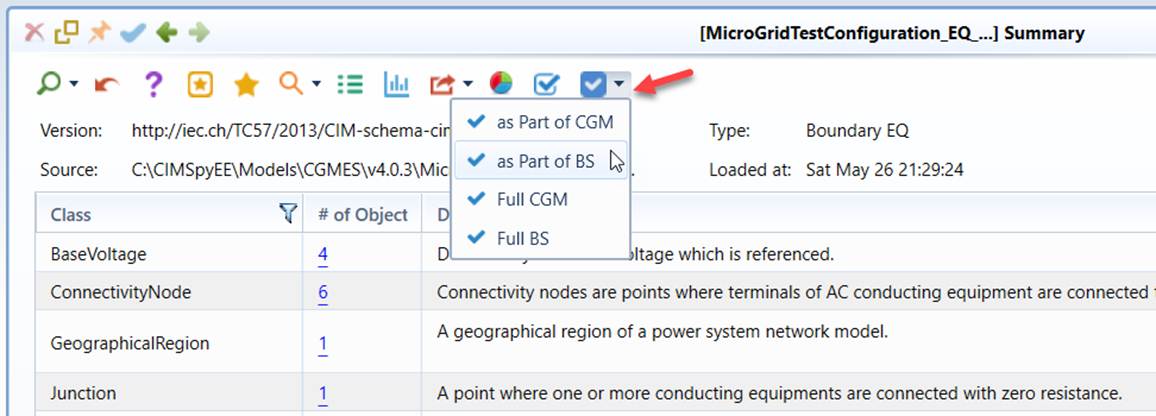
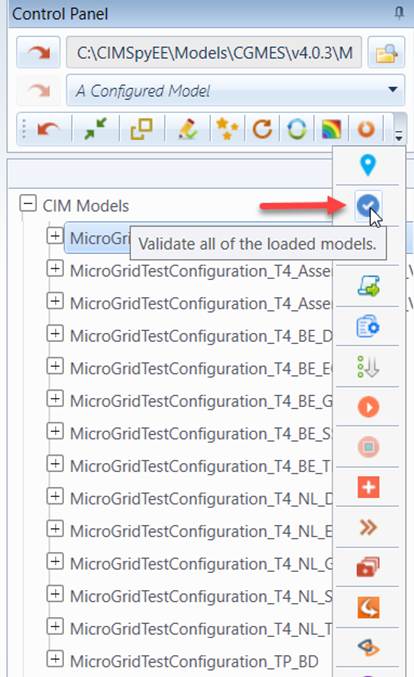
CGMES validation can be invoked from the context menu associated with the selected model or command icon at the header of model summary page, as illustrated below:
The Tool supports different types of CGMES validation:
- Full BS: full boundary set validation. The validation results include all of the incidents in the BS model parts. The function can only be invoked from the boundary EQ model part.
- as Part of BS: full boundary set validation showing only the validation results associated with the selected BS model parts. The function can be invoked from any of the boundary model parts, including boundary EQ model and boundary TP model part.
- Full IGM: full individual grid model (IGM) validation. The validation results include all of the incidents in the IGM model part. The function can only be invoked from the IGM EQ model part.
- as Part of IGM: full IGM validation showing only the validation results associated with the selected IGM model part. The function can be invoked from any of the IGM model parts.
- Full CGM: full common grid model (CGM) validation. The validation results include all of the incidents in the CGM model parts. The function can only be invoked from the boundary EQ model part.
- as Part of CGM: full CGM validation showing only the validation results associated with the selected CGM model parts. The function can be invoked from any of the CGM model parts.
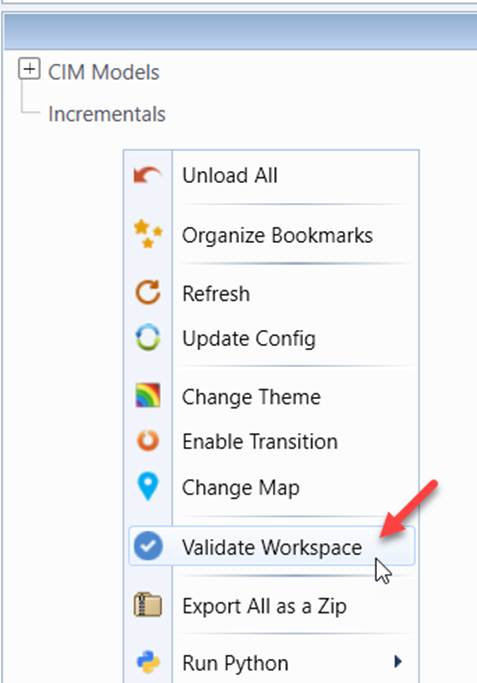
- Workspace Validation: validating all of loaded model parts in the broadest context and show all of the validation results. The function can only be invoked from the global context menu, as illustrated below.
In summary,
- “Full BS/IGM/CGM” and “as Part of BS/IGM/CGM” are fundamentally the same, but showing different reports:
- “Full” validation displays all of the incidents for all of the model parts;
- “as Part” validation displays only the incidents related to the selected model part;
- “Full” validation can only be invoked from the ‘master’ model part (for example, EQ for IGM, EQ_BD for CGM), while “as Part” validation can be invoked from any model parts.
Note:
- The Tool has a built-in intelligence to determine what types of CGMES validation are supported for each load model. For example, if at least 2 IGMs are loaded along with the shared BS, the CGM related CGMES validations will be enabled. If users expect a certain type of CGMES model validation shall be supported for the selected model part, but the related context menu is disabled or the related item is not shown in the drop-down command icon, this typically means either a related model part is missing or the related model dependences are absent or incorrect. User can identify such issues by running Workspace validation.
- CGMES validation heavily depends on model dependency description in the header of model parts. Additionally, the validation engine determines what types of sub-profiles shall be used for validation the model based on the following prioritized rules:
- If sub-profiles are declared in the master model part (i.e. EQ), the specified sub-profiles will be used to validate the models;
- If sub-profiles are not declared in the master model part (i.e. EQ), the validation engine will determine what kinds of sub-profiles shall be used for validation of the model. For example, if EQ contains ConnectivityNode objects, the model will be validated using Operation (node/breaker) sub-profile.
- In case that the model contents don’t provide any clues, for example, whether Short Circuit data are included, the default Base profile will be used.
IGM Validation
This is the most frequently used CGMES Model Validation, designed to support use case of IGM submittal as described in Section 3.2. IGM Validation can be performed in two ways:
- Raw IGM Validation (Not Recommended): IGM is validated as submitted. Because IGM depends on BS, it is not a complete data set. Errors will most likely be issued due to the dangling references to BS. Some of the CIM classes, such as BaseVoltages are defined in both EQ and EQ_BD, there is no way to know whether a dangling BaseVoltage in EQ references to a valid BaseVoltage object in EQ_BD or is a simply invalid dangling reference. The Tool reports these dangling references as Errors. Additionally, BaseVoltage is such important information. Without it, many validation rules will never be triggered. Raw IGM Validation shall only be performed when BS is not available or the dependency to BS is broken.
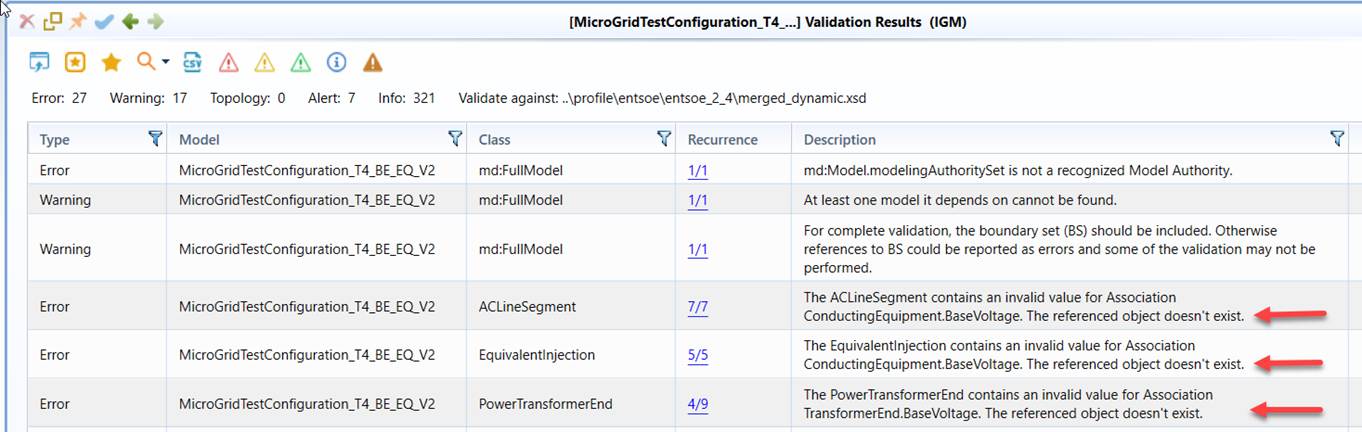
- Extended IGM (EIGM) Validation (Recommended): The submitted IGM is validated together with the BS it depends on. An EIGM is a complete dataset. Thus its validation results are more accurate.
Recommendation: ALWAYS include BS during IGM validation unless BS is not available.
IGM/EIGM validation involves the following sequential steps:
- Partially validating each model part in an IGM/EIGM to detect the incidents that will not be detected in an assembled IGM;
- Assembling all of the model part in an IGM/EIGM to create a temporary assembled IGM, with detected inconsistency logged;
- Fully validating assembled IGM;
- Distributing the validation incidents detected in Step 3 to the related model parts and then deleting the temporary assembled IGM;
- Preparing the model validation report.
In the IGM model validation report, the reported incidents normally shave a navigation link to the related objects in the related model part. But in some cases, the reported issues are in other model parts. This is because there are no related objects in the other model part. In the following example, the reported incident has a link to an object in the EQ model part, but the issue is actually in the SV model part. There is no way to report this issue in the SV model part.

CGM Validation
This is the most complicated CGMES Model Validation because of the following reasons:
- Different Modeling Practices of IGMs: IGMs are prepared by TSO following different modeling practices. For example, some IGMs use node-breaker representations, and the others are bus-branch models. Short circuit, DY, DL, and GL modeling data may also be included in some IGMs. Therefore an assembled CGM is not easy to validate due to the heterogeneous modeling practices of IGMs. A practical approach is to validate each EIGM separately.
- Boundary Balancing Checking: CGM validation must check many business logics at the boundary points, ranging from boundary point locations to balance of model per technology type by control area.
- CGM SV: the solution model part that covers all of the IGMs. It can’t be part of EIGM validation and must be separately validated against all of the IGMs.
CGM Validation involves the following sequential steps:
- Perform BS Validation for EW_BD and TP_BD, as illustrated below.
- Perform EIGM Validation for each IGM as illustrated below, with all of the incidents related to BS ignored.
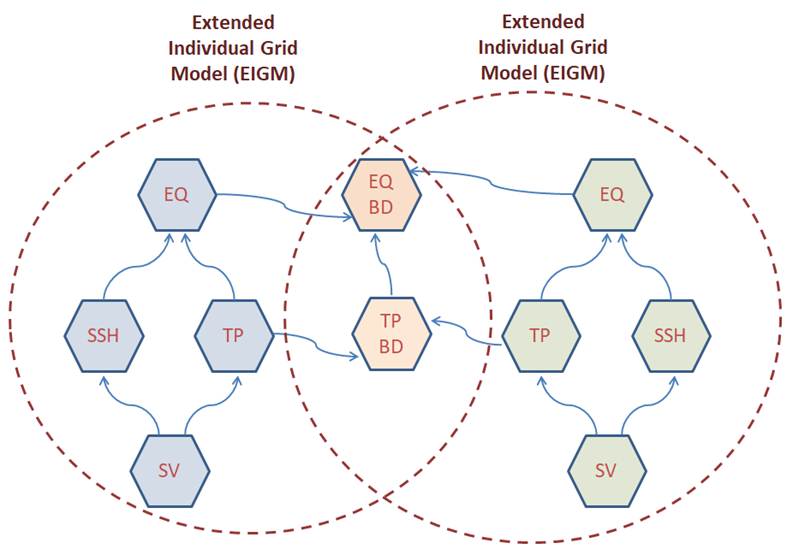
- Assembling all of the model part in an CGM to create a temporary assembled CGM;
- Checking boundary balancing by triggering related validation rules, as illustrated below;
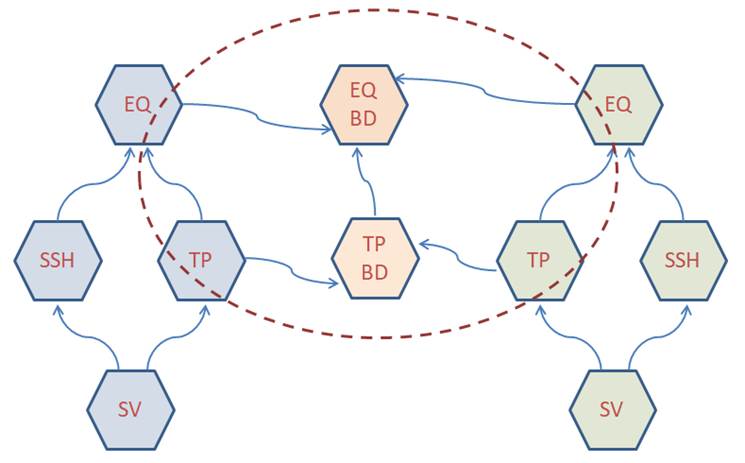
- Validating CGM SV (if available) against the assembled CGM, as illustrated below;
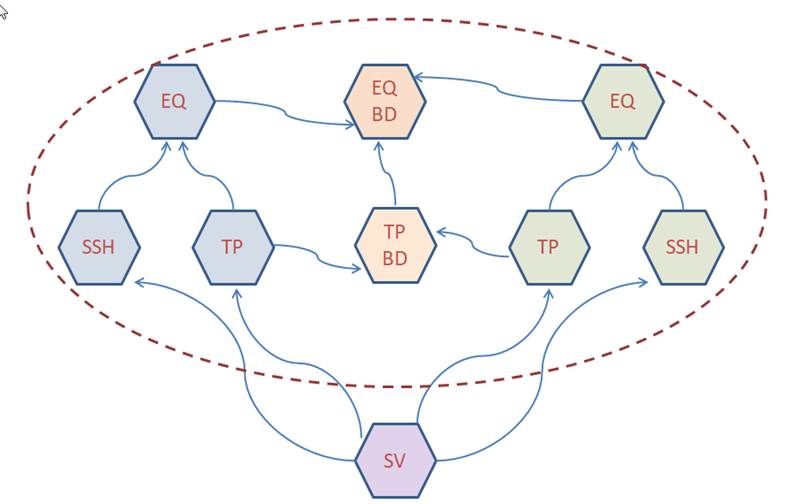
- Distributing the validation incidents detected in Step 1- 5 to the related model parts and then deleting the temporary assembled CGM;
- Preparing the model validation report.
Support of Model Superseding
In addition to DependentOn, Supersedes declarations in model header are supported in support of the following two model exchanges processes in Operational Planning Data Environment (OPDE)
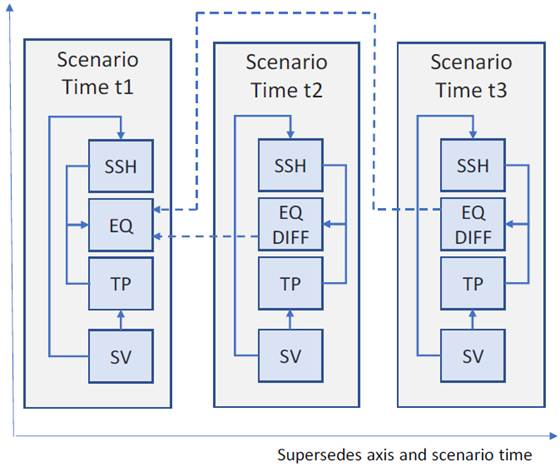
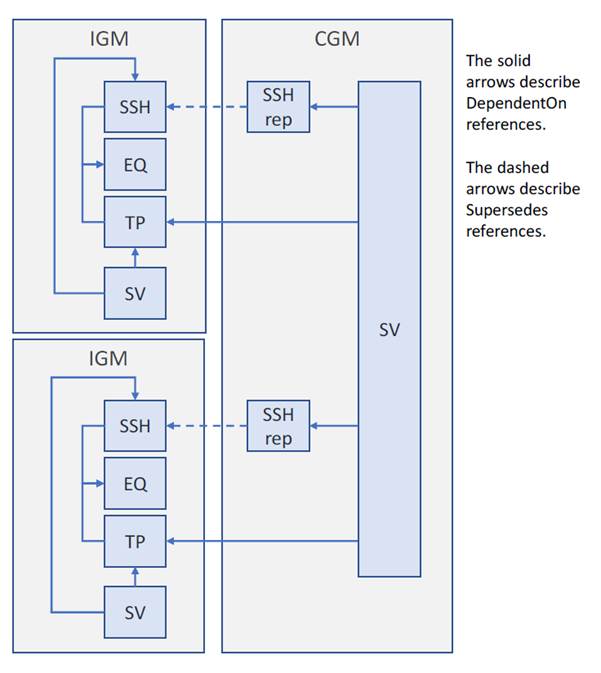
Once the related model parts are loaded into the same workspace, the Tool will rely on its built-in logic to identify IGM/CGM based on DependentOn and Supersede declarations in the model header. Once an IGM/CGM is identified, it will enable the corresponding model assembling and validation functions. Uses can then validate the identified IGM/CGM.
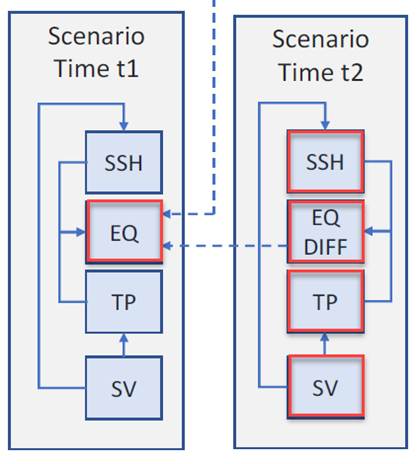
Example 1: When an EQ is superseded by an EQDIFF, the built-in logic will identify the highlighted model parts as an IGM.
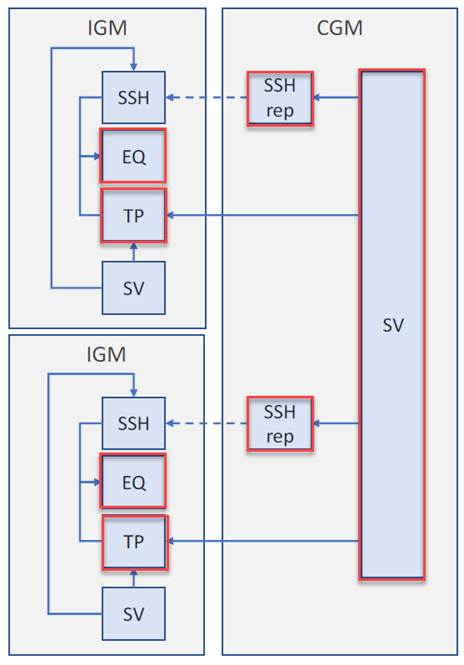
Example 2: When an SSH is replaced by another SSH, the built-in logic will identify the highlighted model parts as CGM.
Workspace Validation
Workspace validation is used to validate all of the model parts loaded into workspace. Once model parts are loaded into a model space, they will be grouped based on the model grouping rules defined in the previous section. This is based on the fact: whenever possible, model parts shall be validated in a broader context. More specifically:
- CGM Validation is the most comprehensive validation. It validates all of the IGMs and checks balance/coordination among IGMs at boundary points.
- EIGM Validation validates all of the model parts of IGM and enhances raw IGM Validation by incorporating the BS it depends on into the validation context.
- Raw IGM Validation validates all of the model parts in an IGM. But the validation results are incomplete due to lack of the critical information which is defined in the BS it depends on.
- Standalone model part validation is a local validation. It doesn’t check the consistency between related model parts.
Workspace validation mainly consists of two sequential steps:
- Load model parts of any kinds into the model space in arbitrary sequences and in various formats;
- Execute the model validation in the context of the model space. The validation engine does rest of the job. It groups the loaded model parts into groups and determines how each model part shall be validated based on the following prioritized rules:
- If a model part belongs to a CGM, it shall be validated as part of CGM;
- If a model part belongs to a BS, it shall be validated as part of BS;
- If a model part belongs to an EIGM, it shall be validated as part of EIGM;
- If a model part belongs to an IGM, it shall be validated as part of IGM;
- If a model part does not belong to any of the above, it shall be validated as a standalone model part.
Workspace validation is particularly useful when model dependencies are missing or misleading. In these cases, the BS/IGM/CGM validation (menu items or command icons) may be disabled. Workspace validation can always be invoked, enabling users to identify issues related to missing or misleading model dependencies.
Enabling Model Authority Related Validation
This feature is only available for CIMdesk. In CIMdesk, some of the validation rules require users to specify the corresponding model authority for the specified IGM. These rules are used to validate the boundary connections. However the model authority set (MAS) declared in the model header is not standardized. These rules cannot be validated, as described in the validation report.

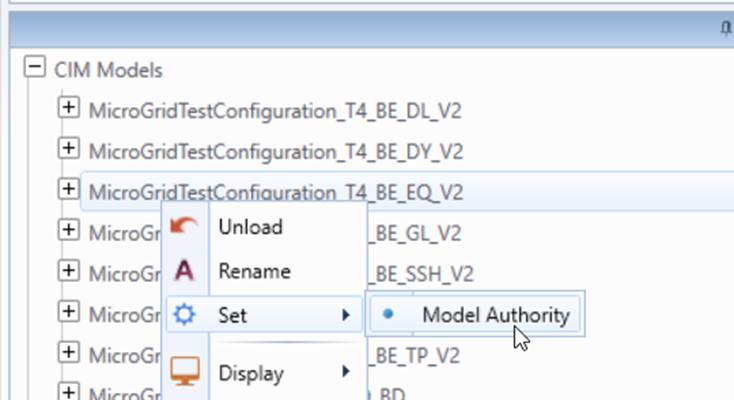
In order to enable model authority related validation rules, users must explicitly declare the model authority for the imported IGM. This is accomplished by “Set→Model Authority” for the EQ model part, as illustrated below.
Once the command is invoked, users will be prompted to select a model authority from a dropdown list which lists all of the TSO model authorities defined in the ENTSO-E boundary set (i.e. fromEndNameTso and toEndNameTso). Initially, the Tool will infer the best-matching model authority based on MAS declared in the model header. But users must explicitly select the one even the inferred model authority is correct.
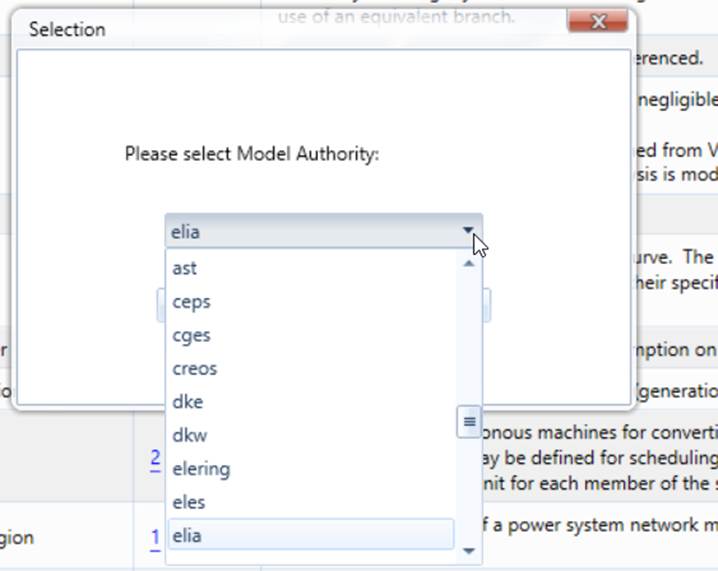
Once the model authority is selected, the related validation rules will be enabled. However, users must explicitly run the validation again.

Note:
- The model authority setting is not stored. That means users will have to set the model authority each time after a new IGM is loaded.
- If IGM is assembled, users must also set the model authority for the assembled model.
- This feature is intended to be a temporary solution. Once MAS is standardized, model authority setting will no long be needed.
Operational Model vs. Planning Model
This feature is only available for CIMdesk. In CGMES, there are two types of models: Operational Model and Planning Model. The former is typically the reality-based as-built model, while the latter is for future planning, such as ENTSO-E Ten-Year Network Development Planning (TYNDP). While the two kinds of models follow mostly the same CGMES modeling practices, there are some differences:
- Planning Models use some conventions, for example, using attribute IdentifiedObject.description to carry some additional information, such as fuel type category, PINT flag, etc.
- Planning model vendors are not fully ready to support CGMES Quality of Data Set and Calculation. Therefore, some of the validation rules are excluded, and some of the errors are downgraded to warnings
- Planning Models need to be validated against the future boundary set and Pan-European Market Modelling Data Base (PEMMDB).
Because of the above modeling differences, CIMdesk model validator must know what type of model the loaded IGM is. Unfortunately, the model header of the IGM doesn’t contain the related meta-information.
The concept of workspace was introduced to support multi-tasking. A workspace is an independent modeling environment with its own configuration. The concept of workspace enables multiple “customized” versions of the Tools to be hosted within a single instance. This makes it possible to dedicate a workspace for each business process. The dedicated workspace is configured to support a specific business process, including validation, reporting... Users can switch between the business process specific workspaces.
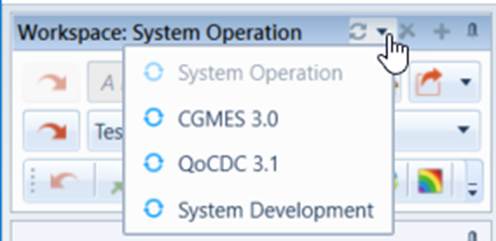
Once set to the Planning modeling environment, any models loaded into the workspace will be treated as Planning Models. Users can also switch back to the default Operational modeling environment. Once the modeling environment is changed, users must re-run the validation in order to validate the loaded models in the new modeling environment.
By default, modeling environment is set as Operational. Users can change the default modeling environment to Planning by changing configuration in CIMSpy\config\CustomConfig.xml, as illustrated below.
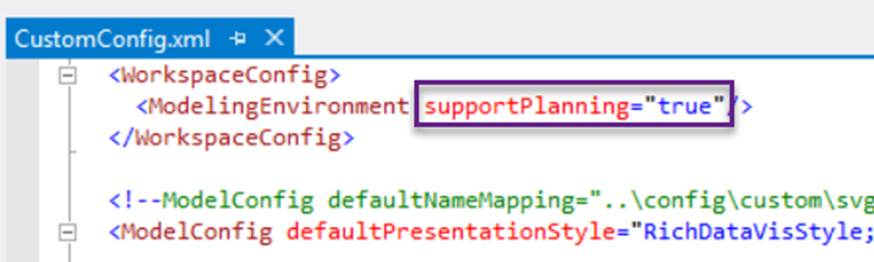
In CIMdesk, two workspaces are pre-configured to support System Operation and System Development business processes. The System Operation workspace is configured for operational model and conforms to system operation business process, such as QoCDC. The System Development workspace is configured for planning model. TYNDP related features, such as validation against PEMMDB and CGMES reporting are only available in the System Development workspace:
PEMMDB-Related Validation
In Planning Modeling Environment, CGMES validator checks the loaded IGM against the dataset from Pan-European Market Modelling Data Base (PEMMDB). By default, the PEMMDB dataset is stored as a configuration file (i.e. config\custom\cimdesk\PEMMDB.csv). In CIMdesk, the System Development workspace is pre-configured to validate models against PEMMDB. Thus, users must either load the models to the System Development workspace or move the models to the System Development workspace.
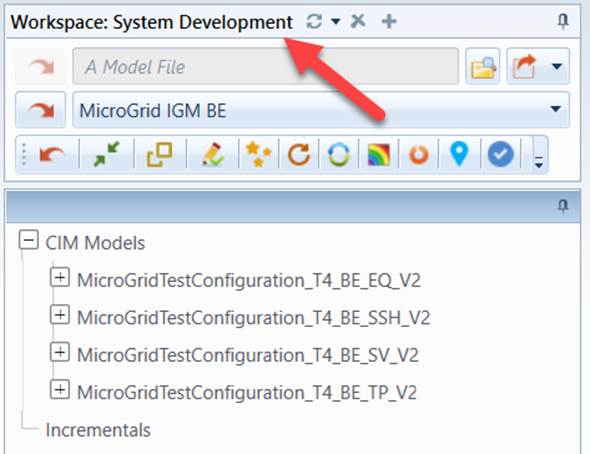
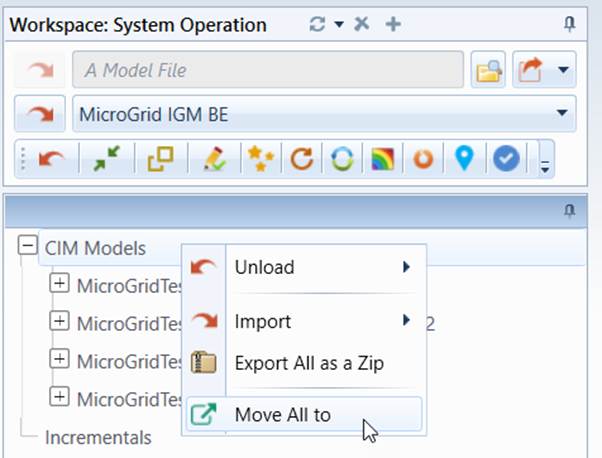
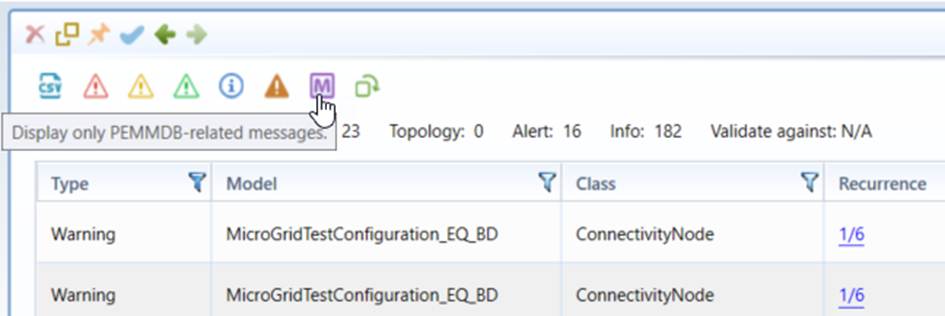
The PEMMDB-related incidents are displayed as a new category, like Topology-related incidents. By default, PEMMDB-related incidents are not displayed. Users can display such incidents by clicking the corresponding icon, as illustrated below.
CGMES Reporting
As supplement to CGMES validation, a collection of built-in reports are provided in CIMdesk. These reports provide detailed information for some specific CGMES validation, particularly for validation of Planning Models. While the CGMES reports are available for any models with EQ components, these (full) reports shall be called from the assembled model. Like other custom reports, all of the CGMES reports can also be exported as CSV files,