Understanding Graphical Modeling Entity
While the object-based data editor enables users to make arbitrary model changes, CIM-based modeling remains to be a challenging task. This is because CIM, as a standard information model designed to support multiple business practices, models the power system and its operation at very fine-granulated level. For example, a transformer is modeled as different types of objects in CIM, including PowerTransformer, TransformerWinding (or PowerTransformerEnd), Terminal, RatioTapChanger, etc. While fine-granulated model provides flexibility for meeting the requirements of multiple applications, it makes modeling much more challenging. Modeling engineers must understand how each physical modeling entity is modeled in CIM, create the corresponding component objects, and associate them properly, etc. Consequently, object-based modeling becomes a tedious and error-prone task.
The graphical model editor deals with reality-based modeling entities rather than fine-granulated CIM objects. These reality-based modeling entities are called graphical modeling entities (or modeling entities) in the graphical model editor. Each type of graphical modeling entity, as listed in the Components Panel, typically corresponds to a kind of physical network components in the real-world, and each graphical modeling entity may correspond to multiple strongly-associated CIM objects in the data model. When users add a 3-winding transformer graphical modeling entity, for example, a collection of strongly-associated CIM objects are added into the data model, as illustrated in the following screenshot.
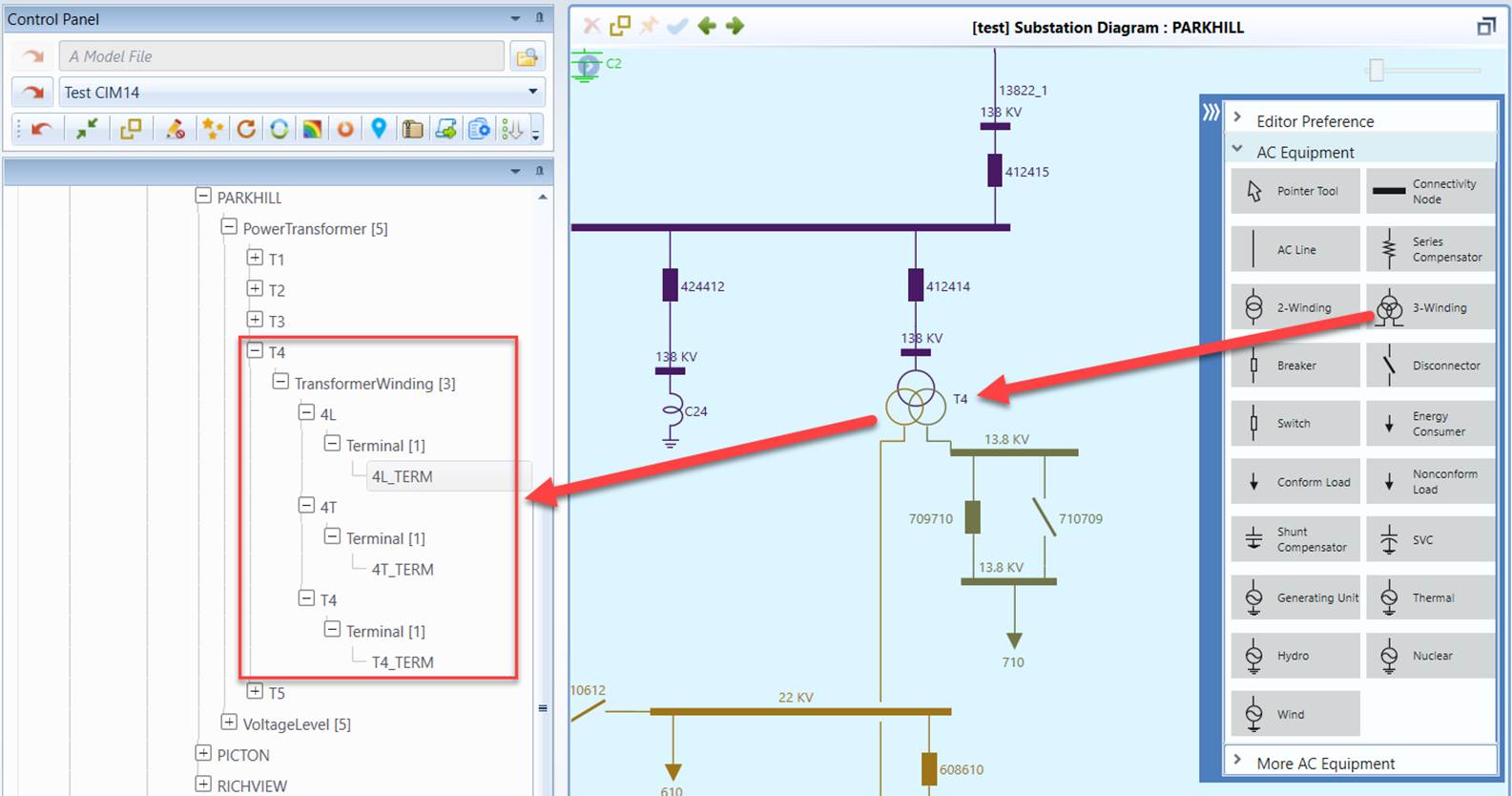
There are three types of graphical modeling entities: ConnectivityNode, Equipment, and Substation. ConnectivityNode and Equipment are also called network components. They are the building blocks of a Substation which is a container. Equipment modeling entity mainly corresponds to ConductingEquipment/Equipment in CIM, but an Equipment modeling entity is more than a ConductingEquipment/Equipment, as explained above. More precisely, an Equipment modeling entity corresponds to physical equipment in the field. There are many types of Equipment modeling entities. They are listed in Components Panel as shown above.