SHACL Validation
SHACL validation support introduces a standards-based framework for validating model content against defined data quality and conformance requirements. While the support introduced in this release is considered preliminary, it establishes a flexible foundation for the continued evolution of SHACL-based model quality assurance, profile compliance checking, and interoperability validation capabilities.
About SHACL Validation
The Shapes Constraint Language (SHACL) is a W3C standard for describing and validating RDF graphs. In the context of CIM and CGMES model exchanges, SHACL provides a standardized mechanism for defining data quality, consistency, and conformance rules that can be automatically evaluated against a model.
The preliminary support for SHACL validation allows users to validate loaded CIM/CGMES models against predefined SHACL rule sets, which can express more advanced constraints, including relationships between objects, mandatory attributes, cardinality requirements, and business-specific modeling rules.
- The SHACL validation framework supports both:
- Profile-based validation, such as verifying compliance with CGMES 3.0 profile requirements.
- Business process-specific validation, such as Quality of CIM Data for Code Coordination (QoCDC) checks used in System Operation and System Development processes.
- SHACL validation is performed against a selected set of SHACL shapes and generates detailed validation results identifying model elements that violate defined constraints. Validation findings can be reviewed to help identify data quality issues, improve model consistency, and ensure compliance with applicable exchange requirements.
- Because existing SHACL rule sets lacks some model context information and may vary in quality and completeness, the validation engine provides several configuration options that allow users to accommodate known limitations, ambiguities, or implementation-specific characteristics of existing SHACL definitions.
SHACL Validation Engine
The SHACL validation capability is implemented using the TopQuadrant SHACL API, a widely used open-source Java framework for SHACL processing and validation. The framework provides support for executing SHACL rules against RDF-based CIM/CGMES models and generating detailed validation reports.
Since the TopQuadrant SHACL API is Java-based, a supported Java Runtime Environment (JRE) or Java Development Kit (JDK) must be installed on the local system. The application uses the Java runtime to execute the SHACL validation engine and process the selected SHACL rule sets.
If a compatible Java installation cannot be found, users will be notified when attempting to run a validation. For this reason, it is recommended that Java be installed and configured before using any SHACL validation features.
Running SHACL Validation
SHACL validation can be started from the model's context menu or by clicking the SHACL Validation toolbar icon, as illustrated below.
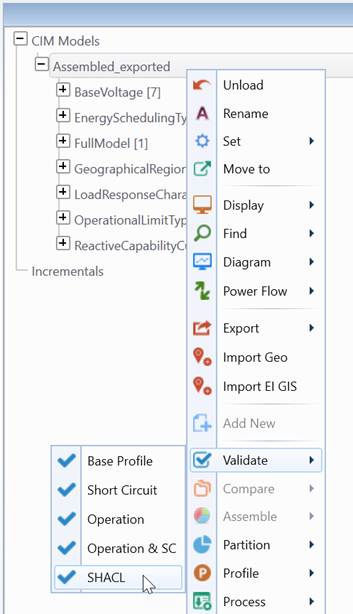
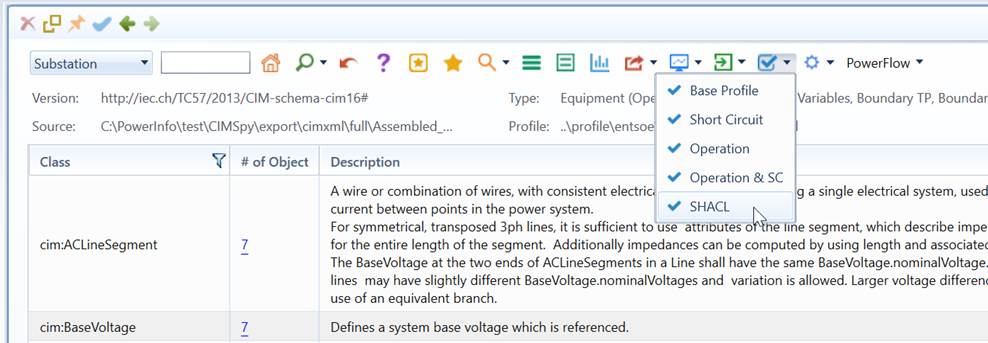
When validation is started, the Tool automatically determines the applicable SHACL rule sets based on the characteristics of the loaded model and the current workspace configuration. Depending on the selected validation configuration, the Tool may execute both profile-based and business process-specific rule sets.
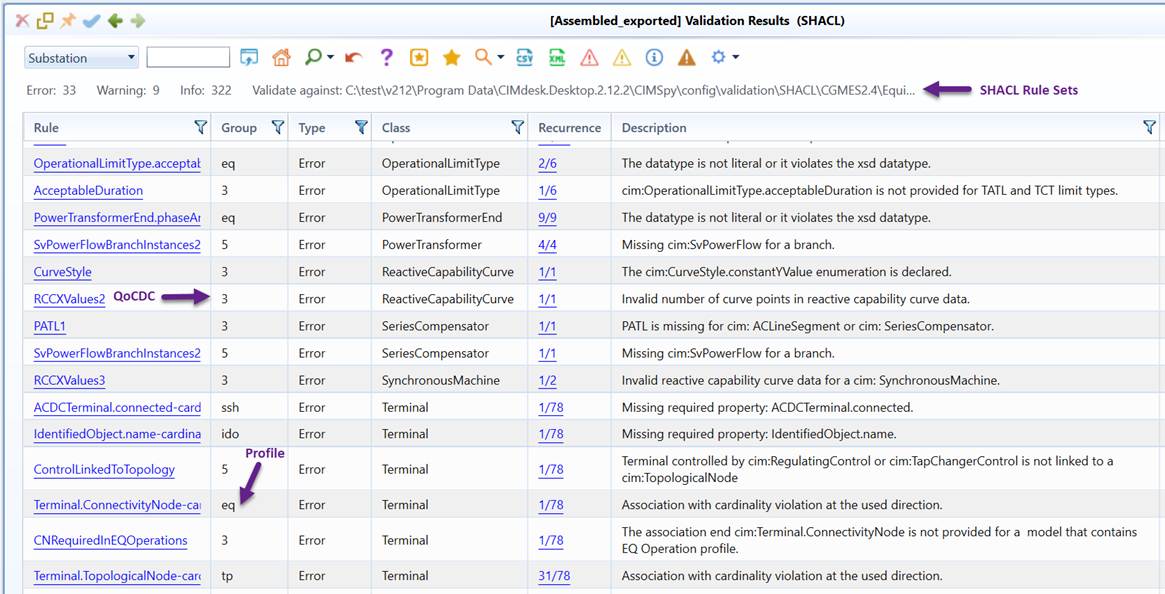
The validation process evaluates the model against the selected SHACL constraints and generates a validation report identifying any errors, warnings, or informational findings. Validation results are displayed in the Validation Results report, allowing users to navigate directly to the affected model objects and review the corresponding constraint violations. For large models or complex rule sets, the validation process may take some time to complete. Once completed, users can review the validation report and, if necessary, correct the identified issues before re-running the validation.
Inside SHACL Validation
SHACL validation follows a two-stage sequential validation process that is conceptually similar to the validation workflow used in CGMES Validation.
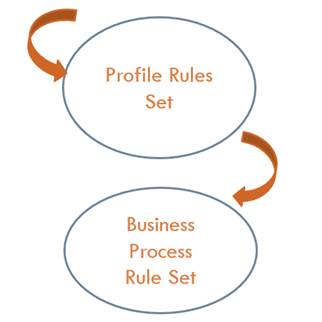
- Profile Validation: During this stage, the model is validated against the SHACL rule sets associated with the CIM profile(s) represented in the model. These rule sets define profile-specific requirements, including mandatory attributes, cardinality constraints, allowed relationships, and other modeling constraints specified by the profile definition. For example, a CGMES 3.0 model is validated against the SHACL rules corresponding to the applicable CGMES 3.0 profiles. The objective of profile validation is to verify that the model conforms to the structural and semantic requirements of the governing profile.
- Business Process Validation: After successful profile validation, the model may be further validated against one or more Business Process Rule Sets, depending on the workspace configuration. Business process rule sets contain additional constraints that are specific to a particular data exchange or operational process. Examples include Quality of CIM Data for Code Coordination (QoCDC) validation for System Operation and System Development processes, as well as other business-specific validation frameworks. Business process validation extends the profile validation by introducing additional requirements that may not be part of the underlying profile specification but are necessary to support a specific business process.
During the above process, the Tool automatically determines the applicable profile and business process rule sets based on:
- The profiles identified in the loaded model.
- The active workspace configuration.
- The customization options.
SHACL Rule Set Selection
SHACL validation is driven by one or more SHACL rule sets that define the constraints to be applied during the validation process. To ensure that the correct validation rules are used for each model and business context, the Tool organizes SHACL rule sets into profile-specific and business-process-specific categories.
- The profile-specific SHACL rule sets are defined in the file \CIMSpy\config\profile\Standard.xml. This configuration associates SHACL rule sets with specific CIM and CGMES profiles, enabling the Tool to automatically select the appropriate profile validation rules based on the profiles present in the loaded model.

- The business-process-specific SHACL rule sets are defined in the corresponding workspace configuration files located under \CIMSpy\Customization\CIMdesk\CIMSpy\config\workspace. These workspace configurations specify the additional SHACL rule sets required to support particular business processes, such as QoCDC for System Operation and System Development. Business process rule sets are applied on top of the profile rule sets and may introduce additional constraints beyond those defined by the underlying profile specifications.

During validation, the Tool automatically determines the applicable SHACL rule sets by analyzing the loaded model and the active workspace configuration. It first selects the profile-specific rule sets associated with the identified CIM/CGMES profiles and then applies any business-process-specific rule sets configured for the current workspace. As a result, users typically do not need to manually select SHACL rule sets. The Tool automatically assembles and executes the appropriate combination of profile and business process validations for the model being validated, ensuring that both standard profile requirements and business-specific requirements are evaluated consistently.
In CIMSpy, no business-process-specific SHACL rule sets are currently defined. Consequently, SHACL validation is performed exclusively against the rule sets associated with the governing CIM profiles present in the model. The validation focuses on verifying profile conformance and ensuring compliance with the requirements defined by the applicable profile specifications.
In CIMdesk, additional business-process-specific SHACL rule sets have been defined to support industry validation frameworks. Currently, two business-process-specific validations are available:
- QoCDC for System Operation
- QoCDC for System Development
To maintain backward compatibility with existing validation workflows, the CIMdesk 2.12.2 release reuses the existing workspace configurations to determine the applicable business-process-specific SHACL rule sets. As a result, users can immediately benefit from SHACL validation without modifying their existing workspace setup or validation procedures. The SHACL validation rule sets associated with the currently supported workspaces are summarized in the table below.
| Workspace | Target Profile Rule Sets | Supported Business Process Rule Sets |
|---|---|---|
| System Operation | CGMES 2.4 .15 | |
| System Development | CGMES 2.4 .15 | QoCDC 4.1 for System Development |
| QoCDC 3.2 | CGMES 2.4 .15 | QoCDC 4.1.4 for System Operation |
| CGMES 3.0 | CGMES 3.0 Network Code 2.4.0 |
It should be noted that:
- The current workspace-to-rule-set mapping primarily reflects the validation configurations that existed before the introduction of SHACL validation. While this approach preserves compatibility with existing deployments and user workflows, the workspace definitions may not always represent the most accurate separation of profile-based and business-process-specific validation requirements.
- Future CIMdesk releases will introduce enhanced workspace configurations that more accurately reflect the underlying business processes, validation frameworks, and SHACL rule set organization. This will provide greater flexibility in selecting validation contexts, simplify the management of SHACL rule sets, and improve alignment between workspace definitions and industry validation requirements.
Customizing SHACL Validation
One of the challenges with the currently available SHACL rule implementations is that they often do not explicitly specify the conditions under which a rule should be applied. For example, a SHACL rule typically does not indicate:
- Whether the rule applies to a full model or a difference (incremental) model.
- Which profile combinations the rule applies to, such as EQ-only, EQ+, or EQ + SSH, or other profile sets.
- Whether the rule is intended for IGM, CGM, or both validation scopes.
- How conflicts between rules from different rule sets should be resolved.
Because this contextual information is generally not available in the SHACL rule definitions, the Tool has no reliable way to determine when a particular rule should be excluded from validation. As a result, all rules contained within the selected SHACL rule sets are executed during the validation process.
While this approach ensures that no potentially relevant rule is omitted, it can also produce ‘false positives’ (false alarms). For example, a rule designed for a difference model may be evaluated against a full model, or a rule intended for a particular profile combination may be applied when the required profiles are not present. In addition, rules originating from different rule sets may occasionally overlap or impose contradictory requirements, resulting in conflicting validation findings.
To address these limitations, the Tool provides a SHACL validation customization mechanism that allows users to tailor the validation process to their specific modeling environment and business requirements. This mechanism can be used to:
- Restrict rules to specific model types, profile combinations, or validation scopes.
- Resolve conflicts between rules originating from different SHACL rule sets.
More specifically, users can provide a customization file in CSV format that defines rule-specific overrides and filtering criteria. During validation, the Tool evaluates these customizations before executing the SHACL rules and applies the configured exceptions, suppressions, and precedence rules accordingly. A sample CSV customization file can be found at the following location.

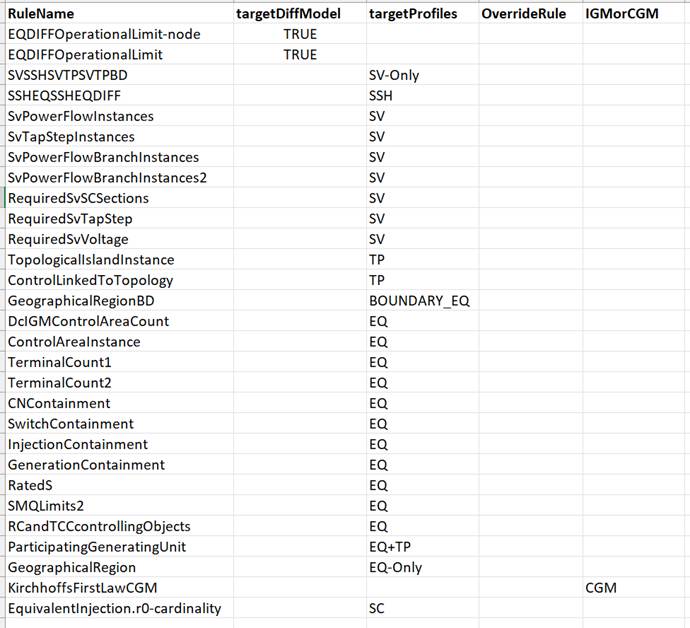
More specifically, users can provide a CSV customization file that defines additional applicability criteria and precedence rules for individual SHACL rules.
- RuleName identifies the SHACL rule to which the customization applies.
- targetDiffModel specifies whether the rule is intended for validation of a difference (incremental) model. Valid values are TRUE and FALSE. If not specified, the default value is TRUE.
- targetProfilesspecifies the profile combinations for which the rule is applicable. Supported values include EQ-Only (models containing only the EQ profile), EQ (models containing the EQ profile, with or without additional profiles), EQ+SSH (models containing both EQ and SSH profiles, with or without additional profiles), and other profile combinations as required. During validation, rules whose profile requirements do not match the profiles present in the model are automatically excluded, helping to reduce false positives and improve validation accuracy.
- OverrideRule specifies name of another rule that is overridden by the current rule. This mechanism can be used to resolve conflicts between rules originating from different SHACL rule sets by explicitly defining which rule takes precedence. This is typically used to resolve conflicts between profile-specific and business-process-specific rules by explicitly specifying that the business-process-specific rule overrides the profile-specific rule.
- IGMorCGM specifies whether the rule applies to the IGM or CGM validation scope. If no value is specified, the rule applies to both scopes. This prevents rules intended for one validation context from being applied to another context where they may generate invalid findings.
During validation, the Tool evaluates these customization settings before executing the SHACL rules. Rules that do not satisfy the configured applicability criteria are skipped, while any configured override relationships are used to resolve conflicts between competing rules. This allows organizations to tailor SHACL validation to their specific modeling practices and business requirements while preserving the original SHACL rule definitions.
This approach allows organizations to adopt industry-standard SHACL rule sets while compensating for limitations in the current rule implementations and maintaining a validation process that is aligned with their operational and business requirements. Future SHACL rule releases are expected to provide richer metadata regarding applicability and validation context, which may reduce the need for such customizations.