Filtering Models
Contents
The Tool provides a model filtering function, enabling users to remove the information, i.e. classes/properties, not needed in the loaded models. For example, users may want to remove all of the information not conforming to the governing profiles or they may want to remove all of the physical connectivity information such as ConnectivityNode, from a node/breaker model to generate a pure bus/branch model. More specifically, the Tool provides the following model filtering functions:
- Filtering out Undeclared: All of the classes/properties not declared in the governing profile, such as CIM extensions, will be removed.
- Filtering out Operation: All of the classes/properties declared in the Operation sub-profile will be removed.
- Filtering out Short Circuit (SC): All of the classes/properties declared in the ShortCircuit sub-profile will be removed.
- Filtering out Operation & SC: All of the classes/properties declared in the Operation and ShortCircuit sub-profiles will be removed.
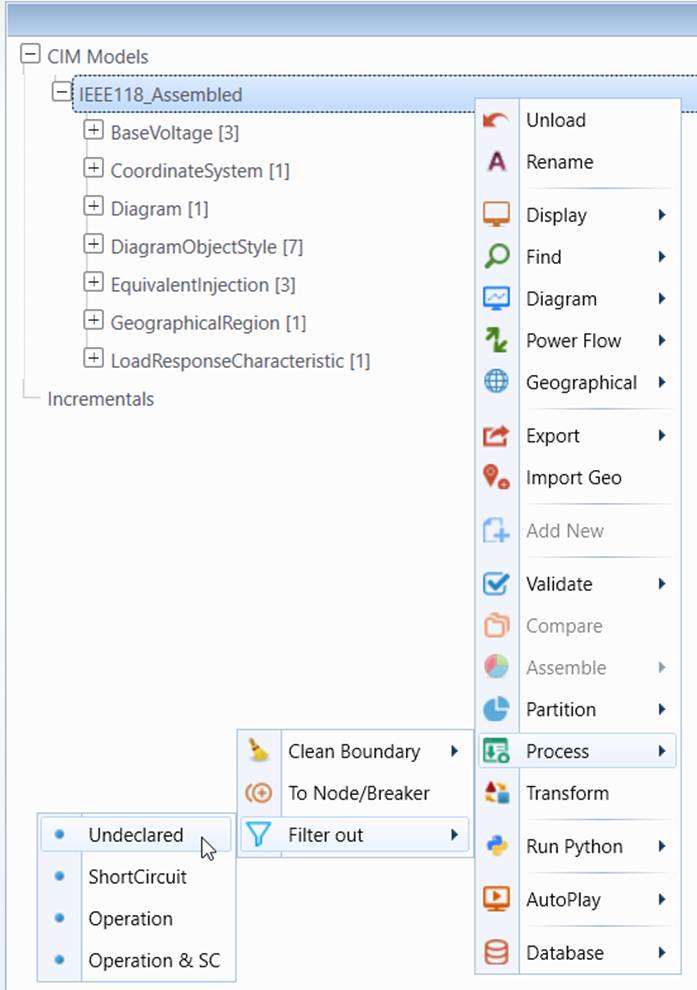
The model filtering process can be invoked through the context menu associated with the model. Users must select the filtering criterion. The outcome is a new model with all of the specified information filtered out.
- Load the original model into the Tool. , right-click the tree item associated with the model loaded and select the filter criterion, as illustrated.
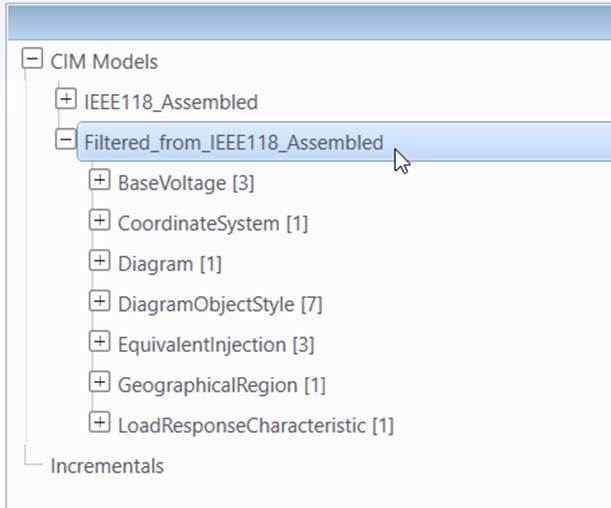
- Once the filtering process is completed, a new model will be generated and loaded into the Tool, with the specified information removed.
Note:
- During the filtering process, the Tool may perform some model changes to ensure that the filtered model is valid. For example, when filtering out Operation components, all of the none-retained switching devices including their Terminals will be removed. Similarly, if a Bay object is removed, its contained Equipment will be moved to its parent VoltageLevel.
- Users may execute the multiple filtering processes to remove the unneeded information, for example, removing undeclared information and then the ShortCircuit information.