Inspecting the Validation Report
The Tool classifies the detected incidences into the following categories:
- Error – These incidences are inconsistence between the instance model and the schema definition or violations of modeling rules. For example, a required attribute/association is missing or a RegulatingControl is set to regulate a 110-kV ConnectivityNode to 69 kV, etc,
- Warning – These incidences may or may not be the problems. Users shall pay some attention to these messages. For example, the validator will detect a ConnectivityNode island which doesn’t any ConductingEquipments connected. This may be a topology error or an intended modeling effort.
- Topology– These incidents are results of network topology analysis, reporting physical, topological, and electrical islands at both node and substation levels. These are essentially Warnings, but separated due to potentially the large number of incidents.
- Alert – These incidences are not the problems. These messages are for mainly information only. In general, CIM is less restricted than the proprietary information model. For example, CIM allows an ACLineSegment to reside within a Substation and PowerTransformers cross two Substations. The Tool alerts users of such unusual but acceptable modeling patterns.
- Info– These incidents are purely for information only. For example, the Tool reports the detected recognized CIM extensions, classes not found in the model, etc.
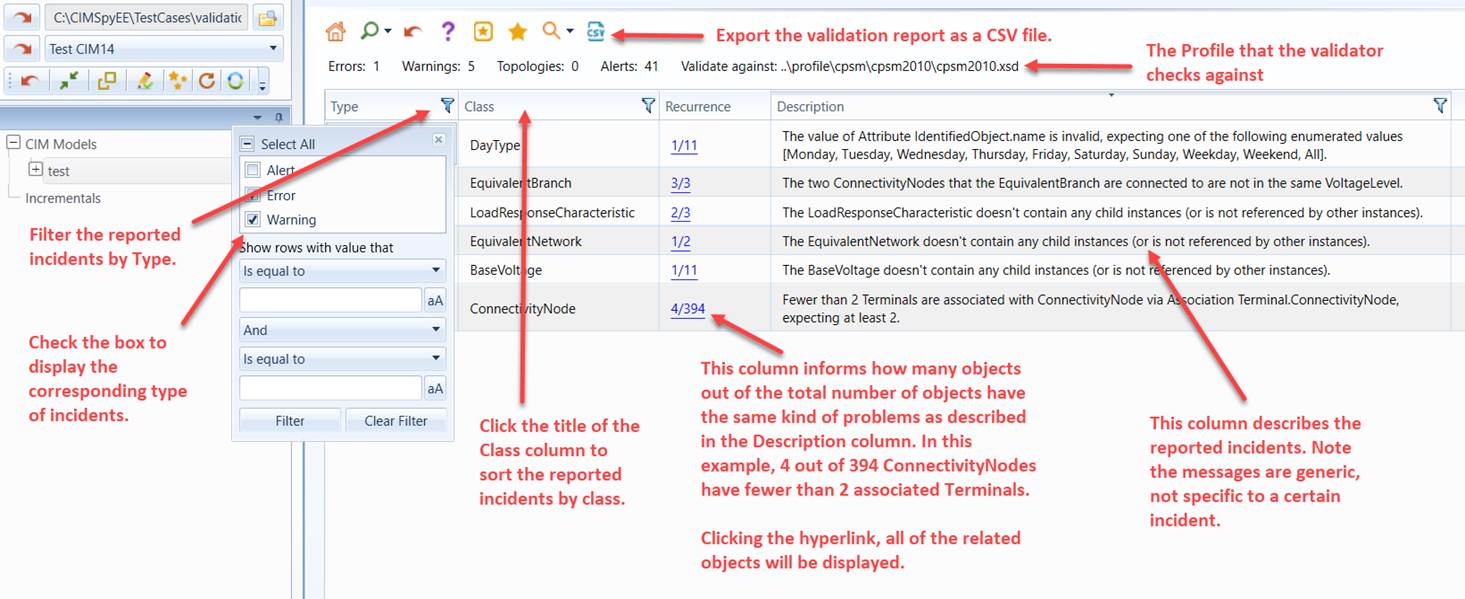
The validation report groups multiple incidents of the same type into one. It also provides link to enable users to view all of the grouped incidents in a tabular display. Users can also selectively decide what kinds of error messages to view. The following screenshot illustrates these features.
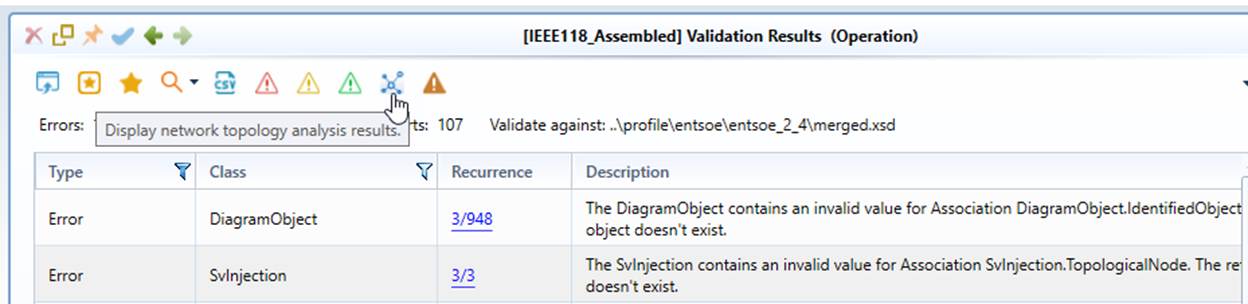
In version 2.4 or later, command icons are added to enable users quickly filter the validation incidents by Types, as illustrated below.
When exporting the validation report to a CSV file, by default, all types of incidents are exported. Users can change this behavior by specifying what types of incidents shall be exported in the Configuration file (i.e. CustomConfig.xml in the config folder), as illustrated below.
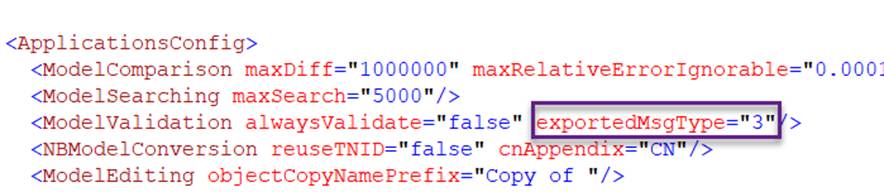
Attribute exportedMsgType is sum of incident types to be exported. The incident types are coded as following:
- Error : 1
- Warning: 2
- Topology: 4
- Alert: 8
- Info: 16
Thus, to show incidents of error and warning types, exportedMsgType = 1 + 2 = 3.
In summary, the validation report:
- Supports grouping and filtering by incident type;
- Provides navigations to the reported instances to facilitate model debugging;
- Can be exported as CSV and XML files.
Note: The Tool has a built-in mechanism to determine whether a new validation shall be performed. Once the validation is completed, the validation report will be stored and can be displayed when users invoke the validation next time. However if model has changed since the initial validation, the Tool will re-run the full validation regardless of what have been changed.
Export Validation Results as XML
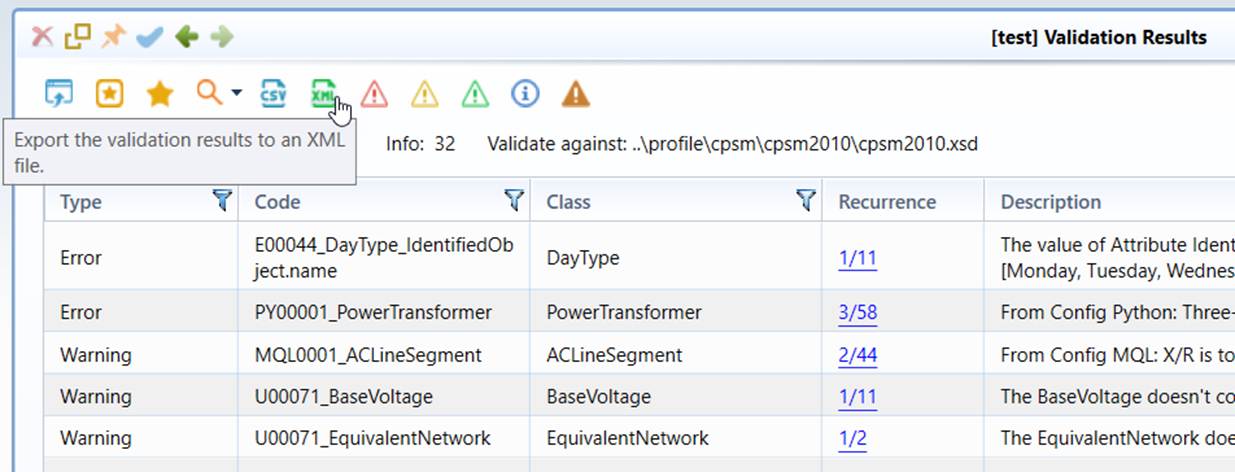
Validation report can be exported as an XML document consumable by other applications, as illustrated below.
The exported XML document contains full information with a hierarchy shown below.
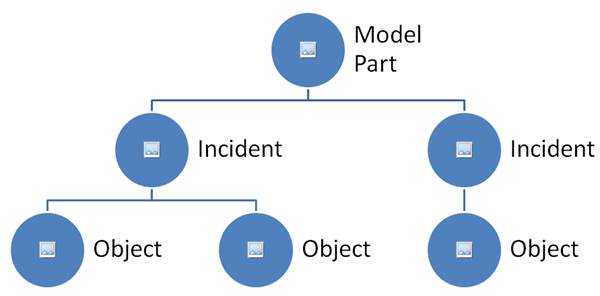
There are three layers in the hierarchy of the XML document:
- Model Part: Each reported incident belongs to exactly one model part. Therefore, all of the incidents are grouped by their model parts.
- Incident: Each incident describe a type of detected issues or something requiring users to pay attention to, depending on the ‘severity’ (or type) of the incident. In most cases, incidents are specific to a CIM class.
- Object: Related CIM objects of the detected incident. Reported objects are mainly to assist users to debug the model. Each object is uniquely identified by rdf:ID (mandatory) and cim:IdentifiedObject.name (if available, optional). Most incidents have related objects. Objects are not reported in the following cases:
- If the incidents are not specific for a CIM class, no objects will be reported.
- If the incidents are for all of the objects of a CIM class, objects will not be reported to make the report succinct. Typically the message will inform users that the reported incidents apply to all of the objects, such as “Missing … for all of the … objects”.
A sample of model validation report in XML is shown below:
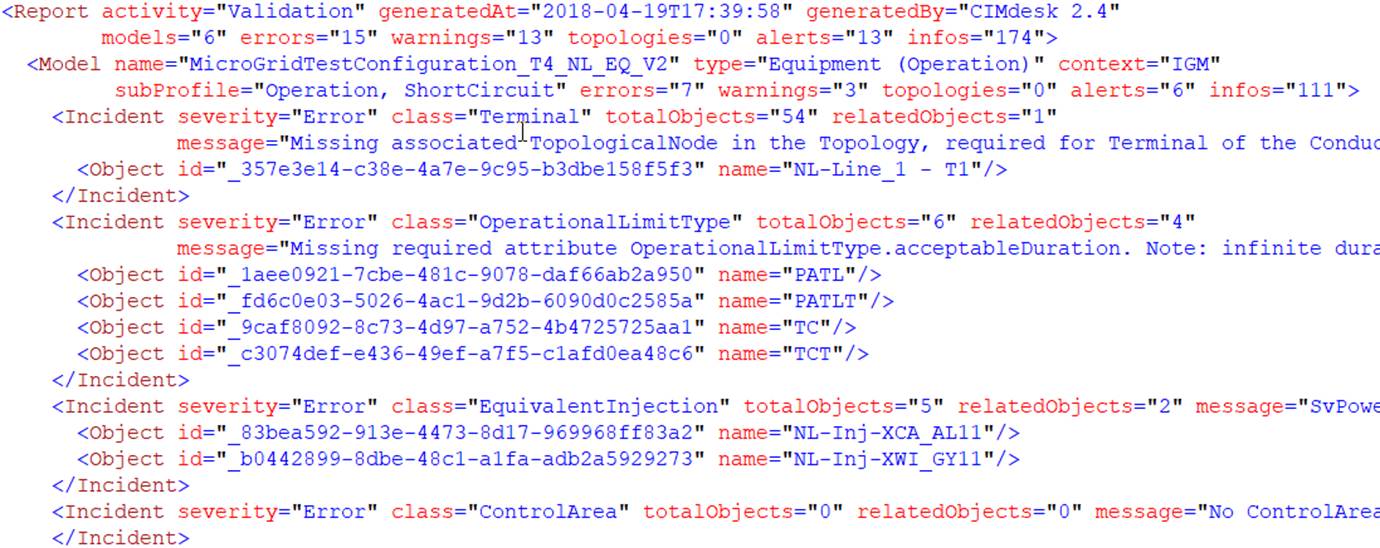
The following table describes the each element and attribute in the XML-based validation report
Element
Attribute
Attribute Type
Description
Report
activity
String Enumeration
Type of activity, i.e. Validation, Assembling
context
String Enumeration
Global context (applicable only to Assembling activity) , Valid values: IGM, BS, CGM.
generatedAt
UTC Date Time
Date/time when this report is generated
generatedBy
String Enumeration
Version of the Tool used to generate this report
models
Integer
Number of models that are validated
errors
Integer
Number of Error Incidents in this report
undeclared
integer
Number of undeclared incidents in this report
pemmdbs
integer
Number of PEMMDB-related Incidents in this report (for CIMdesk)
warnings
Integer
Number of Warning Incidents in this report
topologies
Integer
Number of Topology Incidents in this report
alerts
Integer
Number of Alert Incidents in this report
infos
Integer
Number of Information Incidents in this report
Model
name
String
Name of the model part, extracted from the model file name
type
String Enumeration
Type of the model part, i.e. Equipment, TP, SSH, etc. Valid values: “Equipment”, “Topology”, "State Variables", “SSH”, "Boundary EQ", "Boundary TP"
context
String Enumeration
Context of validation, such as BS, IGM, CGME, etc.
subProfile
String Enumeration
Sub-profile used to for model validation, such as Base, Operation, ShortCircuit, etc.
errors
Integer
Number of Error Incidents in this model part
warnings
Integer
Number of Warning Incidents in this model part
topologies
Integer
Number of Topology Incidents in this model part
alerts
Integer
Number of Alert Incidents in this model part
infos
Integer
Number of Information Incidents in this model part
Incident
severity
String Enumeration
Type of incident, such as Error, Warning, etc.
class
String Enumeration
Class name of the related objects (Optional)
code
String
Internal incident code used to group the incidents of the same type
ruleName
String
Name of the rule (Optional)
ruleGroup
String
Name of the rule group (Optional)
totalObjects
Integer
Number of total objects of the class in the model part
relatedObjects
Integer
Number of the related objects
message
String
Description of the Incident
tag
String
Used to carry additional information if needed. This attribute is optional.
Object
id
RDF:ID (URI)
rdf:ID of the related object
name
String
Name of the object (Optional)
path
String
Hierarchical path of the object (Optional)
Like CSV export, XML export of validation results is controlled by validation configuration. For example, attribute exportedMsgType can be used to determine what types of incidents shall be exported.