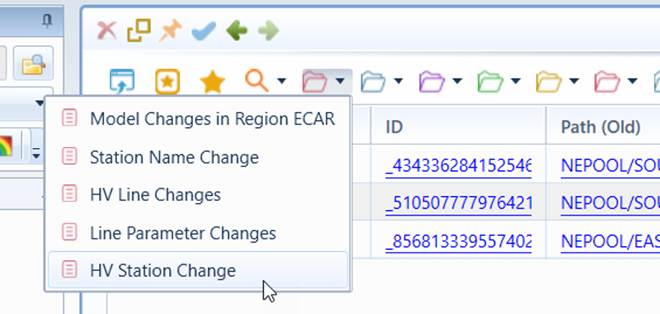
Model Change Reporting
CIM difference model or incremental model reflects model changes between two model releases. It is normally used to update the model after the source model has changed. The CIM difference model is either received from the model authority that maintains the source model or generated through model comparison.
While CIM difference model, describing model change details, is mainly designed to facilitate model update, it is not user-friendly due to the following reasons:
- Too Detailed: Deleting a Substation, for example, may result in hundreds of change items.
- Lack of Context Information: CIM difference model contains only the changed modeling information.
- Unstructured: Model change could be arbitrary, thus making it difficult to present the model changes intuitively.
The model changing reporting function is designed to help users understand model changes and generate model change reports for various purposes. More specifically, the Tool provides the following functionalities to facilitate model change reporting:
- Generating model change summary through aggregation of related change items: For example, all of the change items resulting from deletion of a Substation will be aggregated and presented a single aggregated change item.
- Facilitating model change reporting: More than 40 reports are provided to display model changes at various levels and from different perspectives. Navigation links are provided to allow users can inspect model change at high level and navigate to low-level reports for the details.
- Allowing users to subscribe what changes to report and at what levels: For example, user can call a report that shows all of the Substations that contain the Equipment changes.
- Displaying the full context information: Each report includes navigations to incremental models and full models, object hierarchical path and the hyperlinks for tree expansion, and property popups, etc.
- Generating schematic diagrams to highlight model change: Users can visualize model changes via diagram popups.
- Supporting customization: Users can derive their own ad-hoc model change reports by changing filtering and grouping settings and adding new columns to display the additional information.
- Auto-generation of changed diagram: Users can auto-generate diagrams for changed Substations/Lines.
Enabling Model Change Reporting
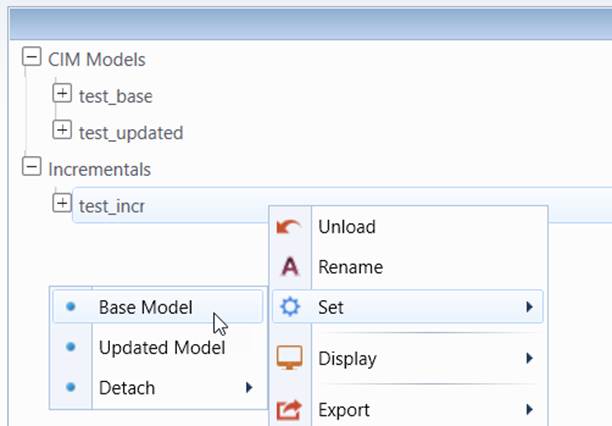
Model change reports are always associated with a CIM difference model. However a CIM difference model itself doesn’t contain the adequate information for generating model change reports. It must be associated with the base and updated full model in order to enable model change reports. The former is the model before the change, while the latter results from the performed/applied model changes. If the CIM difference model results from model comparison in the Tool, the associations from the resulting CIM difference model to the base/updated full models are automatically set. In other cases, users must explicitly set the association between the CIM difference model and the base/updated full models, as shown below.
Note
if the updated full model is not available, it can be created by applying the CIM difference model to the base full model. More specifically:
- Load the CIM difference model and two base full models into the Tool.
- Apply CIM difference model to one of the loaded full base model to create an updated model.
- Set the Base Model and Updated Model for the CIM difference model.
Again, if the CIM difference model results from model comparison in the Tool, there is no need to set the Base Model and Updated Model for the CIM difference model. The associations are automatically by the Tool.
Calling Model Change Reports
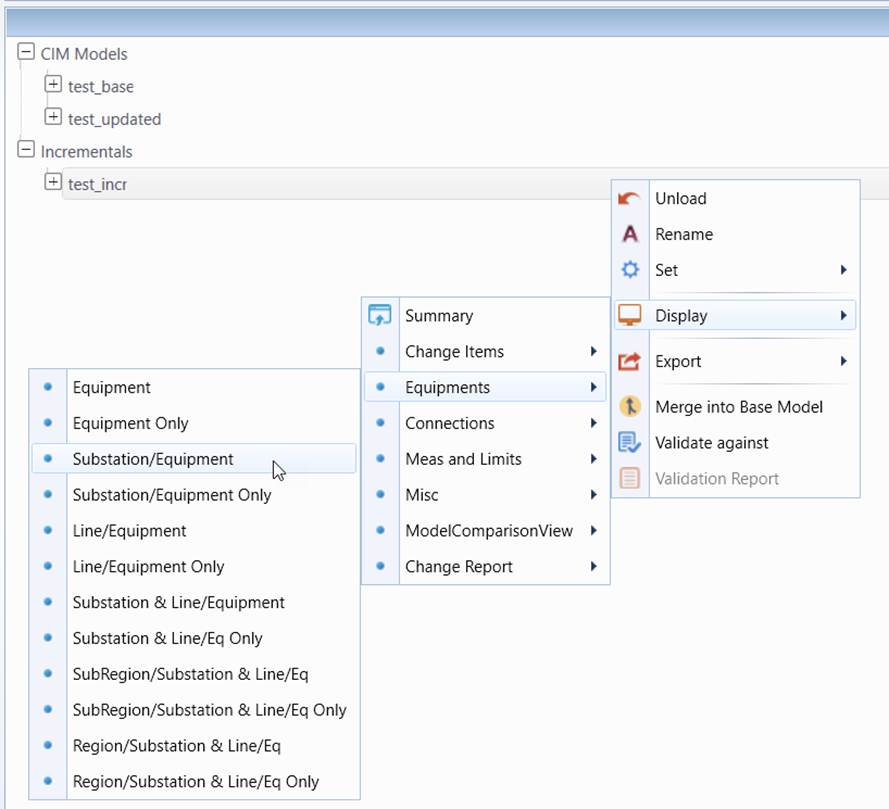
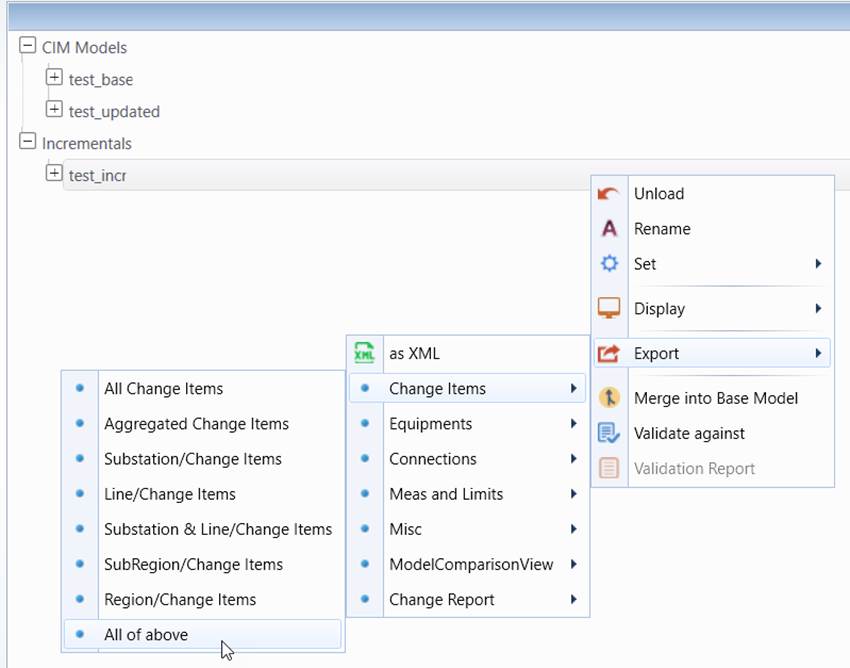
Once a CIM difference model is associated with a base full model and an updated full model, model change reports will be automatically enabled and can be called from the context menu associated with the CIM difference model, as illustrated below
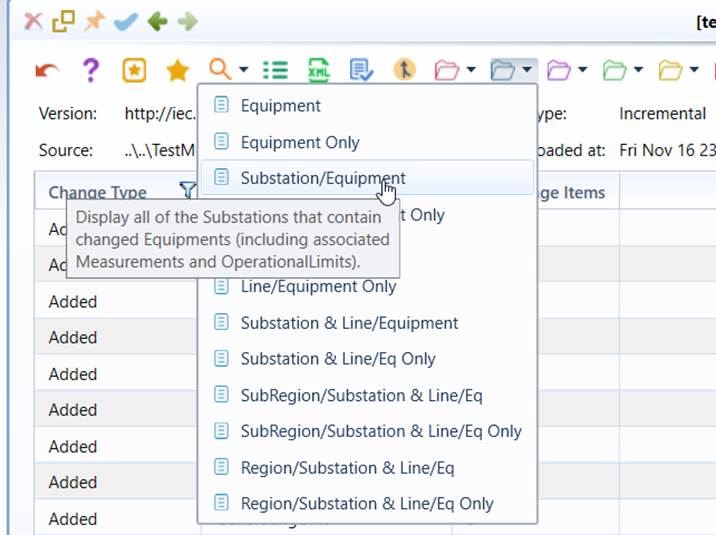
Alternatively, a more convenient way to call model change reports is from the from the dropdown icons at the top of any CIM difference model displays, as illustrated below. A tool tip will pop up to briefly describe the each report when the mouse hovers over the dropdown item.
Model change reports can also be exported as CSV files, as illustrated below.
Understanding Model Change Reports
Model change reports are designed to facilitate understanding of model changes, thus containing context-rich information. A sample of change report is shown below.
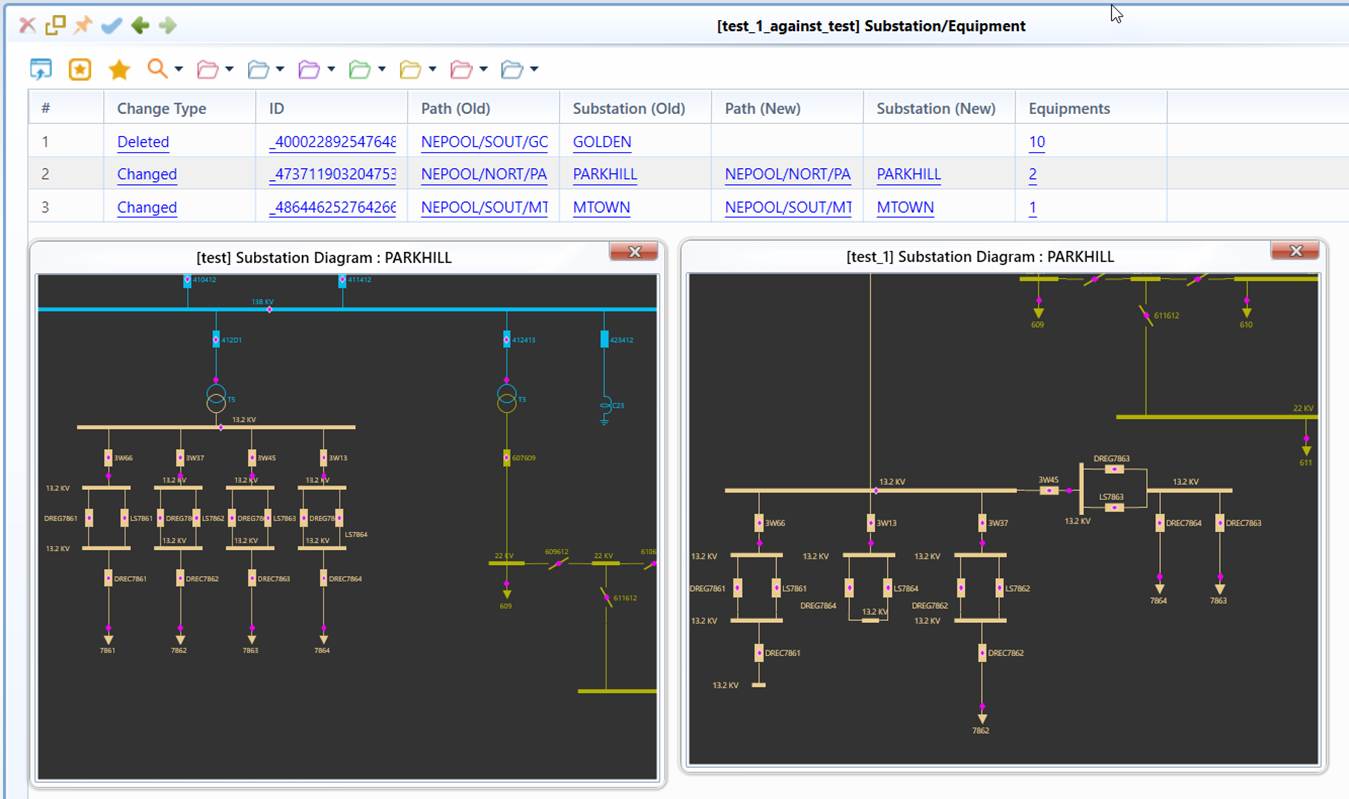
A model change report typically contains the following information:
- Context information: including ID, name, class, and object path showing the hierarchical location of the change item.
- Hyper Links: enabling users to navigate to the related objects on the full model, expand navigation trees, call popup to show details and diagrams, and navigate to another (descendant) reports for details of the aggregated change item.
More specifically, depending on the type of called change reports, the following information is provided in a model change report
|
|
|
|---|---|---|
|
|
|
|
|
|
|
|
|
Name/Class (new/old) |
|
|
|
|
|
Summary of Model Change Reports
Model change reports are fundamentally based on the support of Custom Reporting. All of the reports are derived from three built-in reports with various attribute settings. In other words, these built-in reports, referred to as Base View (Report), serve as templates. By changing their attribute parameters, two families of model change reports can be derived. More specifically:
- ChangeItems: This built-in Base Report is designed to report change items (i.e. changed objects) in a flat or an aggregated table. In the latter case, the added/deleted change items are aggregated based on the predefined model hierarchies. For example, if a Substation is deleted, all of its descendants (equipment, measurement, limit, etc.) will be aggregated into a single change item in the report. Users can navigate to the child reports to find the details of the aggregated descendant change items. Through aggregation, the number of reported change items is significantly reduced, thus facilitating comprehension of model changes.
- ChangeOf: This build-in Base Report is designed to allow users to subscribe what model change to report and at what level. This is a pure report template. Reports derived from this Base report are normally target-driven. Users must specify the baseClass parameter. It declares at what class level, the model changes are observed. For example, if baseClass is ‘Substation’, then all of the changes related to a Substation and its descendant objects will be reported as a (aggregated) change item. Additionally, users can specify what kind of changes to observe by specifying descendantView, which is another ChangOf Report declared normally for descendant class. For example, when designing a view reporting changes of Equipment at Substation level, the baseClass is Substation and the descendantView shall refer to a view defined at Equipment level. Reports derived from ChangeOf Base Reports are recursive in nature, enabling users to explore model changes from one level to another level.
- NetworkChange: Full model comparison report contains a lot of modeling difference, making it difficult to identify major model change: network configuration changes, such as adding/deleting substation/equipment/measurement… These changes provide important inputs for many operational maintenance practices, such as updating schematic one-line diagrams used for real-time operation. To help users quickly identify network configuration changes, this family reports network configuration changes in a condensed and easy-to-understand way.
All of the change reports are grouped in a View Group called BuiltInChangeReport. Some of built-in Base Reports, such as ChangeItems and ChangeOf, are not the real reports, thus not shown in UI. Instead they serve as report templates. Others, such as NetworkChange, are real reports. All of these built-in Base Reports, are designed to derive other custom report.
Derived from the two Base Reports, the Tool provides more than 40 common change reports compatible with all versions of CIM, enabling users to inspect model changes at various levels and from different perspectives. These reports are classified into the following five ViewGroups, each is defined as a View configuration file at folder \config\view\ChangeReports.
| ViewGroup (Report Group) | Base View (Base Report) | Description |
|---|---|---|
Change Items |
ChangeItems |
This group of reports display change items (changed objects)at various levels ranging from Substation to GeographicalRegion. Change items are aggregated (grouped) hierarchically bsed on the predefined model hierarchies. |
Network Configuration |
NetworkChange |
This group of reports condense network configuration changes hierarchically from Substation``→``ConductingEquipment``→``Measurement, and reports the condensed network configuration changes in a succinct manner. The goal is to help users quickly identify the major network configuration changes, while enabling them to find more detailed information via hyperlinks embedded in the report. |
Equipments |
ChangeOf |
This group of reports display equipment-related changes at various levels ranging from Substation to GeographicalRegion. Associated measuetments and limits may or may not be accounted for, rsulting in two sub-groups, i.e. ‘Equipment’ and ‘Equipment Only’. The former accounts for changes of the associated measuetments and limits, while the latter ignores the changes of the associated measuetments and limits. |
Connections |
ChangeOf |
This group of reports display network connection related changes at various levels ranging from Equipment to GeographicalRegion. Network connection changes are typically reported by monitorng changes for Terminal and ConnectivityNodes. Some of the reports include all of the connection changes, while the others display only connection changes for the existing network components (referred to as ‘Reconnection’). |
Meas and Limits |
ChangeOf |
This group of reports display measurement and limit related changes at various levels ranging from Equipment to GeographicalRegion. |
Misc |
ChangeOf |
This group of reports display other miscellanious changes, such as changes related to LoadArea, Curve and Schedule, etc. |
The following table lists ad describes all of the model change reports.
ViewGroup (Report Group)
View (Report)
Description
Change Items
All Change Items
Display all of the change items (changed objects) in a flat table.
Aggregated Change Items
Display all of the aggregated change items. An aggregated change item groups the descendant change items based on pre-defined model hierarchies.
Substation/Change Items
Display the all of the Substations that contain descendant change items.
Line/Change Items
Display the all of the Lines/ACLineSegments that contain descendant change items.
Substation & Line/Change Items
Display the all of the Substations and Lines/ACLineSegments that contain descendant change items.
SubRegion/Change Items
Display the all of the SubGeographicalRegions/SubControlAreas that contain descendant change items.
Region/Change Items
Display the all of the GeographicalRegions/HostControlAreas that contain descendant change items.
Network Configuration
Network Configuration
Reports addition/deletion/reconnection of Substation and Equipment.
Network Config & Meas
In addition to those reported in the Network Configuration report, also reports addition/deletion/reconnection of Measurement
Substation Configuration
Reports all of the configuration changes at the Substation level. This report is used toauto-generate diagrams for changed Substations.
Line Configuration
Reports all of the configuration changes at the line (ACLineSegment/SeriesCompensator/…) level. This report is used toauto-generate diagrams for changed lines.
Equipments
Equipment
Display all of the Equipments that contain model changes, including Measurements and OperationalLimits
Equipment Only
Display all of the Equipments that contain model changes, excluding associated Measurements and OperationalLimits
Substation/Equipment
Display all of the Substations that contain changed Equipments (including associated Measurements and OperationalLimits).
Substation/Equipment Only
Display all of the Substations that contain changed Equipments (excluding associated Measurements and OperationalLimits).
Line/Equipment
Display all of the Lines/ACLineSegments that contain changed Equipments (including associated Measurements and OperationalLimits).
Line/Equipment Only
Display all of the Lines/ACLineSegments that contain changed Equipments (excluding associated Measurements and OperationalLimits).
Substation & Line/Equipment
Display all of the Substations and the Lines/ACLineSegments that contain changed Equipments (including associated Measurements and OperationalLimits).
Substation & Line/Eq Only
Display all of the Substations and the Lines/ACLineSegments that contain changed Equipments (including associated Measurements and OperationalLimits).
SubRegion/Substation & Line/Eq
Display all of the SubGeographicalRegion/SubControlArea that contain Equipment changes (including associated Measurements and OperationalLimits)
SubRegion/Substation & Line/Eq Only
Display all of the SubGeographicalRegion/SubControlArea that contain Equipment changes ((excluding associated Measurements and OperationalLimits).
Region/Substation & Line/Eq
Display all of the GeographicalRegion/HostControlArea that contain Equipment changes (including associated Measurements and OperationalLimits).
Region/Substation & Line/Eq Only
Display all of the GeographicalRegion/HostControlArea that contain Equipment changes (excluding associated Measurements and OperationalLimits).
Connections
Connection
Display all of the (Terminal) connection changes.
ReConnection
Display all of the Terminals that are re-connected to other ConnectivityNodes.
Node
Display all of the changed ConnectivityNodes.
Equipment/Connection
Display all of the Equipments (except BusbarSecton) whose connections are changed.
Equipment/ReConnection
Display all of the existing Equipments (except BusbarSecton) that are reconnected to other ConnectivityNodes.
Substation & Line/Equip/Conn
Display all of the Substations and Lines/ACLineSegments that contain Equipments with connection changeed.
Substation & Line/Equip/ReConn
Display all of the existing Substations and Lines/ACLineSegments that connection changes.
Substation & Line/Node
Display all of the Substations and Lines/ACLineSegments that contain changed ConnectivityNodes.
SubRegion/Station & Line/Equip/Conn
Display all of the SubGeographicalRegions/SubControlAreas that contain connection changes
Region/Station & Line/Equip/Conn
Display all of the GeographicalRegions/HostControlAreas that contain connection changes
Meas and Limits
Measurement
Display all of changes of the Measurements, including Analog, Discrete, etc."
Limit
Display all of the changes related to OperationalLimitSets/LimtSets.
Equipment/Measurement
Display all of the Equipments that contains measurement changes.
Equipment/Limit
Display all of the Equipments that contain limit changes.
Substation & Line/Equip/Meas
Display all of the Substations and Lines/ACLineSegments that contain measurement changes.
Substation & Line/Equip/Limit
Display all of the Substations and Lines/ACLineSegments that contain limit changes.
SubRegion/Station & Line/Equip/Meas
Display all of the SubGeographicalRegions/SubControlAreas that contain measurement changes.
SubRegion/Station & Line/Equip/Limit
Display all of the SubGeographicalRegions/SubControlAreas that contain limit changes.
Region/Station & Line/Equip/Meas
Display all of the GeographicalRegions/HostControlAreas that contain measurement changes.
Region/Station & Line/Equip/Limit
Display all of the GeographicalRegions/HostControlAreas that contain limit changes.
Misc
Load Area
Display all of the LoadAreas that contain changes.
Curve & Schedule
Display all of the Curves and Schedule that contain changes.
Busbar
Display all of the BusbarSections that contain changes.
Equivalent
Display all of the EquivalentNetworks that contain changes.
Building Your Own Model Change Reports
Model changes are arbitrary in nature. While the above model change reports provide various ways to allow users inspect common model changes from different perspectives, they don’t cover all of the use cases. Many times, users may want to generate reports to display specific types of model changes, or ad hoc model change reports. Examples include:
- A change report to display model change for a specified GeographicalRegion or SubGeographicaRegion
- A change report to display Substations whose names have been changed
- A change report to display model changes for ACLineSegment of 220 kV and above
- A change report to display existing ACLineSegments whose parameters have been changed
- …
While it is infeasible to provide all of these ad hoc change reports, the Tool provides strong support for users to derive their own model change reports. The process of building model change report is the same as Building Custom Report. It involves two steps:
- Declaring model change reports, i.e. ViewGroups and Views
- Plugging the defined model change reports into the Tool
For more details, please refer to Building Custom Reports.
Like custom reports of the full model, model change reports are declared with ViewDef, as illustrated below

Model change custom reports are normally defined by setting the attribute of the Base Reports. These attributes are summarized in the following table.
Attribute
Applicable Base Report
Required or Optional
Description
name
ChangeItems ChangeOf
Required
Name of the view (report), must be unique within ViewGroup. It is displayed in UI. Note: if the name contains xml reserved characters, such as ‘&’, these characters must be escaped. For example, Character ‘&’ must be represented as ‘&’ in the view configuration XML.
baseViewGroup
ChangeItems ChangeOf
Required
Name of the base view group, should always set to be ‘BuiltInChangeReport’.
baseView
ChangeItems ChangeOf
Required
Name of the base view, either ‘ChangeItems’ or ‘ChangeOf’.
plugIn
ChangeItems ChangeOf
Required
A flag indicating whether this is a plug-in view. Always set to be ‘true’.
includeClassInPath
ChangeItems ChangeOf
Optional
A flag indication whether the class name shall be included in the path column. The default is ‘false’, i.e. not including class name in the path.
filteringCriteria
ChangeItems ChangeOf
Optional
Filtering criterial in logical MQL expression. This attribute is for filtering. If specified, the base object associated with the row must pass the test. Only those that pass testing will be displayed. The filter criteria are only applicable for the base objects. They are not passed to the descendant views (reports).
monitoredClasses
ChangeItems ChangeOf
Optional
If specified, only changes involving the monitored classes will be reported. Note: multiple classes, separated by ‘;’, can be specified. Monitored classes are passed to the descendant views, overwriting those specified in the descendant views. Namespaces prefix can be omitted if no naming conflict when specifying monitoredClasses.
monitoredProperties
ChangeItems ChangeOf
Optional
If specified, only changes involving the monitored properties will be reported. Note: multiple properties, separated by ‘;’, can be specified. Monitored properties are passed to the descendant views, overwriting those specified in the descendant views. . Namespaces prefix can be omitted if no naming conflict when specifying monitoredProperties.
excludeOperations
ChangeItems ChangeOf
Optional
If specified, the corresponding change types (i.e. Added, Deleted, or Updated) will not be reported. Multiple change types, separated by “;” can be specified. For example, when this attribute is specified as “Added;Deleted”, only updated change items will be reported. This attribute doesn’t pass to the descendant views.
comment
ChangeItems ChangeOf
Optional
Description of the view (report) to be displayed in UI as tool tip.
aggregated
ChangeItems
Required
This attribute is only applicable for report of ChangeItems and its derived reports. If this attribute is ‘true’, all of the added and deleted descendant change items will be aggregated. They are not shown in the report. But navigations are reported to display them in a separate descendant view.
baseClass
ChangeOf
Required
This attribute is only applicable for views (reports) derived from base view ChangeOf. It declares at what class level, and what the model changes are observed. For example, if baseClass is ‘Substation’, then all of the changes related to a Substation and its descendant objects will be reported as a (aggregated) change item. Multiple base classes can be specified. They can be separated by ‘:’ (and) or ‘/’. For example, if baseClass is specified as ‘Substation;Line/ACLineSegment’, model changes will be reported at the level of Substation and Line (or ACLineSegment in case that Lines are not found in the model).
descendantViewGroup
ChangeOf
Optional
This attribute is only applicable for views (reports) derived from base view ChangeOf. It declares the descendant view group. If the descendant view group is the same as that of this report, then it is unnecessary to specify it. This attribute and attribute descendantView declare the descendant view. Descendant views declare what kind of changes to observe. They refer to views derived from base view ChangeOf for descendant classess. For example, when designing a view reporting changes of Equipment at Substation level, the baseClass is Substation and the descendant view shall refer to a Equipment view. If descendantViewGroup/descendantView is not specifed, the default will set to Change Items/Aggregated Change Items (i.e. the aggregated change item view), meaning any changes for all of the descendants.
descendantView
ChangeOf
Optional
This attribute is only applicable for views (reports) derived from base view ChangeOf. It declares the descendant view. This attribute and attribute descendantViewGroup declare the descendant view.Descendant views declare what kind of changes to observe. They refer to views derived from base view ChangeOf for descendant classess. For example, when designing a view reporting changes of Equipment at Substation level, the baseClass is Substation and the descendant view shall refer to a Equipment view. If descendantViewGroup/descendantView is not specifed, the default will set to ‘Change Items/Aggregated Change Items’(i.e. the aggregated change item view), meaning any changes for all of the descendants.
descendantColumn
ChangeOf ChangeItems
Optional
This attribute specifies name of the column that shows the number of reported descendant changes. The column also serves as link for navigating to the descendant view. If not specified, it will set to the default value of "Related Change Items".
mode
Network Configuration
Optional
This attribute is used to derive custom reports from Network Configuration Base Report. It is a combination of the following control flags used to customize Network Configuration reports:
1: include equipment with measurement changes in the report2: include all of the equipments/measurements for the added/deleted substations4: report ConnectivityNode-related changes in the report8: report BusbarSection-related changes in the report16: include renamed Substations/equipments/measurements in the report32: report configuration changes at the Substation level64: report configuration changes at a specified Equipment level
As an example, the Substation Configuration report is derived from Network Configuration Base Report with mode = 53 (1 + 4 + 16 + 32). It reports network configuration changes at the Substation level (32), including measurement changes (1), node changes (4) and name changes (16). It is used toauto-generate diagrams for changed Substations.
ViewColumnDef is normally needed to be defined, since the Base Report offers the rich context information as described above. However, if users want add additional context information, this can be achieved by defining ViewColumnDef, as shown below.

Custom model change reports should be defined as a separate view configuration files so that they can be carried over to the new version of the Tool. DO NOT include the customer reports in the model change reports that come with the Tool. A sample csutom report designed for the above examples can be found at folder \TestCases\change_report. It is desiged for samle model “Test CIM14”.
Once the custom model change reports are defined, they can be plugged into the tool, just like other Custom Reports. The following shows how to plug in the sample model change custom report into the Tool by changing CustomConfig.xml under folder config.
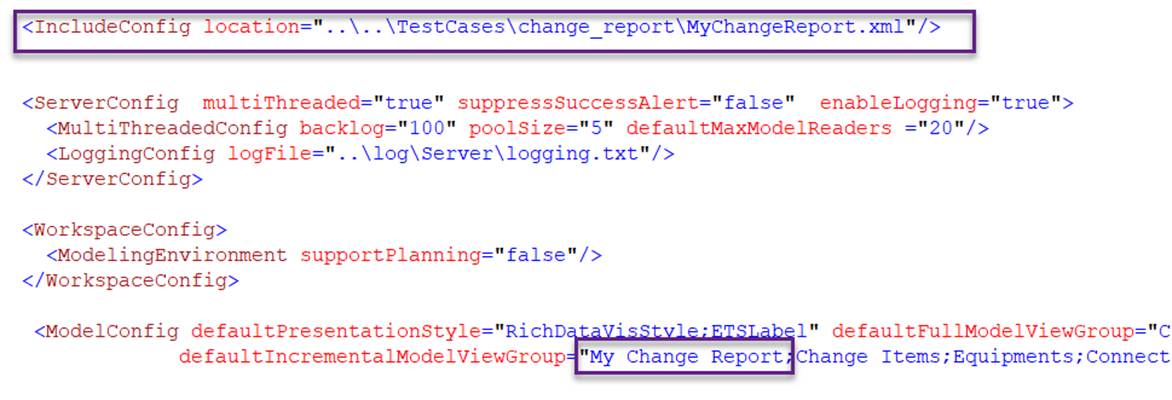
Once plugged-in, model change custom reports can be invoked, just like other model change reports, as shown below