Languages Supported

The Tool supports Unicode/UTF-8. It works with CIM/XML files that contain virtually any languages as long as any non-ASCII characters in these files are UTF-8 encoded. UTF-8 (UCS Transformation Format—8-bit) is a variable-width encoding that can represent every character in the Unicode character set. It is the official encoding for CIM/XML file according to IEC 61970-301.
More specifically, if the input CIM/XML file is UTF-8 encoded, the Tool is capable of displaying any non-ASCII characters properly, including multiple-byte characters such as Chinese, Japanese, and Korean. The tool also enables users to edit the model by entering any non-ASCII characters or search contents that match the entered non-ASCII characters.
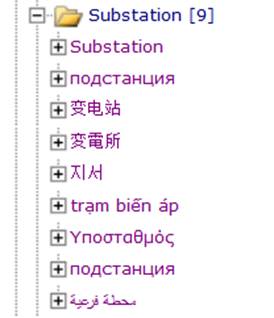
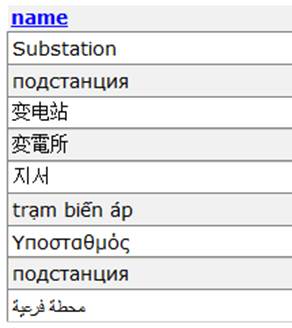
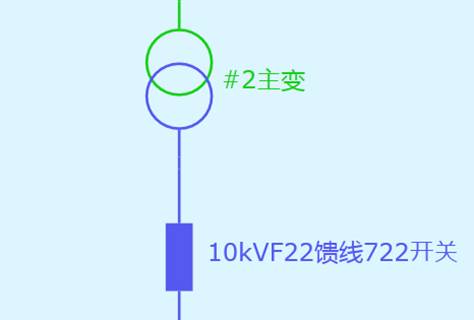
In order for the Tool to function properly with non-ASCII characters, the input CIM/XML files must be UTF-encoded. The encoding is typically specified at the header of an XML file, as illustrated below.

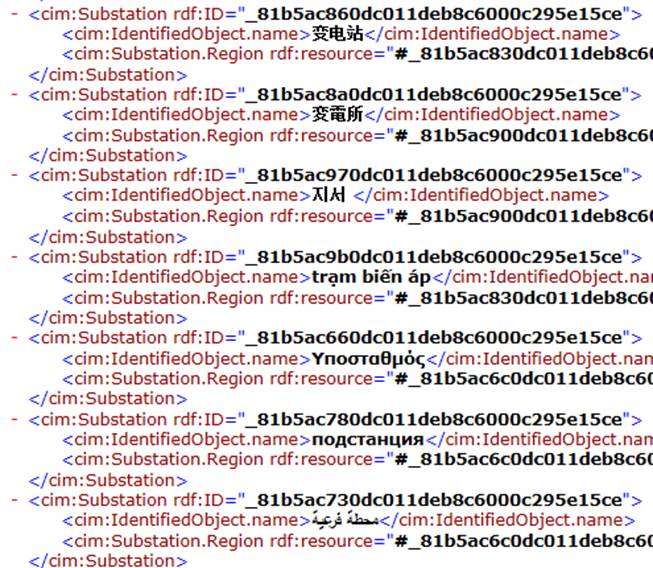
It is very important to note that specifying the encoding specification at the header of an XML file simply tells the file consumers that the encoding used in this file is UTF-8. Any non-ASCII characters in the file must be encoded according to UTF-8. To verify whether the input is a valid UTF-8 CIM/XML file, users can open the file with Internet Explorer (IE). If non-ASCII characters are properly displayed in IE as illustrated, that means the actual encoding matches the encoding specification at the header of the file.
Limitations
While the Tool supports model files containing virtually any languages, its user interface/message is only in English. The input file path must not contain any non-ASCII characters.