Learning MQL by Examples (2)
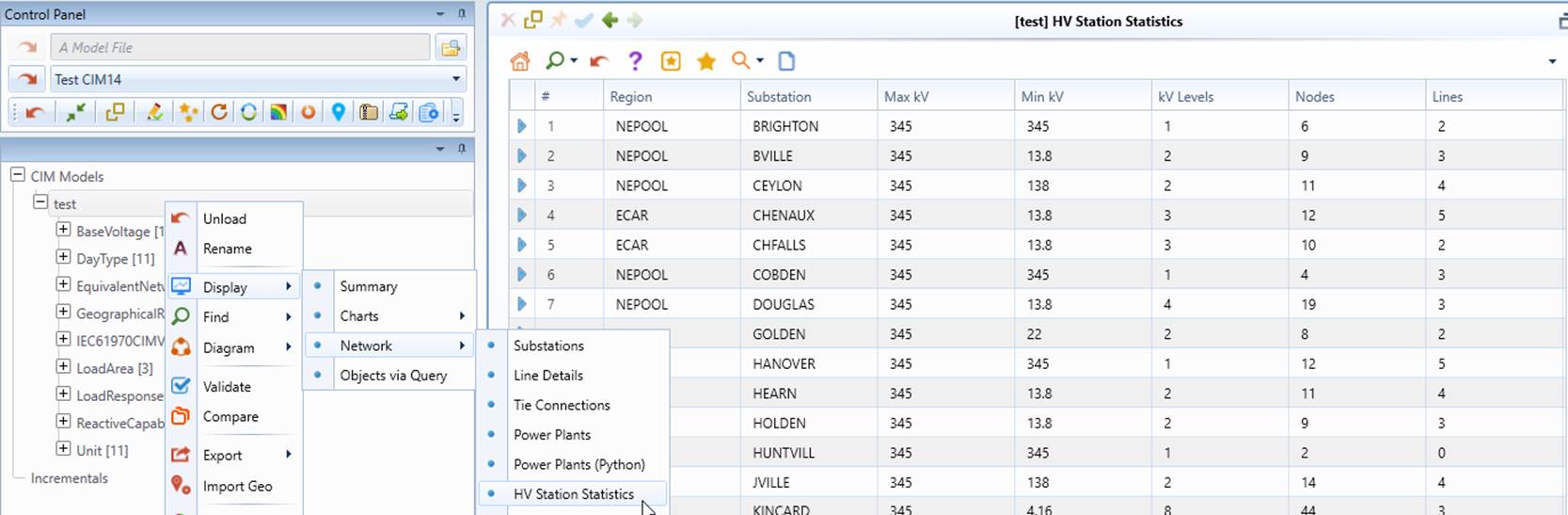
In this tutorial, we will use 6 examples to demonstrate how to formulate MQL property expressions to create Custom Tabular Display for reporting purpose. These examples are based on a CIM14-compliant test model that comes with the installation package. The test model is called test.xml under the \TestModels folder. Users are encouraged to load this model file into the tool and try each example to gain some hand-on experience. Once the model is loaded, users can generate these custom reports through the context menu associated with this model as follows:
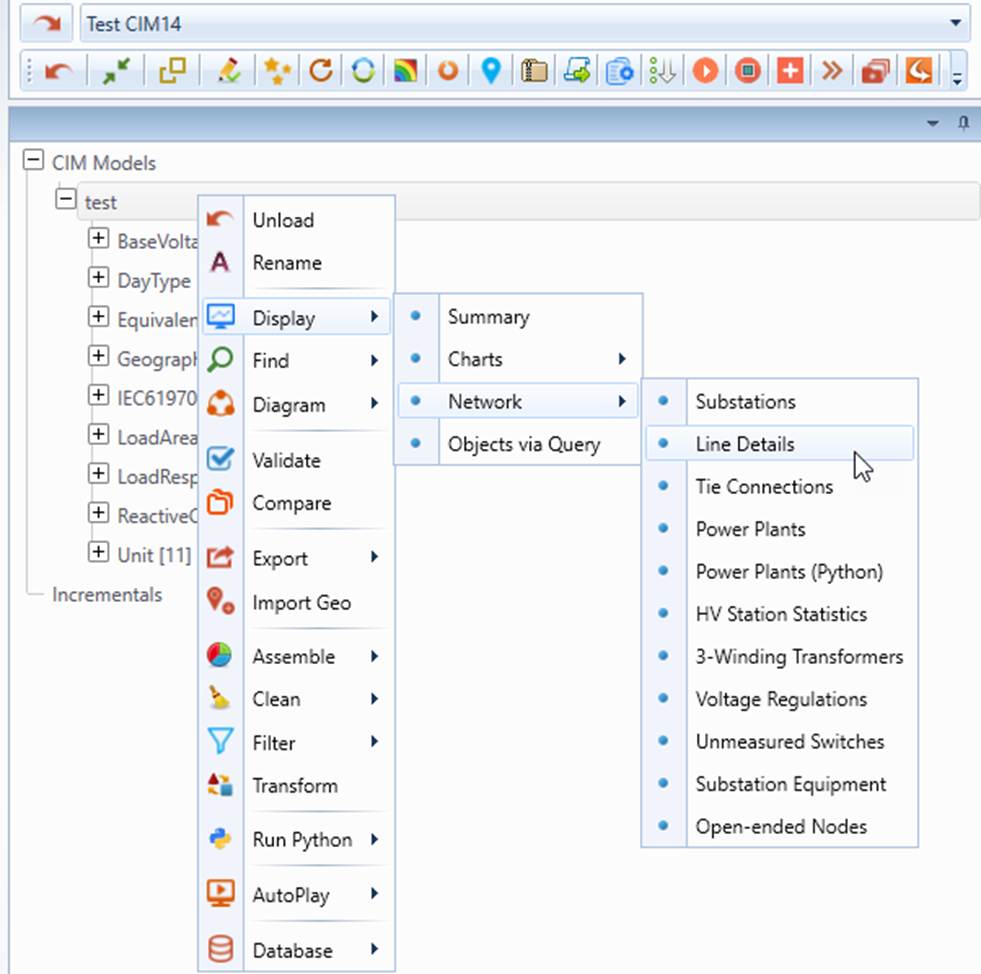
The sample reports are defined in an XML file called Network.xml under folder CIMSpy\config\view. The MQL expressions used to define these views are relatively complicated. It is expected that users understand the basic constructs of MQL, as well as advanced concepts of MQL.
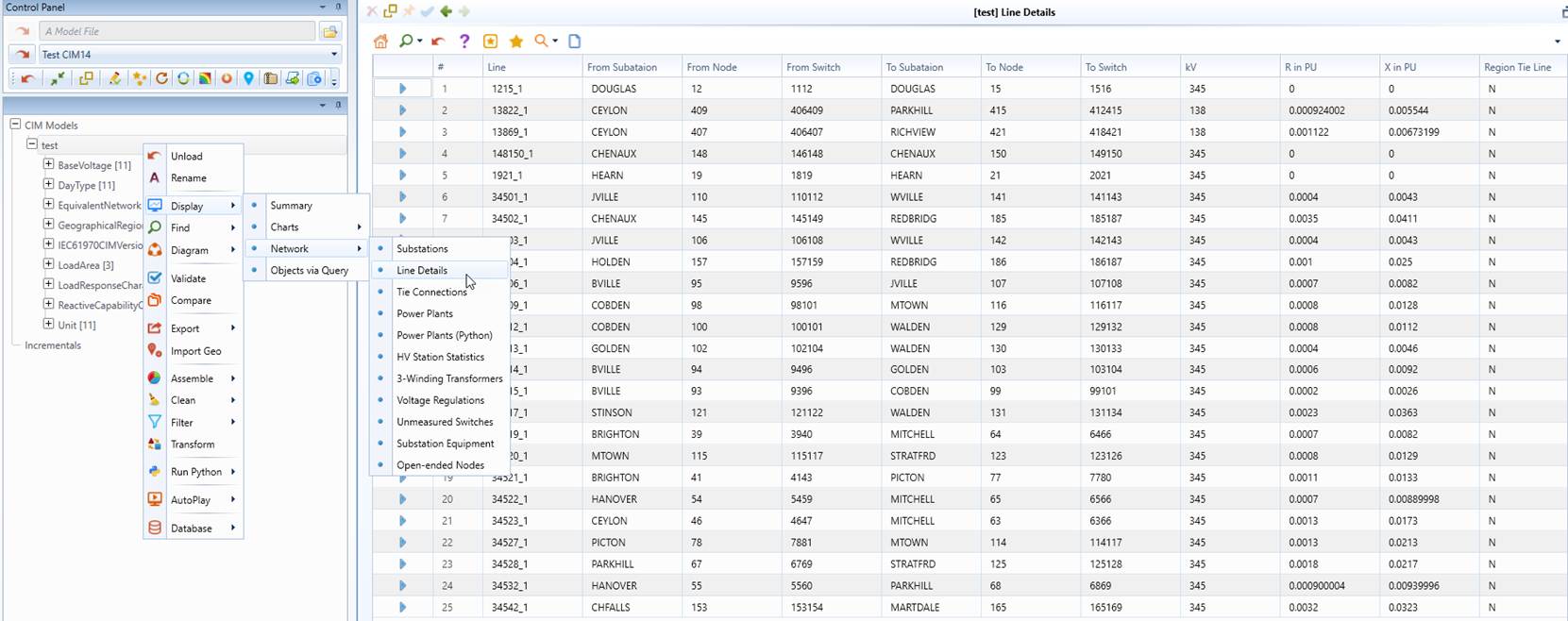
Example 1: Line Details
This example demonstrates how MQL can be generally used to combine the related information from various related objects through object navigations, particularly the inverse navigation. The objective is to find all of the ACLineSegments and the related information including connected ConnectivityNode, switching devices (if available), and Substations. The example also demonstrates that the raw CIM data can be manipulated. The line parameters (i.e. resistance and reactance) are converted from Ohms to Per-Unit (PU).
<``ViewDef name``=``"Line Details" baseClass="ACLineSegment">
<``ViewColumnDef name``=``"Line" definition="[IdentifiedObject.name]"/>
<``ViewColumnDef name``=``"From Subataion" definition="[{Terminal.ConductingEquipment@1}->Terminal.ConnectivityNode
->ConnectivityNode.ConnectivityNodeContainer->VoltageLevel.Substation->IdentifiedObject.name]``"/>
<``ViewColumnDef name``=``"From Node" definition="[{Terminal.ConductingEquipment@1}->Terminal.ConnectivityNode
->IdentifiedObject.name]``"/>
<``ViewColumnDef name``=``"From Switch" definition="[{Terminal.ConductingEquipment@1}->Terminal.ConnectivityNode
->{Terminal.ConnectivityNode#([Terminal.ConductingEquipment->%ShortClassName]=Breaker ||
[Terminal.ConductingEquipment->%ShortClassName]=Disconnector)}->Terminal.ConductingEquipment
->IdentifiedObject.name]``"/>
<``ViewColumnDef name``=``"To Subataion" definition="[{Terminal.ConductingEquipment@2}->Terminal.ConnectivityNode
->ConnectivityNode.ConnectivityNodeContainer->VoltageLevel.Substation->IdentifiedObject.name]``"/>
<``ViewColumnDef name``=``"To Node" definition="[{Terminal.ConductingEquipment@2}->Terminal.ConnectivityNode
->IdentifiedObject.name]``"/>
<``ViewColumnDef name``=``"To Switch" definition="[{Terminal.ConductingEquipment@2}->Terminal.ConnectivityNode
->{Terminal.ConnectivityNode#([Terminal.ConductingEquipment->%ShortClassName]=Breaker ||
[Terminal.ConductingEquipment->%ShortClassName]=Disconnector)}->Terminal.ConductingEquipment
->IdentifiedObject.name]``"/>
<``ViewColumnDef name``=``"kV" definition="[ConductingEquipment.BaseVoltage->BaseVoltage.nominalVoltage]"/>
<``ViewColumnDef name``=``"R in PU" definition="[ACLineSegment.r]*100.0/[ConductingEquipment.BaseVoltage
->BaseVoltage.nominalVoltage]/[ConductingEquipment.BaseVoltage->BaseVoltage.nominalVoltage]``"/>
<``ViewColumnDef name``=``"X in PU" definition="[ACLineSegment.x]*100.0/[ConductingEquipment.BaseVoltage
->BaseVoltage.nominalVoltage]/[ConductingEquipment.BaseVoltage->BaseVoltage.nominalVoltage]``"/>
<``ViewColumnDef name``=``"Region Tie Line" definition="!([{Terminal.ConductingEquipment@1}->
Terminal.ConnectivityNode->ConnectivityNode.ConnectivityNodeContainer->VoltageLevel.Substation
->Substation.Region->SubGeographicalRegion.Region->ID]==
[{Terminal.ConductingEquipment@2}->Terminal.ConnectivityNode->ConnectivityNode.ConnectivityNodeContainer
->VoltageLevel.Substation->Substation.Region->SubGeographicalRegion.Region->ID]) ? Y : N``"/>
<``ViewColumnDef name``=``"Subregion Tie Line" definition="!([{Terminal.ConductingEquipment@1}->
Terminal.ConnectivityNode->ConnectivityNode.ConnectivityNodeContainer->VoltageLevel.Substation
->Substation.Region->ID] == [{Terminal.ConductingEquipment@2}->Terminal.ConnectivityNode
->ConnectivityNode.ConnectivityNodeContainer->VoltageLevel.Substation->Substation.Region->ID]) ? Y : N``"/>
</``ViewDef``>
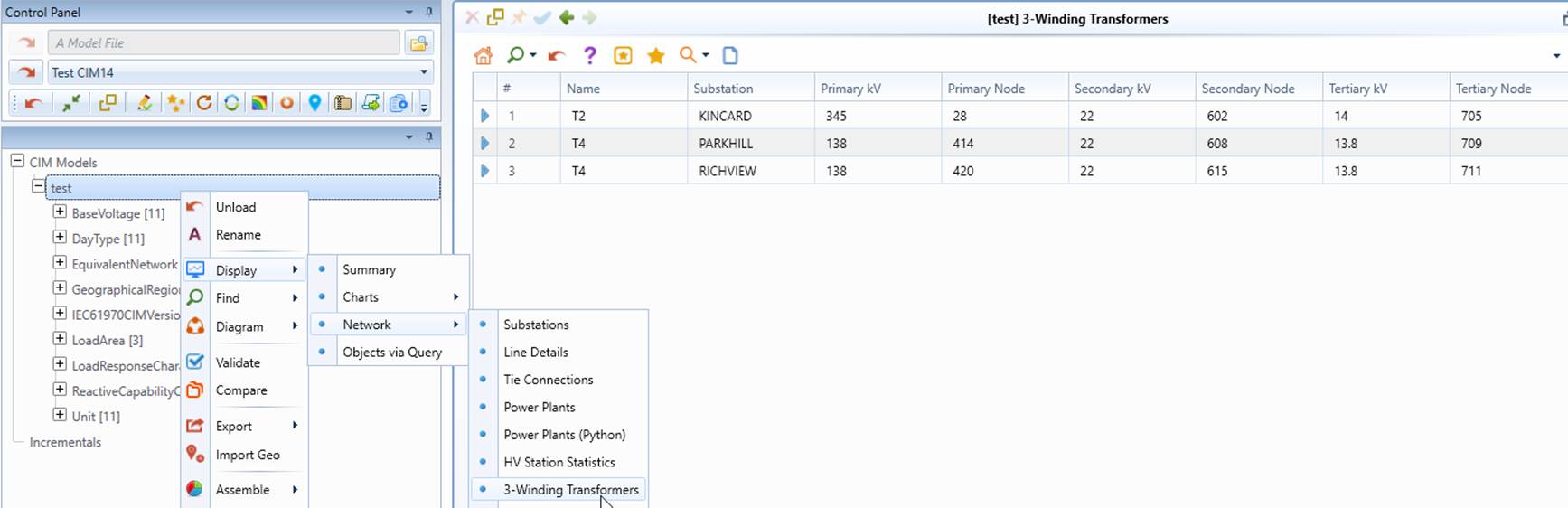
Example 2: Three-Winding Transformers
This example demonstrates how logical MQL property expressions can be used to filter the objects and how they can be embedded in the inverse navigation to limit the search space. The goal is to find all of the 3-winding transformer and their winding information.
<``ViewDef name``=``"3-Winding Transformers" baseClass="PowerTransformer"
filteringCriteria``=``"[{TransformerWinding.PowerTransformer}->%ObjectCount] == 3">
<``ViewColumnDef name``=``"Name" definition="[IdentifiedObject.name]"/>
<``ViewColumnDef name``=``"Substation" definition="[Equipment.EquipmentContainer->IdentifiedObject.name]"/>
<``ViewColumnDef name``=``"Primary kV" definition="[{TransformerWinding.PowerTransformer#[TransformerWinding.windingType]
=WindingType.primary}->TransformerWinding.ratedU]``"/>
<``ViewColumnDef name``=``"Primary Node" definition="[{TransformerWinding.PowerTransformer#[TransformerWinding.windingType]
=WindingType.primary}->{Terminal.ConductingEquipment@1}->Terminal.ConnectivityNode->IdentifiedObject.name]``"/>
<``ViewColumnDef name``=``"Secondary kV" definition="[{TransformerWinding.PowerTransformer#[TransformerWinding.windingType]
=WindingType.secondary}->TransformerWinding.ratedU]``"/>
<``ViewColumnDef name``=``"Secondary Node" definition="[{TransformerWinding.PowerTransformer#[TransformerWinding.windingType]
=WindingType.secondary}->{Terminal.ConductingEquipment@1}->Terminal.ConnectivityNode->IdentifiedObject.name]``"/>
<``ViewColumnDef name``=``"Tertiary kV" definition="[{TransformerWinding.PowerTransformer#[TransformerWinding.windingType]
=WindingType.tertiary}->TransformerWinding.ratedU]``"/>
<``ViewColumnDef name``=``"Tertiary Node" definition="[{TransformerWinding.PowerTransformer#[TransformerWinding.windingType]
=WindingType.tertiary}->{Terminal.ConductingEquipment@1}->Terminal.ConnectivityNode->IdentifiedObject.name]``"/>
</``ViewDef``>
Example 3: Unmeasured Switches
This example demonstrates how Ternary Conditional Operator can be used to evaluate the conditional values. The example is to find the normal status of the switches that don’t have field measurements. For testing purpose, we changed the status of the first two switches.
<``ViewDef name``=``"Unmeasured Switches" baseClass="Breaker;Disconnector"
filteringCriteria``=``"[{Measurement.PowerSystemResource}->%ObjectCount] == 0">
<``ViewColumnDef name``=``"Normal Status" definition="[Switch.normalOpen]=true ?
open : ([Switch.normalOpen]=false ? closed : unknown)``"/>
<``ViewColumnDef name``=``"Name" definition="[IdentifiedObject.name]"/>
<``ViewColumnDef name``=``"Substation" definition="[Equipment.EquipmentContainer->VoltageLevel.Substation
->IdentifiedObject.name]``"/>
<``ViewColumnDef name``=``"Type" definition="[%ShortClassName]"/>
</``ViewDef``>
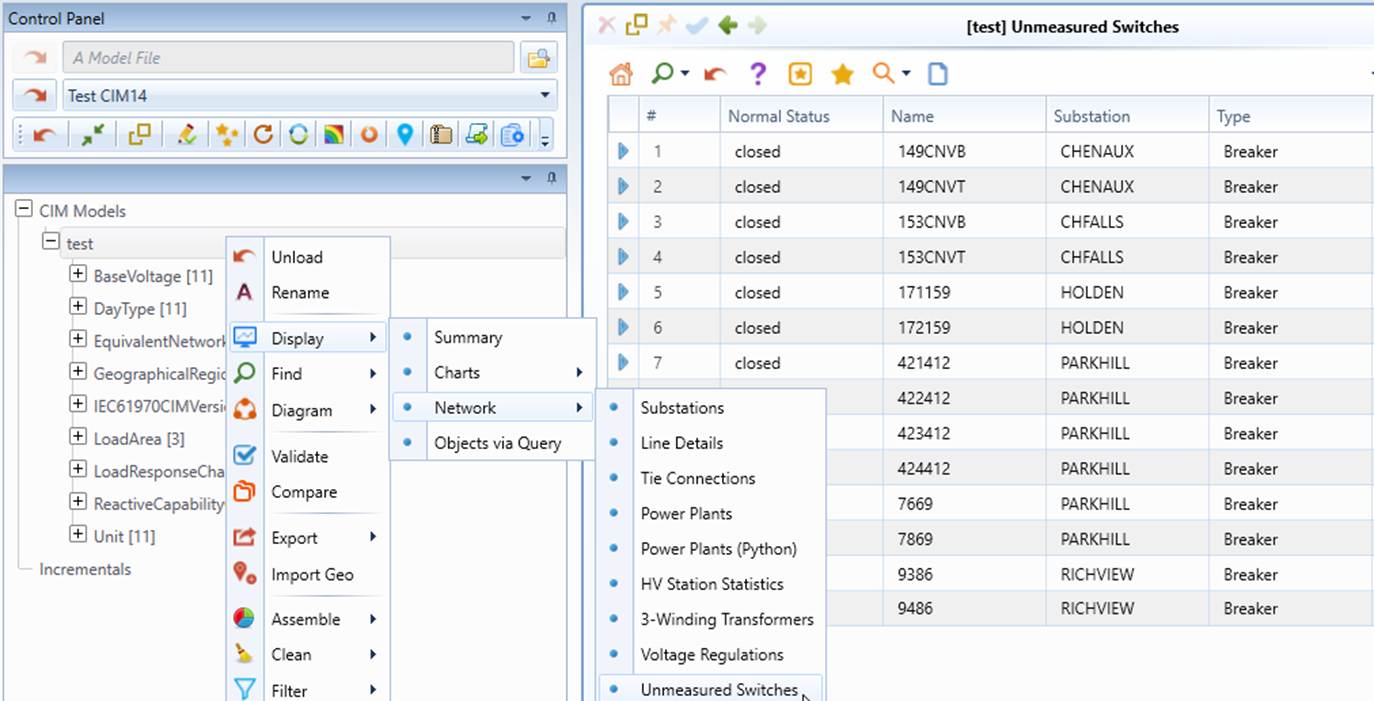
Example 4: Power Plants
This example demonstrates how property functions can be used to find the statistic information about power plants, including the number if generating units, and the total nominal MW output. Additionally, MQL aliases are used to facilitate the construction of MQL expressions.
<!--``>Delcaring a collection of common MQL substrings used in View and other definitions``-->
<``MQLAliases``>
<!--``delcaring a collection MQL substring used for navigation from Substation to its parent regions``-->
<``MQLAlias name``=``"SubstationRegion" mqlString="Substation.Region->SubGeographicalRegion.Region"/>
<``MQLAlias name``=``"SubstationRegionName" mqlString="$SubstationRegion->IdentifiedObject.name"/>
<!--``delcaring a collection MQL substring used for navigation from Substation to its child Equipments``-->
<``MQLAlias name``=``"SubstationUnits"
mqlString``=``"{VoltageLevel.Substation}->{Equipment.EquipmentContainer#[%ShortClassName]=SynchronousMachine}"/>
</``MQLAliases``>
<``ViewDef name``=``"Power Plants" baseClass="Substation" filteringCriteria="[$SubstationUnits->%ObjectCount]>0">
<``ViewColumnDef name``=``"Substation" definition="[IdentifiedObject.name]"/>
<``ViewColumnDef name``=``"Region" definition="[$SubstationRegionName]"/>
<``ViewColumnDef name``=``"Number of Units" definition="[$SubstationUnits->%ObjectCount()]"/>
<``ViewColumnDef name``=``"Total Nominal MW" definition="[$SubstationUnits->%Total(SynchronousMachine.ratedS)]"/>
</``ViewDef``>
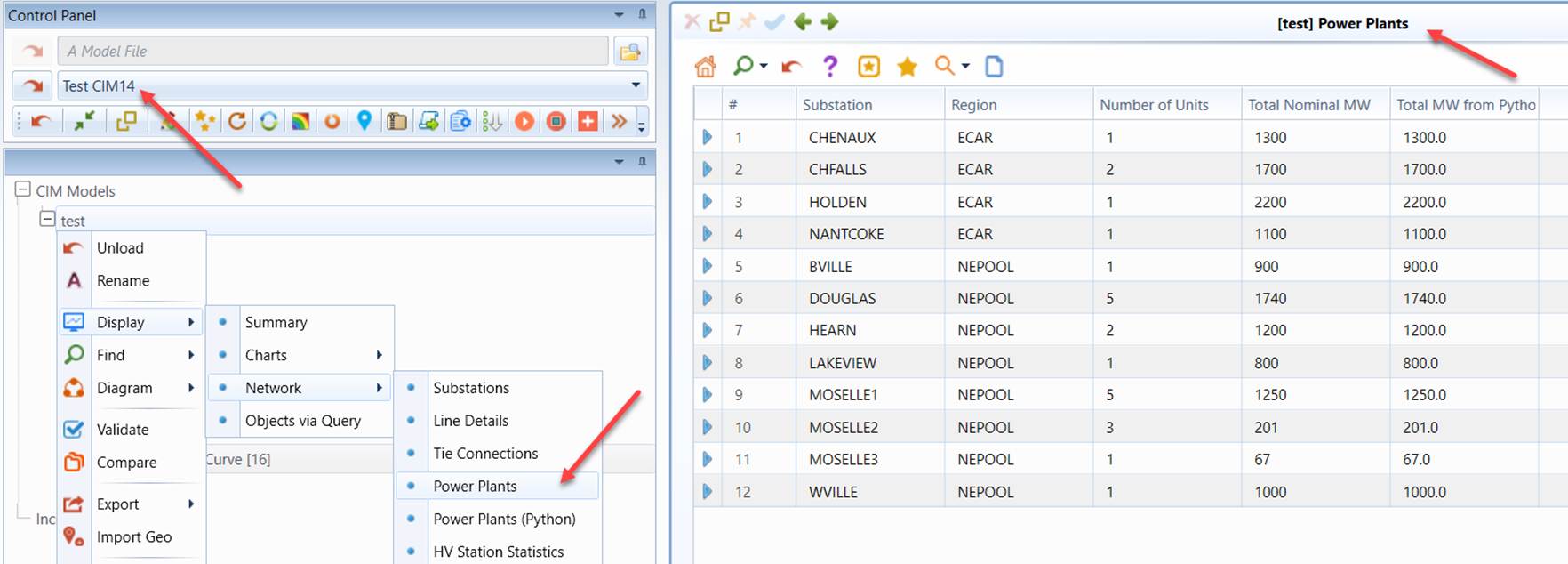
Example 5: Substation Equipment
This example demonstrates Trial and Error operator can be used to find the related information from different types of objects under different equipment containership hierarchies. The goal is to generate a report listing all of the substation equipments.
<``ViewDef name``=``"Substation Equipment" baseClass="*"
filteringCriteria``=``"[Equipment.EquipmentContainer->%ShortClassName]=Substation
|| [Equipment.EquipmentContainer->VoltageLevel.Substation->%ShortClassName]=Substation``">
<``ViewColumnDef name``=``"Substation" definition="[Equipment.EquipmentContainer->VoltageLevel.Substation
->IdentifiedObject.name] | [Equipment.EquipmentContainer->IdentifiedObject.name]``"/>
<``ViewColumnDef name``=``"Type" definition="[%ShortClassName]"/>
<``ViewColumnDef name``=``"Name" definition="[IdentifiedObject.name]"/>
</``ViewDef``>
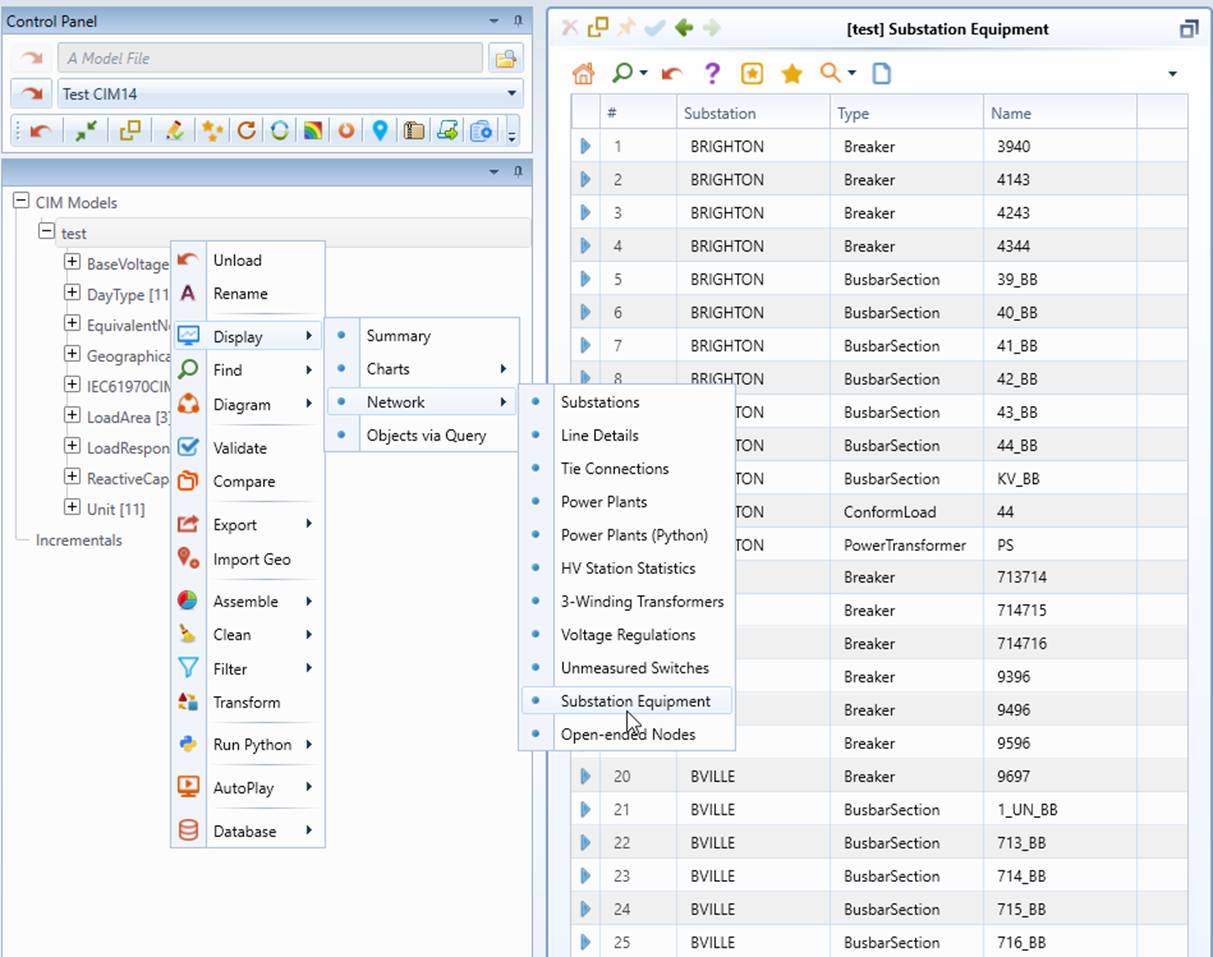
Example 6: High-Voltage Substation Statistics
This example demonstrates how to get the statistic information about high-voltage Substations including the number of the connected ACLineSegments, which are not directly associated with Substations.
<``ViewDef name``=``"HV Station Statistics" baseClass="Substation"
filteringCriteria``=``"[{VoltageLevel.Substation}->VoltageLevel.BaseVoltage
->%Max(BaseVoltage.nominalVoltage)]>=345``">
<``ViewColumnDef name``=``"Region" definition="[Substation.Region->SubGeographicalRegion.Region
->IdentifiedObject.name]``"/>
<``ViewColumnDef name``=``"Substation" definition="[IdentifiedObject.name]"/>
<``ViewColumnDef name``=``"Max kV" definition="[{VoltageLevel.Substation}->VoltageLevel.BaseVoltage
->%Max(BaseVoltage.nominalVoltage)]``"/>
<``ViewColumnDef name``=``"Min kV" definition="[{VoltageLevel.Substation}->VoltageLevel.BaseVoltage
->%Min(BaseVoltage.nominalVoltage)]``"/>
<``ViewColumnDef name``=``"kV Levels" definition="[{VoltageLevel.Substation}->%ObjectCount]"/>
<``ViewColumnDef name``=``"Nodes" definition="[{VoltageLevel.Substation}
->{ConnectivityNode.ConnectivityNodeContainer}->%ObjectCount]``"/>
<``ViewColumnDef name``=``"Lines" definition="[{VoltageLevel.Substation}
->{ConnectivityNode.ConnectivityNodeContainer}
->{Terminal.ConnectivityNode#[Terminal.ConductingEquipment->%ShortClassName]=
ACLineSegment}->Terminal.ConductingEquipment->%ObjectCount]``"/>
</``ViewDef``>