Dynamic Update of Configurations
When the serve is started, the model configuration will be used to initialize the server working space and client UI. The Tool allows users to make some configuration changes without having to shut down the application and restart it. The feature of dynamic update of configuration is quite useful when users deal with some large models which take long to load. The feature is particularly useful when users try to design some custom reports, which involves a lot of trials-and-errors.
To update the modified configuration dynamically:
- Make the proper configuration changes using some text editor. Note it is expected that the changes shall be in the CustomConfig.xml.
- Right-mouse-click a blank spot in the tree panel to invoke a context menu, as illustrated below. Select “Update Config”, or click the corresponding command icon in the control panel, as illustrated below.
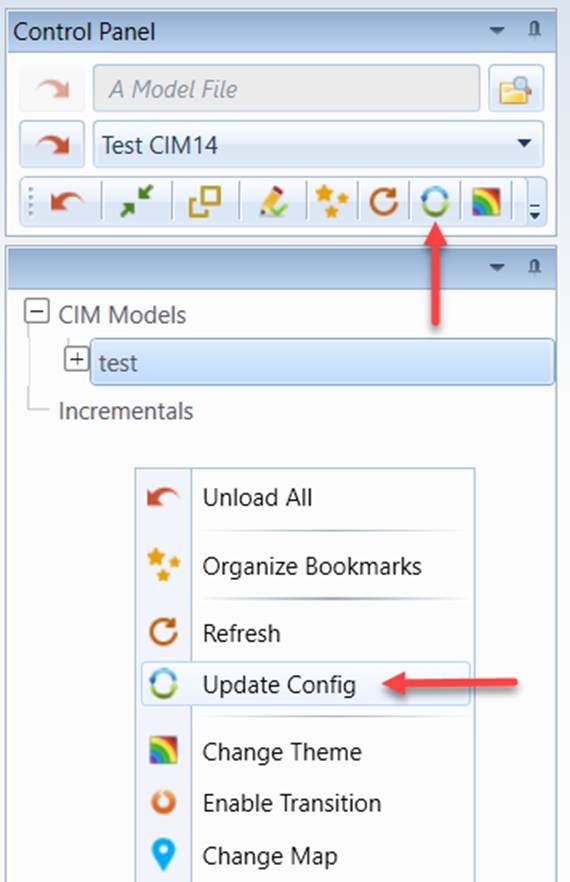
- The new configuration shall be applied. For example, if you added a new data source in the configuration file, the added new data source shall be appear in the dropdown list of the control panel, ready for you to load the model from new data source.
Note
While most of the configuration settings can be dynamically updated, some of the server-related configurations cannot be dynamically updated, such as number of threads. The XSD profiles used to governing the loaded models cannot be dynamically updated either.