Known Issues & FAQs
Known Issue of the Tool
If the loaded model contains the power flow information (SvPowerFlow) for branch type ConductingEquipment, the Tool respect it and show flow as it is. If the loaded model doesn’t contain SvPowerFlow for branch type ConductingEquipment, the Tool will calculate the flow for then using voltage (SvVoltage) at the connected bus (TopologicalNode). However, for transformers with off-nominal tap changers (i.e. RatioTapChanger or PhaseTapChanger), the flow computation is approximated, inaccurate, and may be failed. Once we know how to calculate the flow for transformers with tap ratio or phasor shifters, we will fix the issue.
Because of this issue, users may see some notes in the Power Flow Summary Report.
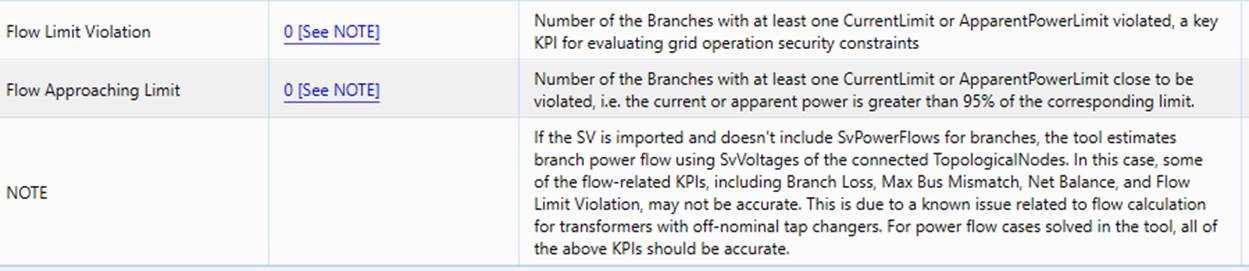
If the power flow is calculated in the Tool, all of the SvPowerFlows will be exported for branch -type ConductingEquipment. This is not an issue.
Known Issues of PowSyBl
The following issues have been identified in the power flow engine, i.e. PowSyBl 1.6. It is expected that these issues will be fixed or addressed in the future release of PowSyBl.
- None-ACLineSegment Tie-Branches: It appears that only tie ACLineSegments are handled in PowSyBl. If the tie-branch is an EquivalentBranch, for example, it will be discarded in PowSyBl. According to CGMES, a tie-branch and be ACLineSegment, Switch, PowerTransformer, and EquivalentBranch. None-ACLineSegment tie-branches shall be handled in PowSyBl.
- Multi-Generators Connected at the Same Bus: If multiple generators are connected to the same bus, but regulates different buses. The following error message will pop up..
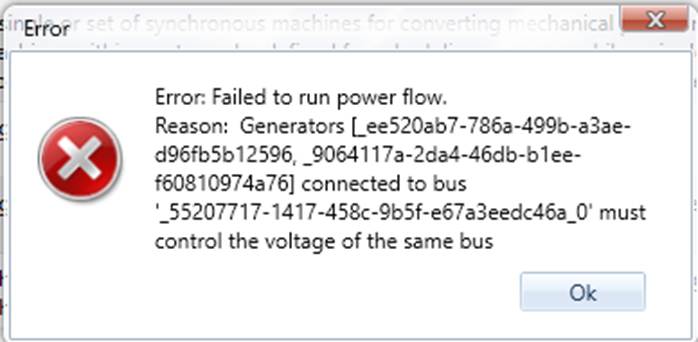
This known issue will be addressed in the future release of PowSyBl. There are multiple workaround available. The easiest is simply disabling all of the regulations, but this will introduce a little inaccuracy in the output. The other is splitting the common bus into multiple buses, each connected to a single generator. The split buses shall be connected with a closed switch. The reconfigurations will by-pass this known issue without impacting the accuracy of power flow.
- Missing Active Power Output in Shunt: LinearShuntCompensator.gPerSection is ignored by PowSyBl. As a result, no active power is available for ShuntCompensators. This is something to be implemented in the future release of PowSyBl.
Frequently Asked Questions (FAQs)
- Q: I run power flow and get the following error message.
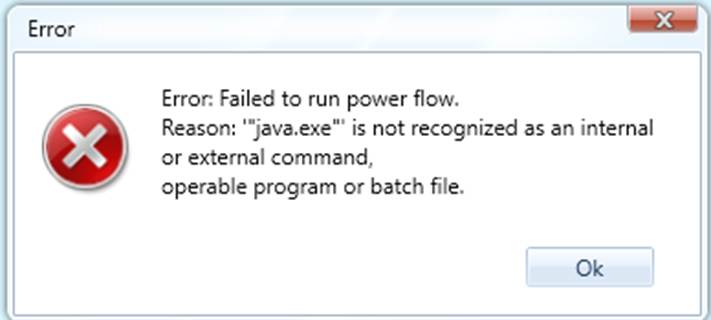
A: The power flow engine, i.e. PowSyBl, is a java application. It requires Java 11 or a later version to be installed. Please Set Up Power Flow Environment.
- Q: Does the Tool require Java to be installed?
A: Only when you want to Run Power Flow. If Java is not installed and you run power flow, the above error message will pop up. There are no other impacts.
- Q: I have set up the power flow environment successfully. How do I run power flow?
A: It is suggested that you start from Power Flow Tutorial. It includes 7 Hands-on Labs designed to demonstrate all of the key features. It is expected that, after these hands-on labs, you cover 80% of the power flow functions. The whole lessons take about 45 – 75 minutes depending how familiar you are with the Tool.
- Q: Does my model have to conform to CGMES in order to run power flow?
A: Not really. As far as your model is based on CIM 16/17 and contains equivalent information (EQ and SSH), the tool can convert it to be CGMES-compatible, for example, by adding headers, creating required CGMES model parts, etc.
- Q: My model is an old version of CIM (10 – 15). Can I run power flow?
A: Not now, but it is the plan to support some legacy versions of CIM at users’ request
- Build converters between old version of CIM and CIM 16.
- Power flow requires two types of input: static network model governed by Equipment (EQ) profile, including network configuration, equipment parameters, etc., and dynamic input governed by Steady-State Hypothesis (SSH profile), including switch status, generation/load settings, etc. Most CIM models exchanged in North America are Equipment models, not including complete SSH information. The plan is to add support for users to convert old versions of CIM to CIM16 and add SSH information using a CSV file.
- Q: Can I run power flow for other formats of models, such as SERC format?
A: Only if there is a mature converter available. For example, there is a SERC 1.0 →CIM 16 converter in CIMSpy, but it is not quite mature yet.
- Q: Why is the total time significantly greater than power flow computational time?
A: This is because a lot of data manipulation may be needed before sending the data to power flow engine for computation. For example, PowSyBl 1.6 doesn’t support assembled model, doesn’t support CGMES 3.0, etc. To by-pass such limitations, the Tool need split assembled model to model parts, or convert a CGMES 3.0 model to CGMES 2.4.15 model, etc. These data manipulations add quite a lot of performance overhead. It is expected that these limitations will be addressed by the future release of PowSyBl. For example, PowSyBl 1.7 now supports CGMES 3.0 as a beta release.
- Q: PowSybl supports exporting power flow results as SV model part. Why is this feature not used?
A: This is because the SV model part exported from PowSyBl 1.6 doesn’t completely meet some of the requirements, for example, exporting SvPowerFlow for branch-type ConductingEquipment. This issue has been addressed in PowSyBl 1.7, though. Evaluation will be conducted to determine whether the SV model part exported from PowSyBl can be directly utilized.