Restricting Modeling Operations
The Tool enables users to make arbitrary model changes though the Model Editing functions. Some of the model editing functions, such as deep copy and cascading deletion are cascading in nature. With these functions, users can copy or deleted a hierarchy of model objects at one shot. While these cascading model editing functions are very powerful, they can also result in some undesirable impacts. For example, when users delete a Substation using the cascading deletion function, the Terminals of the connected ACLineSegments could also be deleted, resulting in invalid models. Similarly, when users deep-copy Substation, additional Terminals could also be added to the connected ACLineSegments. These undesirable behaviors result from the fact that the same CIM object could be under various modeling hierarchies. For example, the Terminal class is introduced to model the network connectivity. A Terminal belonging to an ACLineSegment is normally under the ConnectivityNode contained in a Substation. In order words, the same Terminal could be under two different modeling hierarchies, as illustrated below.
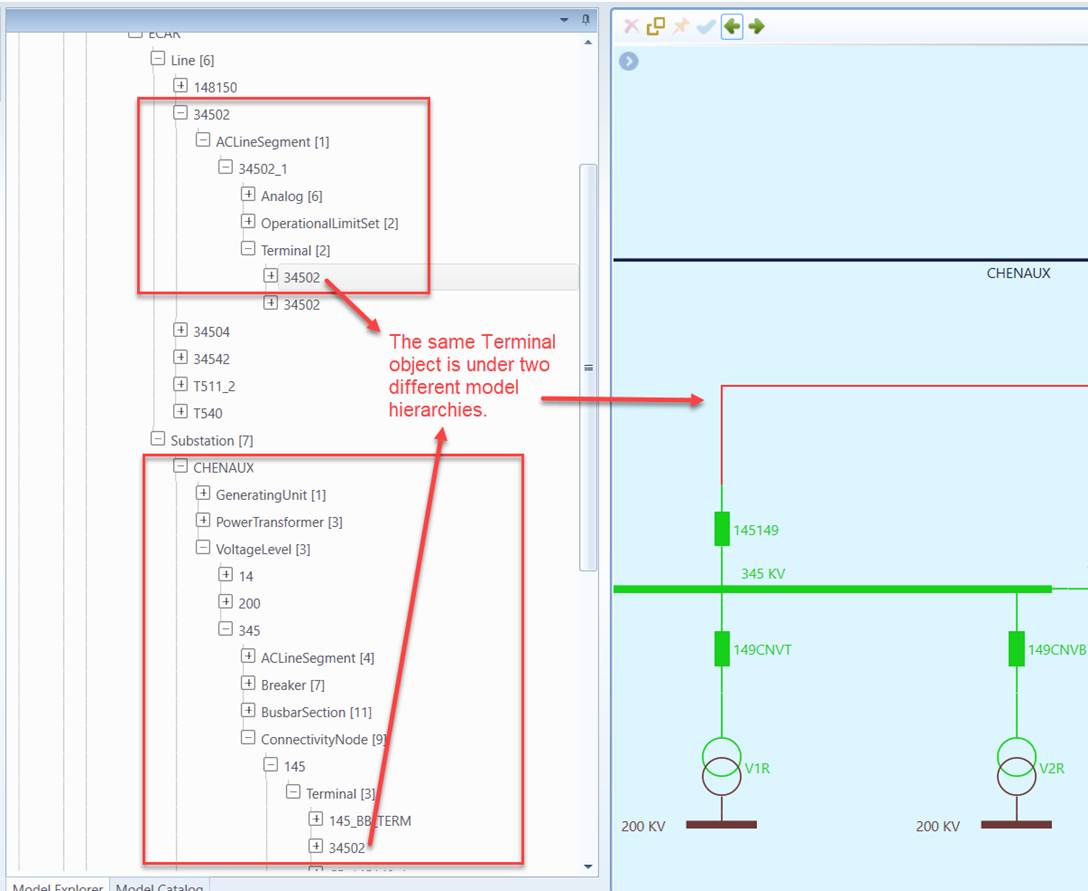
While a CIM object could end up under different modeling hierarchies, it normally has a main parent object or belongs to a single main modeling hierarchy. In this particular case, the Terminal, as part of ACLineSegment, should be deleted or copied alone with the parent ACLineSegment, rather than with the ConnectivityNode. Unfortunately, the Tool itself doesn’t have such domain knowledge. It must be instructed to do so. This is accomplished through modeling restriction definition in the configuration file.
One of the supported modeling restrictions is the main containership for selected classes. For example, the main containership of class Terminal is Terminal.ConductingEqupment. Under this specification, the Terminal object can only be deep-copied or cascading-deleted along with its parent ConductingEquipment. In the above example, Terminal 34502 will be deep-copied or cascading-deleted along with ACLineSegment 34501_1, but not with ConnectivityNode 145, since it is associated with ACLineSegment 34501_1 through main containership cim: Terminal.ConductingEqupment as specified in the ModelConstraint definition below. When users delete Line 34502, Terminal 34502 will be deleted. This is because its parent ACLineSegment is deleted. However, when users delete Substation CHENAUX, Terminal 34502 will remain. By defining the modeling constrains in the configuration, users are now able to control be behavior of cascading modeling operations.
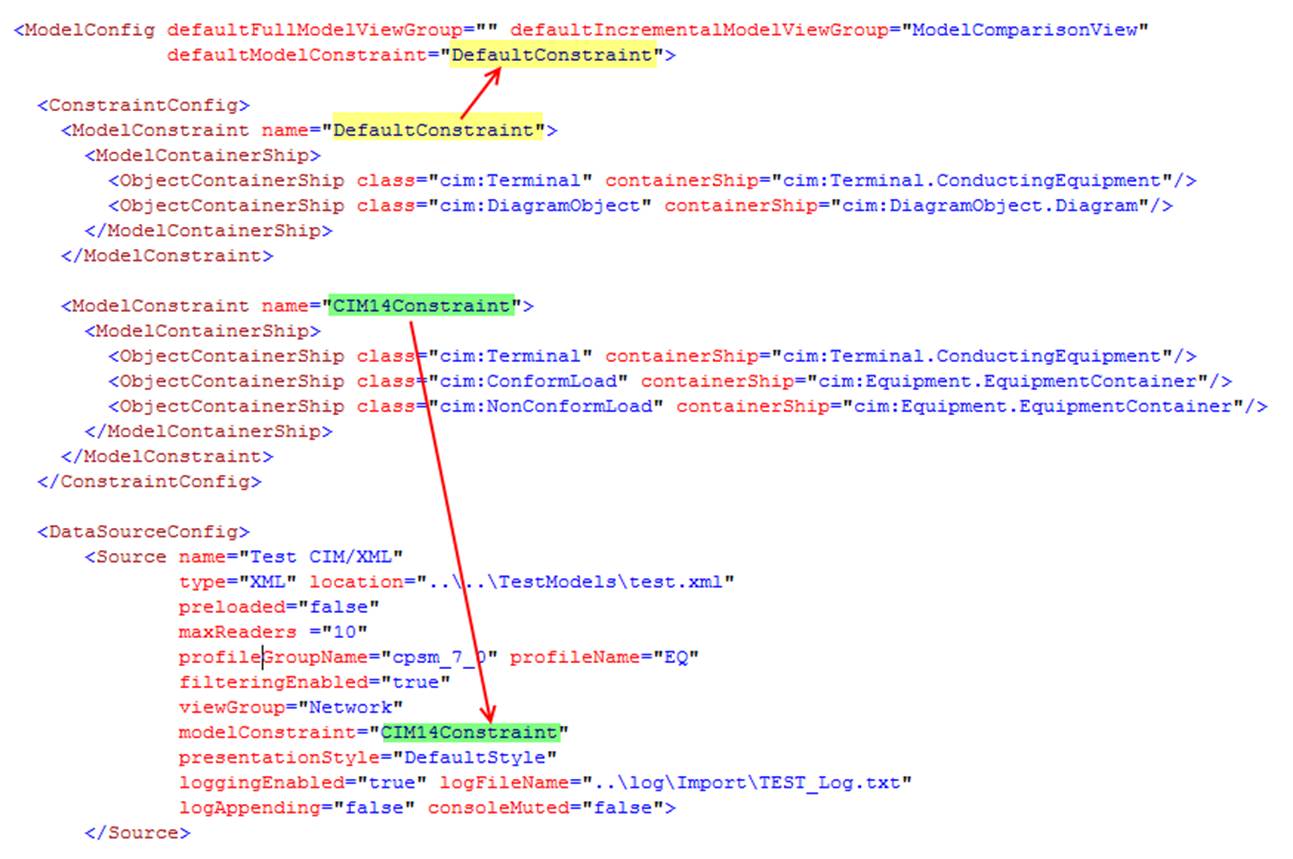
The modeling constraint can be defined as a shared resource within the ModelConfig element. Multiple ModelConstrain elements can be defined, but only one can be applied to one model. If the ModelConstrain is specified at the ModelConfig as defaultModelConstraint, then it applies to any models loaded into the Tool. However, if a ModelConstraint is specified for a certain data source as modelConstarint, the specified model constraint will overwrite the default model constraint. In the above example, ModelConstraint CIM14Constraint, will replace the DefaultConstraint for the defined Data Source “TEST CIM/XML”.
Like other types of shared resources, the modeling constraint can be defined in a separate configuration file and included in the master configuration file where the data sources are defined.

The functions of deep-copying, cascading-deletion, and partial model export are based on the CIM equipment containership hierarchy. However this could result in loss of the equipment in some case. For example, a SeriesCompensator is contained in a Line, but be connected within a Substation. If the Substation is deep-copied, the SeriesCompensator within the Substation could be lost. This is not a desirable behavior. The Tool will detect such equipments and include them during deep-copying, cascading-deletion, and partial model export. Basically if the equipment is not contained in the selected equipment container (as enumerated in the indrectEquipmentContainer, i.e. Substation, SubGeographicalRegion, or GeographicalRegion), but all of its Terminals are connected to the ConnectivityNodes which belong to the selected equipment container. The Tool will include copy/export such equipment during deep-copying, cascading-deletion, or partial model export. Users however can disable such default behavior by changing includeAllInternalEquipment to “false” the DeepCopyCustomization element, as shown below.

The above restriction basically means: if includeAllInternalEquipment is true, then all of the ConductingEquipments that are connected to the ConnectivityNodes belonging to the equipment containers specified in indirectEquipmentContainers will be included in the copied EquipmentContainers. In other words, the equipment containership is inferred based on network connectivity rather than the direct composition or ownership association.
This configuration enables users to configure the behavior of deep-copying, cascading-deletion, and partial model export to maintain the integrity of the copied equipment container regardless of containership modeling. For example, if ACLineSegment is missing containership, users can still include them in the copied GeographicalRegion based on their connectivity.