Model APIs
The APIs defined in this document include the core model-related functions that are designed to support various customization use cases, ranging from building standalone custom processes to plugging-in custom functions for model validation, transformation, or reporting. More specifically, the APIs described in this document are used to
- Create models (model creation APIs)
- Query models (model query APIs)
- Update models (model update APIs)
- ü Import/Export model (model import/export APIs)
- Build views for reporting (reporting APIs)
Overview of Model APIs
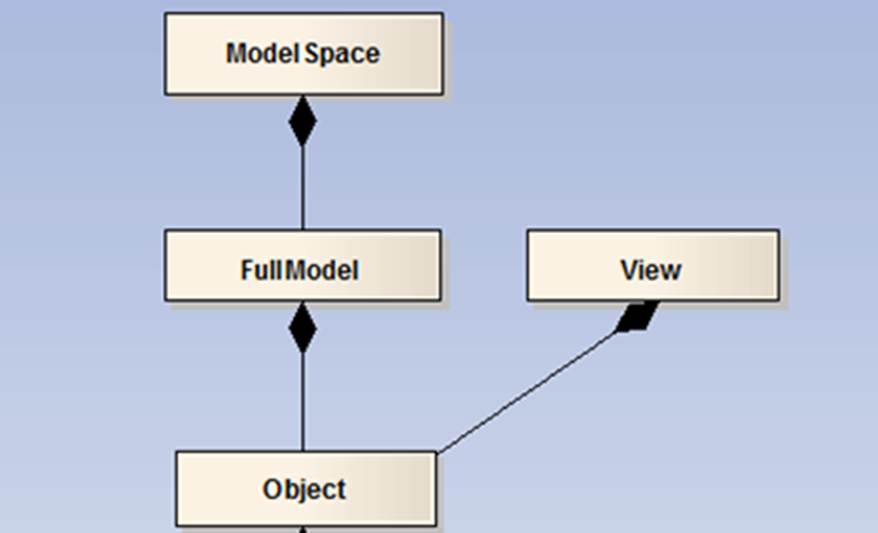
The model APIs are derived from CIMSpy Core APIs. It is a simplified Python version of CIMSpy Core APIs, with only a few major classes exposed. These classes and their diagram are described and shown below.
- ModelSpace is a container class. It hosts all of the loaded models in the server workspace, full or incremental. Currently the server contains only one ModelSpace object. ModelSpace also serves as single point of entry for any service requests. So it can be treated as a service provider.
- FullModel encapsulates all of the information of a loaded or created RDF-based instance model. It organizes the indexed instance objects by classes and provides a set of methods for populating, querying, and updating the instance objects. A FullModel can be exported as a CIM/XML file.
- Object is a class representing an instance, such as a Substation or an ACLineSegment. Each Object is uniquely identified by an ID (referred to as rdf:ID in CIM). Objects are typically contained in the FullModel and grouped by classes. Objects of the same class contain same types of property values. Objects could also be dynamically created for reporting purpose. These ‘temporary’ Objects are owned by the parent View object.
- View is a class defined to support reporting. Each View object represents a report. View objects are not persisted in the ModelSpace. They are dynamically created to group Objects for the purpose of reporting.
Note:
- The published APIs are object-oriented (OO). This is because the server application is an OO application. Therefore, each method must be associated with an object. It is expected that audiences have basic (not sophisticated) OO knowledge.
- All of the objects are exposed to Python environment as references. That basically means that the objects themselves are passed, rather than copied, to the Python environment. Therefore any changes made to these objects in the scripts will be carried over to the server. In Python words, the exposed objects are mutable.
- The published model is ‘generic’ in nature. The most generic data type, i.e. string, is used to represent the values of the property. These property values may need to be converted to the proper data types, such as integer or float, to be useful.
- It is expected that the published APIs will continue to evolve and grow. We will strive to make the future version of APIs to be backward-compatible. Version control mechanism has been seeded in the initial release.
- Model Creation APIs are ‘raw’ in nature. These APIs are designed for performance. The model created or changed with these raw APIs must be adapted to be ready for use. The model creation APIs consists of ModelSpace.CreateNewFullModel, FullModel.CreateNewObject and Object.SetProperty. After a new model is created with these APIs, function ModelSpace.AdpatFullModel must be called to perform profiling, indexing so that the newly created model will be ready for use. Most of the APIs published however are not raw. For example, referential integrity is automatically maintained when updating an existing model with the model update APIs (Add, Update, Delete, and Copy families.) The raw method is marked as ‘raw’ in the published API tables.
Model APIs in Python
The latest version of model APIs are published as follows:
Class
Description
The following functions are defined at top level of CIMSpy module, not associated with any classes
Method
Details
Description
CreateView
Syntax
CreateView()
Called to create and return a new View. View is an object container dynamically created for building custom reporting. The created View must be deleted with function DisposeView to avoid memory leakage.
Returns
View
New view created
Parameters
none
DisposeView
Syntax
DisposeView``(view)
Called to delete the View, This function shall be called once the View created with function CreateView is no longer needed. It is used to recycle the memory allocated.
Returns
none
Parameters
view: view
The View to be disposed (or deleted)
Class
ModelSpace
Description
ModelSpace is a container class. It hosts all of the loaded models in the server workspace, full or incremental. Currently the server contains only one ModelSpace object. ModelSpace also serves as single point of entry for any service requests. So it can be treated as a service provider.
Method
Details
Description
GetFullModels
Syntax
GetFullModels()
Called to return all of the hosted FullModel objects
Returns
FullModelVector
A collection of FullModel objects
Parameters
none
GetFullModel
Syntax
GetFullModel(id)
Called to find a FullModel object based on the assigned model ID
Returns
FullModel
The function returns the identified FullModel object if found, or ‘None’ otherwise.
Parameters
id: str
Model ID assigned by the ModelSpace after a model is loaded. It is typically the name of the model file.
LoadFullModelInCIMXML
Syntax
LoadFullModelInCIMXML (filePath)
Called to load a FullModel into the ModelSpace from a specified CIM/XML file
Returns
FullModel
The function returns the loadedFullModel object if successfully loaded, ‘None’ otherwise.
Parameters
filePath: str
Full path of the CIM/XML file, from which the FullModel will be loaded
CreateNewFullModel
(raw)
Syntax
CreateNewFullModel (name, namespaces)
Called to create a new FullModel and added to the ModelSpace.
Returns
FullModel
The function returns the created FullModel object if successfully created or ‘None’ otherwise.
Parameters
name: str
Name of the new model. It is the same as model ID. The ModelSpace will assign the created model a model ID if the provided name hasn’t been used. Otherwise, a new name (ID) will be assigned by appending a numeric to the original name.
namespaces: StringMap
A map of strings imported as namespaces. Each namespace is a pair of key/value. The key is the prefix of the namespace, such as ‘cim’, while the value is full URL string, such as http://iec.ch/TC57/2009/CIM-schema-cim14#.
AdaptFullModel
Syntax
AdaptFullModel (fullModel)
Called to process the newly-created FullModel before it is fully adapted in the ModelSpace. If a new FullModel is created using the raw model creation APIs, such as CreateNewFullModel and SetProperty, etc., this method must be called to process the created model, for example indexing the model. It is unnecessary to call this method, if the FullModel is updated using the self-contained model update APIs.
Returns
none
Return True if item is in self, False otherwise
Parameters
fullModel: FullModel
The FullModel object to be adapted (indexed, …)
Clear
Syntax
Clear()
Unload all models in the ModelSpace.
Returns
none
Parameters
none
Class
FullModel
Description
FullModel encapsulates all of the information of a loaded or created RDF-based instance model. It organizes the indexed instance objects by classes and provides a set of methods for populating, querying, and updating the instance objects. A FullModel can be exported as a CIM/XML file.
Method
Details
Description
Name
Syntax
Name ()
Called to return name of the model. Model name is the same as model ID. The model name/ID is assigned by the ModelSpace when the FullModel is loaded or created. It must be unique within the ModelSpace. Typically the ModelSpace will use the file name or respect the user-assigned name if the provided name hasn’t been used. Otherwise, a new name (ID) will be assigned by appending a numeric to the original name.
Returns
str
The name/ID of the FullModel
Parameters
none
GetModelNamespaceURI
Syntax
GetModelNamespaceURI``()
Called to get the URI of the FullModel, which is used to uniquely identify CIM version of the FullModel.
Returns
str
The URI of the FullModel, for example: http://iec.ch/TC57/2010/CIM-schema-cim15#.
Parameters
none
AddNamespace
Syntax
AddNamespace``(alias, uri)
Called to add a new namespace. This function is normally used to add CIM extension, for example, AddNamespace(‘pi’, ‘http://www.powerinfo.us/CIM14/2013/extension#’). This function can also be used to overwrite the existing alias/uri. However, if the function is used to change the CIM version, ModelSpace’s AdaptFullModel API must be called subsequently to update the governing profile.
Returns
None
Parameters
alias : str
The short name of the URI, for example, ‘pi’
uri : str
The URI, for example, ‘http://www.powerinfo.us/CIM14/2013/extension#’
GetObject
Syntax
GetObject (id)
Called to find a instance object based on the Object ID
Returns
Object
The function returns the identified instance Object if found, or ‘None’ otherwise.
Parameters
id: str
Object ID used to uniquely identify the Object. If the FullModel is loaded froma CIM/XML file, the rdf:ID will serve as the object ID.
GetObjects
Syntax
GetObjects()
Called to return a collection of Objects contained by the FullModel
Returns
ObjectVector
The function returns a collection of Objects contained by the FullModel.
Parameters
none
GetObjectsOf
Syntax
GetObjectsOf(className)
Called to return a collection of Properties of a specified class, for example, all of the ACLineSegment Objects.
Returns
ObjectVector
A collection of Objects of the specified class.
Parameters
className: str
Full name of the class, including namespace prefix, for example, ‘cim:ACLinesegment’
GetObjectDescendants
Syntax
GetObjectDescendants``(object, includeOnlyLineal)
Called to return a collection of descendant objects of the specified object
Returns
ObjectVector
A collection of Objects that are descendants of the specified
Parameters
object : Object
The specified object
includeOnlyLineal: boolean
True if only the lineal descendants need to be returned, False if all descendants need to be returned. Linear descendants are descendants in the declared model hierarchy, which is described in object PATH.
GetClassNames
Syntax
GetClassNames()
Called to return a collection of class names. Note only those classes with at least one instance will be included.
Returns
StringVector
A collection of class names. The returned class names include namespace prefixes, for example, ‘cim:ACLinesegment’
Parameters
none
GetProperties
Syntax
GetProperties(className)
Called to return a collection of Properties for a specified class
Returns
PropertyVector
Only those with property values are returned
Parameters
className: str
Full name of the class, including namespace prefix, for example, ‘cim:ACLinesegment’
FindObjectsByName
Syntax
FindObjectsByName (name, matchingExactly)
Called to find any Objects whose names match exactly or partially the input string.
Returns
ObjectVector
A collection of Objects whose names match exactly or partially the input string.
Parameters
name: str
Name of the object
matchingExactly: Boolean
A Boolean flag indicating whether the compared strings shall match exactly. If ‘Fasle’, partial name matching will be applied. The partial name is a sub-string of the full name. It does not have to be the initial part of the full name.
FindObjectsByContent
Syntax
FindObjectsByContent (content, matchingExactly)
Called to find any Objects with at least one property value matching exactly or partially the input string.
Returns
Objectvector
A collection of Objects with at least one property value matching exactly or partially the input string
Parameters
content: str
The input string to be exactly or partially matched
matchingExactly: Boolean
A Boolean flag indicating whether the compared strings shall match exactly. If ‘Fasle’, partial string matching will be applied. A partial string is a sub-string of the full string.
FindObjectsByMQL
Syntax
FindObjectsByMQL(mql)
Called to find any Objects that meet the MQL-based selection criteria
Returns
ObjectVector
A collection of Objects that meet the MQL-based selection criteria, i.e. the evaluated logical MQL expression returns true for these Objects
Parameters
mql: str
A logical MQL expression string, for example: ACLineSegment/[BaseVoltage->nominalVoltage]<=138
CreateNewObject
(raw)
Syntax
CreateNewObject (className, id)
Called to create a new Object of a class. It is a raw model creation method.
Returns
Object
The newly-created Object
Parameters
className: str
Name of the class, including namespace prefix, for example, cim:Substation
id: str
ID of the object, must be uniquely within the FullModel
CreateNewPartialObject
(raw)
Syntax
CreateNewPartialObject (className, id)
Called to create a new partial Object of a class. It is a raw model creation method. A partial Object corresponds to those identified using rdf:about in CIM/XML. It is used to augment the Object in other FullModel.
Returns
Object
Return True if item is in self, False otherwise
Parameters
className: str
Name of the class, including namespace prefix, for example, cim:Substation
id: str
ID of the object, must be uniquely within the FullModel
AddObject
Syntax
AddObject (className)
Called to a new Object of the specified class into the FullModel. A unique ID will be auto-generated and assigned to this Object.
Returns
Object
The function returns the created Object if successfully created or ‘None’ otherwise.
Parameters
className: str
Full name of the class, including namespace prefix, for example, ‘cim:ACLinesegment’
AddObjectWithID
Syntax
AddObjectWithID``(className, rdfid)
Called to add new object in the FullModel with a specified rdf:ID
Returns
Object
Return the newly added object
Parameters
className : str
Full name of the class, including namespace prefix, for example, ‘cim:ACLinesegment’
rdfid : str
The rdf:ID of the new object
DeleteObject
Syntax
DeleteObject (id, cacading)
Called to delete an existing Object
Returns
Boolean
Return True if deletion is successful, False otherwise
Parameters
Id: str
ID of the object to be deleted
cascading; Boolean
True if the deletion is cascading (i.e. including all of the descendant Objects), False if the just for this Object
DeleteObjectsOf
Syntax
DeleteObjectsOf (className)
Called to delete all of the Objects of a specified class
Returns
none
Parameters
className: str
Full name of the class, including namespace prefix, for example, ‘cim:ACLinesegment’
DeleteObjects
Syntax
DeleteObjects (ids, cacading)
Called to delete Objects in bulk (for better performance)
Returns
none
Return True if deletion is successful, False otherwise
Parameters
ids: StringVector
IDs of the objects to be deleted
cascading; Boolean
True if the deletion is cascading (i.e. including all of the descendant Objects), False if the just for this Object
DeleteObjectsByMQL
Syntax
DeleteObjectsByMQL (mql, cacading)
Called to delete all of the Objects of a specified class
Returns
none
Parameters
mql: str
MQL string for object selection
cascading; Boolean
True if the deletion is cascading (i.e. including all of the descendant Objects), False if the just for this Object
DeletePropertiesOf
Syntax
DeletePropertiesOf (className, propName)
Called to delete the specified property values for all of the Objects of the specified class
Returns
none
Parameters
className: str
Full name of the class, including namespace prefix, for example, ‘cim:ACLinesegment’
propName: str
Name of the property, including the namespace prefix. For example, cim:IdentifiedObject.name.
DeleteObjectProperty
Syntax
DeleteObjectProperty (object, propName)
Called to delete the specified property value for the specified Object
Returns
none
Parameters
object: Object
The Object whose property value will be deleted.
propName: str
Name of the property, including the namespace prefix. For example, cim:IdentifiedObject.name.
UpdateObjectProperty
Syntax
UpdateObjectProperty (object, propName, propValue)
Called to set or reset the specified property value for the specified Object
Returns
none
Parameters
Object: Object
The Object whose property value will be modified
propName; str
Name of the property, including the namespace prefix. For example, cim:IdentifiedObject.name.
propValue: str
Value of the property in string
UpdateObjectProperties
Syntax
UpdateObjectProperties (object, properties)
Called to set or reset multiple property values for the specified Object
Returns
none
Parameters
object: Object
The Object whose property value will be modified
Properties: StringMap
A map of the pairs consisting of property name and property value in string
CopyObject
Syntax
CopyObject(object, deepCopy)
Called to copy an Object (and its child Objects if deepCopy is set to True) and then add the new Object(s) to the same FullModel. New rdf:ID and names are assigned to the copied Objects.
Returns
Object
Returns the new Object created if successful, None otherwise
Parameters
object: Object
The Object to be copied
deepCopy: Boolean
True if the deep-copy is applied. Otherwise, only the current Object is copied.
CopyObjectTo
Syntax
CopyObjectTo (object, targetModel, deeppCopy, assignID)
Called to copy an Object (and its child Objects if deepCopy is set to True) and then add the new Object(s) to a specified FullModel.
Returns
Object
The Object to be copied
Parameters
object: Object
The Object to be copied
targetModel: FullModel
The FullModel to which the new Object(s) will be added. It could the same FullModel of the Object to be copied
deepCopy: Boolean
True if the deep-copy is applied. Otherwise, only the current Object is copied.
assignID: Boolean
If True, new ID and name will be assigned to the new Object. Otherwise, the ID and name will be retained in the new Object(s).
ChangeObjectID
Syntax
ChangeObjectID (object, newID)
Change the ID of the object. All of the references will be updated.
Returns
Boolean
Return True if the object ID is successfully changed. Return False if the newID is the same as that of other object. In other words, the newID is not unique.
Parameters
Object: Object
The object whose ID will be changed
newID: string
The new ID
ExportAsCIMXML
Syntax
ExportAsCIMXML (filePath)
Called to export the FullModel to a specified file in CIM/XML format
Returns
Boolean
Return True if successful, False otherwise
Parameters
filePath: string
Full path of the file where the exported FullModel will be stored.
ExportChangesAsXML
Syntax
ExportChangesAsXML``(filePath)
Called to export the model changes as CIM incremental file. This function is used to store model changes in an XML file. Exception will be thrown if the filePath is invalid.
Returns
none
Parameters
filePath : str
Full path of the XML file where the model changes will be stored.
ImportModelChanges
Syntax
ImportModelChanges``(filePath)
Called to import and apply the incremental changes to the FullModel. This function is used to restore the model changes from a CIM incremental XML file. Exception will be thrown if the filePath is invalid.
Returns
None
Parameters
filePath : str
Full path of the file where the imported incremental changes will be stored.
Class
View
Description
View is a class defined to support reporting. Each View object represents a report. View objects are not persisted in the ModelSpace. They are dynamically created to group Objects for the purpose of reporting.
Method
Details
Description
CreateNewObject
Syntax
CreateNewObject (id)
Called to create a new Object for the reporting purpose.
Returns
Object
The function returns the created instance Object if successfully created or ‘None’ otherwise.
Parameters
id: str
Id of the Object, must be unique within View. Typically the rdf:ID of the existing persisted model Object is used to make the generated report ‘navigable’.
ExportToCsv
Syntax
ExportToCsv``(filePath, sortedBy, append)
Called to store the populated View in a CSV file.
Returns
Boolean
The function returns True if it was able to successfully export the view to a csv file, else returns False.
Parameters
filePath : str
Full path of the CSV file
sortedBy : str
Name of the column (property), by which the objects are sorted in the exported CSV file. If empty, no sorting will be performed
append : Boolean
If True, the data will be appended to end of the file. If False, the file will be overwritten.
Class
Object
Description
Object is a class representing an instance, such as a Substation or an ACLineSegment. Each Object is uniquely identified by an ID (referred to as rdf:ID in CIM). Objects are typically contained in the FullModel and grouped by classes. Objects of the same class contain same types of property values. Objects could also be dynamically created for reporting purpose. These ‘temporary’ Objects are owned by the parent View object.
Method
Details
Description
ID
Syntax
ID()
Called to return the ID (rdf:ID) of the Object
Returns
str
ID of the Object
Parameters
none
Name
Syntax
Name()
Called to find the name of the Object, typically the value of property cim:IdentifiedObject.name
Returns
str
The name of the Object, typically the value of property cim:IdentifiedObject.name
Parameters
none
ClassName
Syntax
ClassName()
Called to return the class name of the Object, such as ‘cim:Substation’
Returns
str
The class name of the Object, such as ‘cim:Substation’
Parameters
none
Partial
Syntax
Partial()
Called to return a flag indicating whether the Object is partial. A partial Object is identified as rdf:about in CIM/XML.
Returns
Boolean
A flag indicating whether the Object is partial. A partial Object is identified as rdf:about in CIM/XML.
Parameters
none
GetPropertyValue
Syntax
GetPropertyValue (propName)
Called to return the value of the specified property or empty string if the property doesn’t exist.
Returns
str
The value of the specified property or empty string if the property doesn’t exist
Parameters
propName: str
Name of the property, including the namespace prefix. For example, cim:IdentifiedObject.name.
SetProperty
(raw)
Syntax
SetProperty (propName, propValue, propType, update)
Called to set a property value in the Object. The method is raw.
Returns
Boolean
‘True’ if successful, ‘False’ otherwise. If the property has already been set previously and the ‘update’ is ‘False’, the function will return ‘False’ and the original value will not be changed.
Parameters
propName: str
Name of the property, including the namespace prefix. For example, cim:IdentifiedObject.name.
propValue: str
Value of the property in string
propType: PropertyType (Enum)
Type of the property, i.e. attribute/association/enumeration.
update: Boolean (optional)
If ‘Ture’, the original value will be over-written. This parameter is optional. If not provided, the default value will be ‘False’.
SetAttributeProperty
(raw)
Syntax
SetAttributeProperty (propName, propValue)
This function is an alternative short-cut to set the attribute-type property
Returns
Boolean
‘True’ if successful, ‘False’ otherwise
Parameters
propName: str
Name of the property, including the namespace prefix. For example, cim:IdentifiedObject.name.
propValue: str
Value of the property in string
GetAssociatedObject
Syntax
GetAssociatedObject (assocName)
Called to return an associated Object given the association name. This call could also be used to find the Object associated through a chain of association. For example, The Substation associated with a SynchronousMachine through association chain: cim:EquipmentContainer→cim:VoltageLevel.Substation. In the case, the chain association must be provided.
Returns
Object
The associated Object or ‘None’ if none-existing.
Parameters
assocName: str
Name of the association property, including the namespace prefix, for example, ‘cim:Equipment.EquipmentContainer’; or association chain, for instance cim:EquipmentContainer→cim:VoltageLevel.Substation. A association chain consists of a sequence of association names separated by ‘→’. It is used to find an Object by navigating through a chain of associations., for example, find Substation of a SynchronousMachine by navigating from SynchronousMachine→VoltageLevel→Substation following through association chain: cim:EquipmentContainer→cim:VoltageLevel.Substation.
GetAssociatedObjects
Syntax
GetAssociatedObjects ()
Called to return all of the associated Objects
Returns
ObjectVector
A collection of the associated Objects
Parameters
none
GetObjectsWithInverse Association
Syntax
GetObjectsWithInverse Association (className, assocName)
Called to return the child Objects via inverse association
Returns
ObjectVector
A collection of the child Objects
Parameters
className: str
Class name of the child objects, including namespace prefix
assocName: str
Name of the association from the child Object to this Object, including namespace prefix.
GetPropertyValueByMQL
Syntax
GetPropertyValueByMQL(mql)
Called to return the property value based on MQL query. For example, breaker.GetPropertyValueByMQL(“[Equipment.EquipmentContainer->VoltageLevel.BaseVoltage->BaseVoltage.nominalVoltage]”)
Returns
string
Property value. Empty if the query fails.
Parameters
mql: string
The MQL query string
GetObjectsByMQL
Syntax
GetObjectsByMQL(mql)
Called to return the objects based on MQL query. This call is normally used for inverse navigation, i.e. from parent to child. For example, the following call finds all of the ConnectivityNodes under a specific Substation: substation.GetObjectsByMQL(“[{VoltageLevel.Substation }->{ConnectivityNode.ConnectivityNodeContainer}]')
Returns
ObjectVector
The target object. If more than one target objects are found, only the first one is returned. Return empty vector if the query fails.
Parameters
mql: string
The MQL query string
GetObjectByMQL
Syntax
GetObjectByMQL(mql)
Called to return the single object based on MQL query. This call is normally for forward navigation, i.e. from child to parent. Example: substation.GetObjectByMQL(“[Substation.Region-> SubGeographicalRegion.Region]”)
Returns
Object
The target object. If more than one target objects are found, only the first one is returned. Return None if the query fails.
Parameters
mql: string
The MQL query string
GetAncestors
Syntax
GetAncestors()
Called to return the ancestor Objects based on pre-defined model containership or hierarchy.
Returns
ObjectVector
A collection of the ancestor Objects
Parameters
None
GetAncestorOf
Syntax
GetAncestorOf(className)
Called to return the ancestor Object of a specified class based on pre-defined model containership or hierarchy.
Returns
Object
The ancestor Object or ‘None’ if none-existing.
className: str
Class name of the ancestor objects, including or excluding namespace prefix
Path
Syntax
Path(includingClassName)
Called to return the hierarchical path as a string
Returns
string
The hierarchical path of the Object, such as ‘Region1/SubRegion11/Substation111/…’
Parameters
includingClassName: Boolean
A Boolean flag indicating whether to include class name in the path string.
PassMQLTest
Syntax
PassMQLTest(mql)
Return True if the MQL logical expression is successfully evaluated and return ‘true’. This function is used for object filtering.
Returns
Boolean
Return True if the MQL logical expression is successfully evaluated and return ‘true’.
Parameters
mql: str
MQL logical expression. For example ‘[BaseVoltage->nominalVoltage]<=138’
Class
Property
Description
Property is class describing Object’s property values, including name of the property and type of the property, i.e. attribute/association/enumeration.
Method
Details
Description
Name
Syntax
Name()
Called to return all of the hosted FullModel objects
Returns
str
Name of the property, including namespace prefix. For example, cim:IdentifiedObject.name
Parameters
none
Type
Syntax
Type()
Called to return the type of the property, i.e. attribute/association/enumeration.
Returns
PropertyType (Enum)
Type of the property, i.e. attribute/association/enumeration.
Parameters
none
| Enum | PropertyType |
|---|---|
| Description | The enumeration class defines the type of the property. |
| Enumerated Value | Description |
attribute |
The property is an attribute. For example, property cim:IdentifiedObject.name is of type attribute. |
association |
The property is an association. For example, property cim:Equipment.EquipmentContainer is of type association. |
enumeration |
The property is an enumeration. For example, property cim: SynchronousMachine.operatingMode is of type enumeration. |
Class
FullModelVector
Description
A class that contains a collection of FullModels. This class is designed to wrap C++ template-based vector class, i.e. std::vector
Method
Details
Description
__len__
Syntax
__len__()
Called to implement the built-in function len().
Returns
int
The length (size) of the container, an integer >= 0.
Parameters
none
__getitem__
Syntax
__getitem__(i)
Called to implement evaluation of self[i]
Returns
FullModel
The function returns the ith item in the vector.
Parameters
i: int
Zero-based index of the object to be retrieved
__setitem__
Syntax
__setitem__(i, m)
Called to implement assignment to self[i]
Returns
None
Parameters
i: int
Index of the item to be assigned a value
m: FullModel
FullModel assigned
__delitem__
Syntax
__delitem__(i)
Called to implement deletion of self[i]
Returns
none
Parameters
i: int
Zero-based index of the item to be deleted
__contains__
Syntax
__contains__(m)
Called to implement membership test operators
Returns
Boolean
Return True if item is in self, False otherwise
Parameters
m: FullModel
FullModel to be tested
Class
ObjectVector
Description
A class that contains a collection of Objects. This class is designed to wrap C++ template-based vector class, i.e. std::vector
Method
Details
Description
__len__
Syntax
__len__()
Called to implement the built-in function len().
Returns
Int
The length (size) of the container, an integer >= 0.
Parameters
None
__getitem__
Syntax
__getitem__(i)
Called to implement evaluation of self[i]
Returns
Object
The function returns the ith item in the vector.
Parameters
i: int
Zero-based index of the object to be retrieved
__setitem__
Syntax
__setitem__(i, o)
Called to implement assignment to self[i]
Returns
None
Parameters
i: int
Index of the item to be assigned a value
o: object
Object assigned
__delitem__
Syntax
__delitem__(i)
Called to implement deletion of self[i]
Returns
none
Parameters
i: int
Zero-based index of the item to be deleted
__contains__
Syntax
__contains__(o)
Called to implement membership test operators
Returns
Boolean
Return True if item is in self, False otherwise
Parameters
o: Object
Object to be tested
Class
PropertyVector
Description
A class that contains a collection of Properties. This class is designed to wrap C++ template-based vector class, i.e. std::vector
Method
Details
Description
__len__
Syntax
__len__()
Called to implement the built-in function len().
Returns
Int
The length (size) of the container, an integer >= 0.
Parameters
None
__getitem__
Syntax
__getitem__(i)
Called to implement evaluation of self[i]
Returns
Object
The function returns the ith item in the vector.
Parameters
i: int
Zero-based index of the object to be retrieved
__setitem__
Syntax
__setitem__(i, p)
Called to implement assignment to self[i]
Returns
None
Parameters
i: int
Index of the item to be assigned a value
p: Property
Property assigned
__delitem__
Syntax
__delitem__(i)
Called to implement deletion of self[i]
Returns
none
Parameters
i: int
Zero-based index of the item to be deleted
__contains__
Syntax
__contains__(p)
Called to implement membership test operators
Returns
Boolean
Return True if item is in self, False otherwise
Parameters
o: Property
Property to be tested
Tutorial
To learn how to use the above APIs, check the scripting tutorial.