Setting Default Parameters
Setting Default Export File Location
When exporting a file, the Tool will prompt users to enter the full path of the file to be generated. The default folder is set to ..\export. However if your installation location doesn’t match this default setting, you will have to make the corresponding changes every time you export a file. This default export folder can be reconfigured in your CustomConfig file, as illustrated below.
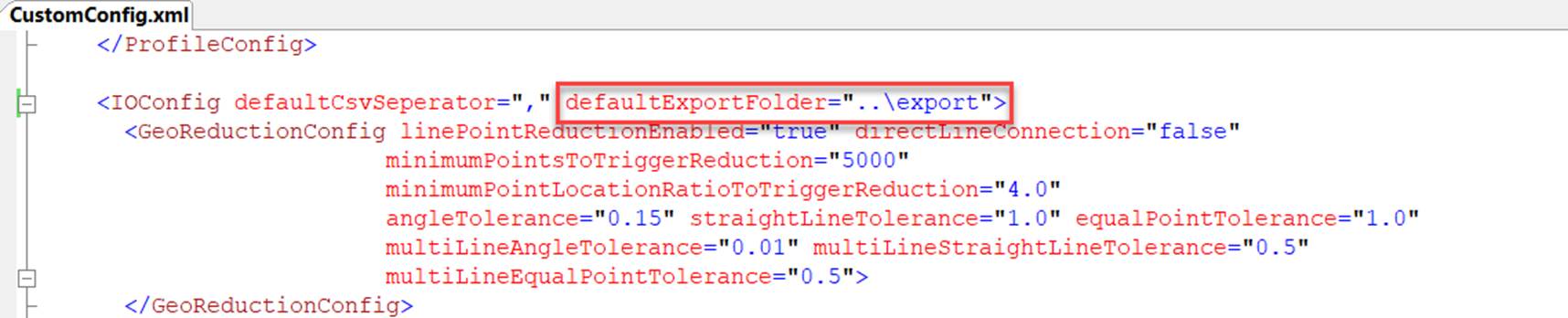
Once this setting is changed, the export folder will be set to the one specified every time a file is exported. If users don’t want to designate a specific folder for export, simply set defaultExportFolder to empty string. In this case, the Tool will always use the folder recently opened as the default export folder. This is the default behavior of Windows.
Setting Default CSV Separator
When exporting a model or part of the model to a collection of CSV files, the Tool will use the comma (i.e. ‘) as separator. Users however can change the default CSV separator to any string. In the following example, the CSV separator is changed to “;”. Note this change is applied to any CSV import/export, unless the corresponding definition in found is IOConfig, such as separator in GeoIOConfig.
