Overview of Model Management

Model management is a new function built to support the emerging industrial requirements of centralized information management in a utility organization. Under this methodology, a modeling entry should be entered once, and then will be available for all of the downstream applications and information systems. More specifically, the Tool provides a multidimensional modeling space and comprehensive data engineering functions to help electric utility organizations maintain and manage their CIM-based power system models. Some of the key highlights include:
- Model Driven: Database schema is auto-generated from the governing model profile, supporting any versions of CIM, standard or extended.
- Process Automation:Model build and maintenance process is fully automated.
- Time-Based: Enabling models to be evolved with major milestones labeled as versions. Users can load any versions of model into workspace, and model changes between any two dependent versions can be extracted as a CIM difference model, ready to be consumed by other systems.
- Multi-Tasking: Enabling multiple parallel modeling tasks to be concurrently performed in support of various business use cases. The branched model revisions or Projects can also be merged into the main trunk or other branches.
- High Performance: Saving & loading of full RTO model (8000 substations) takes seconds rather than minutes.
- Multi-Database Support: Models can be stored in any RDBMS with ODBC connection support. Creating an empty database is all you need from DBA.
- Standard-Complaint: Users can build other CIM applications on top of the CIM-compliant databases.
It is strongly recommended that users read the sections below to understand the basic concepts of model management, and then follow the tutorial to get familiar with these concepts. The tutorial provides step-to-step instructions to walk you through the major workflow of the supported model managements, ranging from setting up the database to version management.
The Model Management feature is released under a trial license.
Use Cases & Requirements
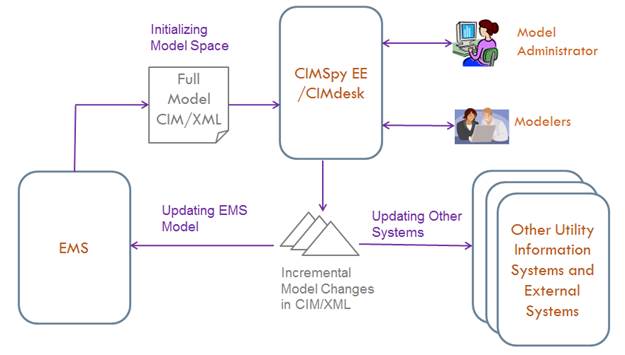
There are many driving forces behind the model management function. A typical use case, as illustrated in the following picture, consists of the following sequential steps:
- The modeling tool is initialized with a full model exported from an existing utility information system, such as EMS.
- The imported model is maintained and managed in the Tool. Model Administrator creates various model/work spaces to support various business requirements ranging from operation to planning. The Tool automates the lifecycle of model maintenance and management, ranging from drafting, submittal, versioning, branching, and merging.
- Periodically and at various milestones, the model changes will be exported from the Tool and used to update various downstream utility information systems, including external systems. For example, the incremental model changes could be sent to the grid coordinating organizations to update the corresponding portion of the shared regional network model.
Driven by the identified use cases, the model management functions are designed to support the following requirements:
- Model changes shall be traceable and extractable;
- The life cycle of model build shall be seamlessly automated, ranging from drafting, submitting, validation, versioning, to study case assembling;
- Must be able to support parallel modeling, allowing models to be branched/merged or built separately to support various business practices;
- The model building blocks (i.e. Projects) shall be sharable and reusable;
- Supporting various RDBMS, including Oracle, MSSQL Server, and MySQL; Support from Database Administrator (DBA) shall be minimized.
Distributed Modeling Environment
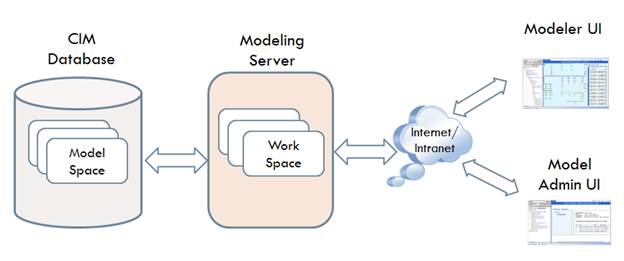
The Tool is designed to provide end-users a distributed modeling environment in support of collaborative and multi-task modeling. Architecturally, the Tool consists of three loosely-coupled tiers:
- Model Database: a relational database containing one or more Modelspaces. Each Modelspace is a self-contained data store containing all of the information related to an independent power system model, including base model, pending/submitted model changes, and model management information such as versions and their dependencies.
- Modeling Server: a working area where the target models are assembled and maintained. The Modeling Server can host one or more Workspaces. Each Workspace contains an integrated power system model assembled from a base model and a collection of changes. The model in a Workspace typically corresponds to a draft or a labeled version of model in the Modelspace.
- UIs: user interface through which the models are maintained and managed. There are two types of UIs, one for model administrators (referred to as Model Admin UI) and the other for modelers (referred to as Modeler UI). The former is mainly for model management, while the latter is designed to facilitate the routine model maintenance. Each UI client can work with multiple models in different Work Spaces and hosted by different Modeling Servers. In this release, Model Admin UI is embedded in Modeler UI. In the future release, they will be separated.
Model Storage
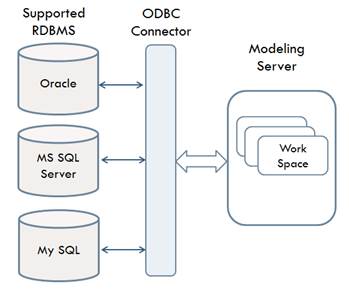
While the Tool works with model files, the model management function requires all of the modeling information be stored in a Model Space, a RDBMS-based database.
- The Tool supports virtually any RDBMS via ODBC connector.
- The official supported RDBMS are Oracle, MS SQL Server and MySQL.
- The recommended RDBMS is MS SQL Server, based on performance testing and usability evaluation.
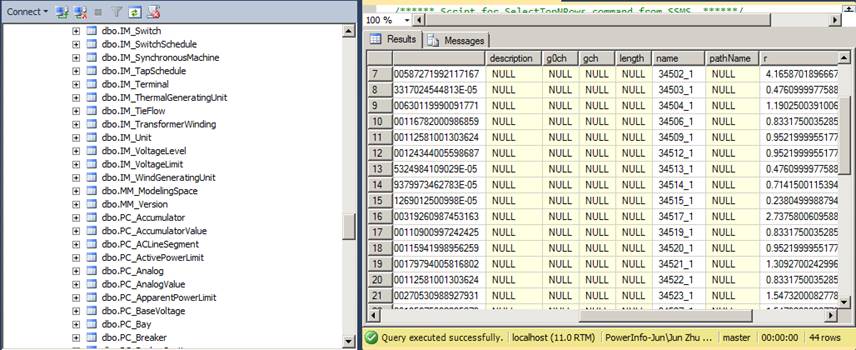
The Model Space is typically initialized with a loaded CIM/XML file. The Tool auto-generates a Modelspace Schema based on the governing profile of the loaded model. This includes
- Tables used to store the full base models (prefixed with FM)
- Tables used to store the model changes, including pending changes (prefixed with PC) and submitted changes (prefixed with IM)
- Tables used to manage the evolution of models (prefixed with MM), such as Version
Graphical Model Editor for Model Maintenance
The graphical model editor is an advanced modeling application designed to assist users to maintain the CIM-based power system models. Based on reality, the graphical application enables users to interactively and intuitively perform complicated modeling tasks in a What-You-See-Is-What-You-Get (WYSIWYG) style. Additionally, it provides some advanced features, enabling users to rapidly perform the model maintenance work by using the existing models as templates. Unlike object-based data editor, the graphical model editor works on graphical modeling entities, which corresponds to physical modeling entities in the real world. For example, when users create a transformer, the Tool automatically creates all required component objects and set the associations among the component objects. Additionally it enforces the modeling constraints, ensuring the created model is valid.
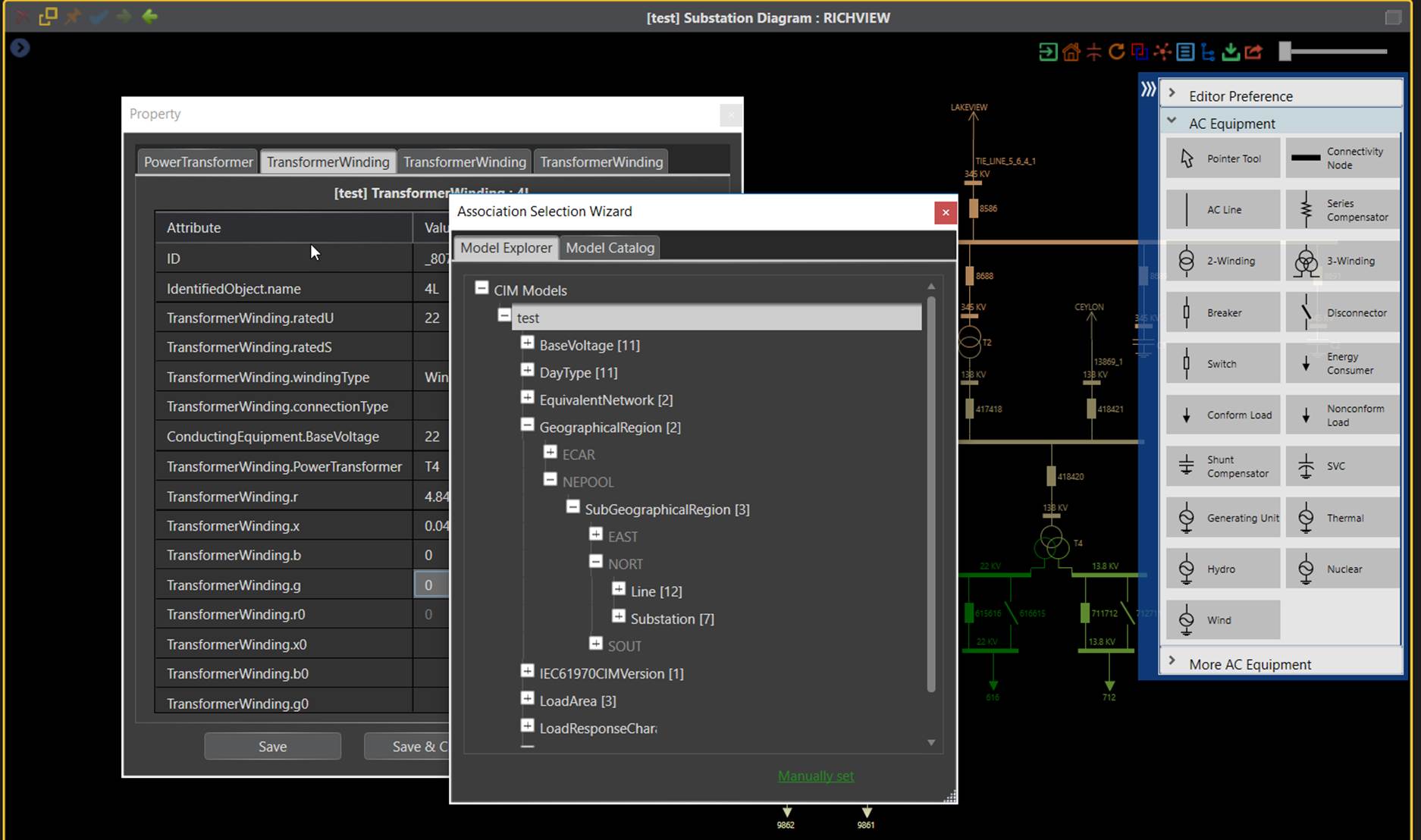
More specifically, the following features and functions are provided in the graphical model editor:
- The design philosophy of this application is enabling users to perform routine model maintenance with minimal effort. The established design philosophy results in a user-centered graphical modeling environment.
- The application is fully WYSIWYG. Modeling task is no longer tedious. Network topology modeling, for example, is translated into a sequence of graphical activities.
- Users work on reality-based modeling entities rather than fine-granulated CIM objects. The application automatically maintains the CIM modeling business logic for you.
- The application is primarily data-driven, working on any supported versions of CIM, standard or extended.
- Data and graphics are seamlessly integrated. Data entry is performed in the context of full graphics.
- Template-based modeling speeds up and significantly improves model maintenance. With one-mouse-clicking, you can add a parallel line or duplicate a substation.
- Advanced features, such as model transplantation, enable users to perform complicated modeling tasks, such as splitting a substation into two, with an instant effort.
- While modeling errors are not eliminated, they become much more difficult to make with modeling constraints enforced.
- Even with strict modeling constraints enforced, users can still perform some unusual modeling tasks, such as connecting two substations with a transformer or a switch.
- All modeling activities performed in the graphical model editor are tracked in a CIM difference format, making it easier to consume by other CIM-compliant infrastructure.
Versioning & Change Management for Time-based Modeling
Unlike the legacy modeling tool which allows users to model only a snapshot of the grid, the Tool is designed to support time-based modeling, enabling users to model the past, present, and the future of the grid, as illustrated below. The Tool enables models to evolve with major milestones marked as versions. Users can load any versions of model into workspace, and model changes between any two dependent versions can be extracted as a CIM difference model, ready to be consumed by other utility systems.
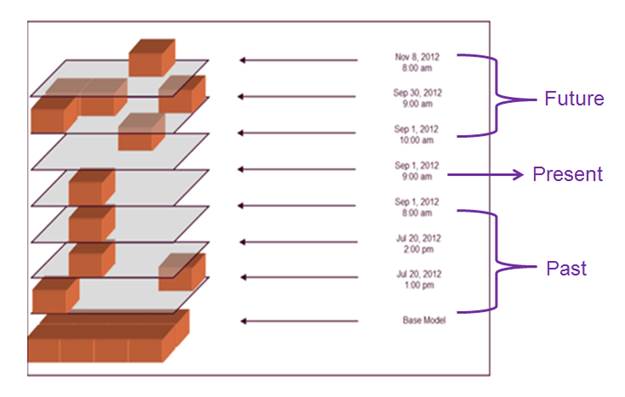
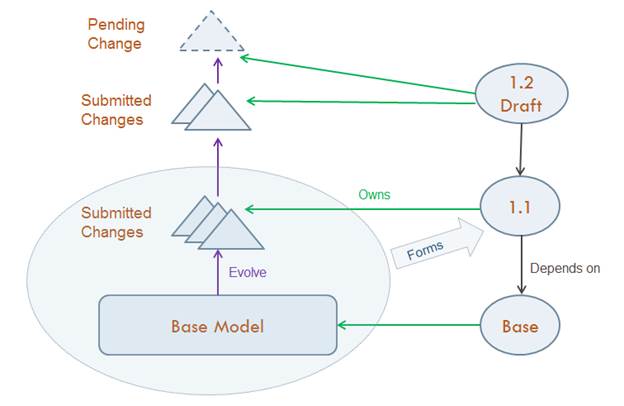
Time-based modeling is accomplished through versioning and change management in the Tool. Once a Model Space is initialized, the Base Model will remain intact during the lifecycle of the model. The model changes will be stored as incremental model changes as time goes on. A Version serves as a milestone of the model evolution. There are two types of Versions:
- Labeled Version – a mature state the evolved model. Once a Version is labeled, it can no longer be changed. It can only be revised through derived versions.
- Draft Version – an active version that accepts the model changes. Draft versions typically serve as leaves in the version tree. They represent the on-going modeling efforts. Labeled Versions always originate from the Draft Versions.
Version owns incremental model changes. There are two types of incremental model changes:
- Submitted Changes – model changes formally submitted by modelers. The submitted model changes typically represent on-going or future grid configuration changes, also referred to as Projects. They are the reusable building blocks of a Version. Once changes are submitted, they can no longer be changed. It can only be revised by submitting new changes. .
- Pending Changes – On-going model changes that may or may not be submitted. Pending changes typically represent the current state of a modeling task. They may be incomplete or invalid. Pending changes could be the results of concurrent modeling efforts from multiple modelers. Pending changes must be validated prior to submittal.
A Labeled Version can only contain the Submitted Changes, while a Draft version can typically consists of a queue of Submitted Changes and a single active Pending Change on the top of the queue. The following diagram illustrates the relationships between Versions and Changes. Because only incremental model changes are stored, the incremental model changes between any two versions can be easily extracted and exported for the downstream applications to use.
Branching & Merging for Multi-Tasking
Model evolution is more than a linear process. Quite often, various revisions of the model are needed to support different use cases. This is particularly true for planning modeling where numerous what-if study cases must be constructed. In an operational environment, the future Projects must also be allowed for in the models and sufficiently tested in a QA environment before the Projects actually go alive. The Tool is designed to support these use case, enabling users to model the grid concurrently and for different purposes.
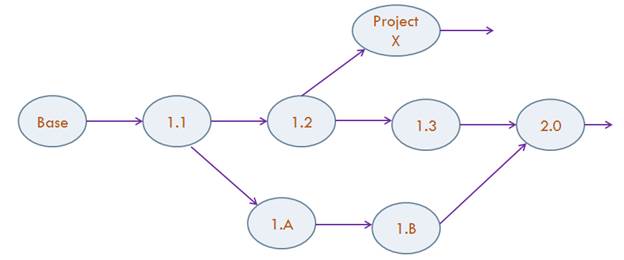
The concurrent modeling is accomplished through Version branching and merging. Model administrators can create unlimited numbers of Draft Versions from a Labeled Version. The resulting is a version tree, with each branch representing an independent model evolution path. The branched version can also be merged by transplanting the Submitted Model Changes from one Labeled Version to the other Labeled Version.
The following diagram illustrates a typical use case where concurrent modeling is supported through version branching and merging. The main trunk, i.e. from Base to Version 2.0 represents the model evolution of as-is operational EMS model. An on-going transmission project involves a lot of model changes. In order not to impact the model maintenance of the as-is operational model, a new version branch, i.e. 1.1->1.A->1.B is derived to model the changes related to the on-going project. Assuming the on-going project now goes alive; the tested and validated model changes can be merged from the branched version to the main trunk, as illustrated below. During the model merging process, modeling conflicts, if any, will be detected and prompted to users for resolutions.
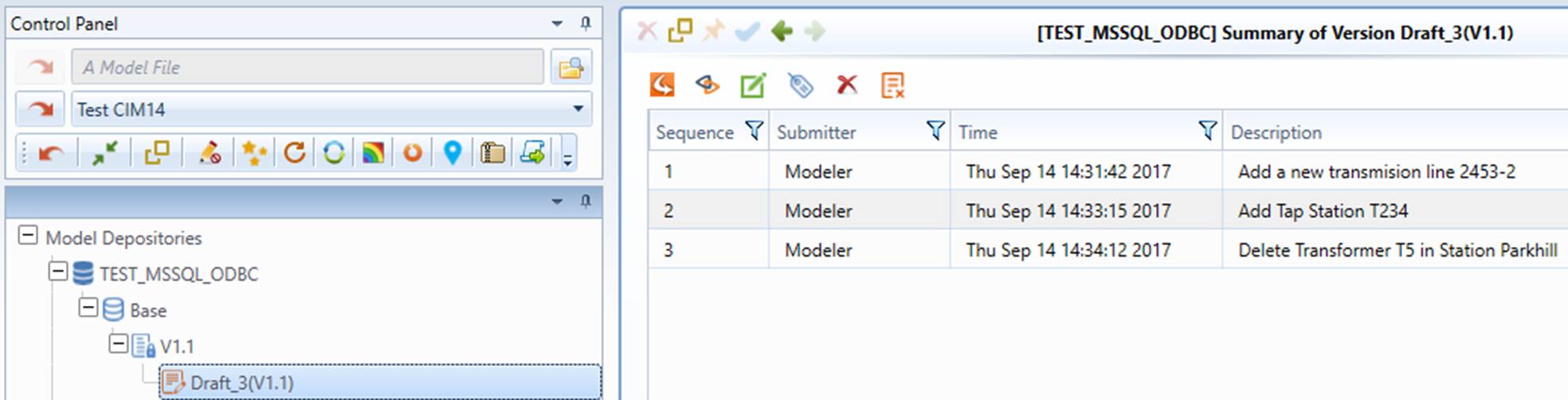
The following screenshot illustrates how the above concurrent modeling use case is supported in the Tool.
Supported Model Build Lifecycle
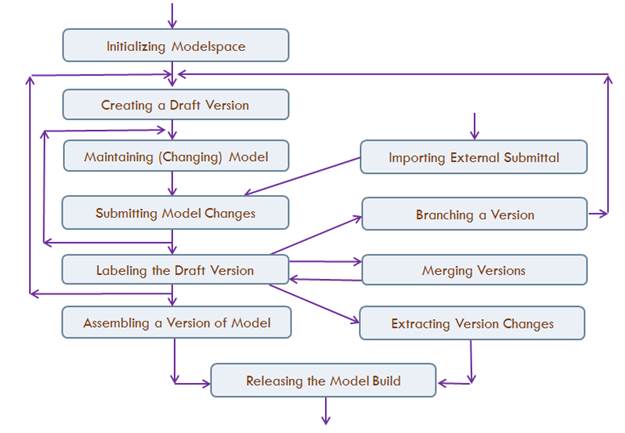
In addition to support various modeling practices, the Tool is designed to automate the model build workflow and enforce the rules during the model build process. Model build life cycle is typically controlled by a model administrator via Model Admin UI. It involves different stages, ranging from initialization, drafting, submittal, versioning, to model build release. Note this process is not recursive rather than sequential. The Tool is also designed to support the concurrent multi-tasking. Therefore the supported model build cycle is quite sophisticated. The release could be a full model build or an incremental changes between the latest and the previous. The following diagram illustrates how the lifecycle of a model build process is supported in the Tool.
Next Step
Follow the tutorial to learn the key model management functions.
Subtopics
- Model Management Tutorial
- Setup and Initialization
- Database Setup
- Modelspace Configuration
- Initialization of Modelspace
- Model Administration UI
- Model Maintenance
- Loading Model for Maintenance
- Making Model Changes
- Tracking and Managing Model Changes
- Submitting Model Changes
- Importing Model Changes
- Model Administration
- Creating a Draft Version
- Loading Model from Modelspace
- Labeling a Draft Version
- Managing Versions
- Branching and Merging Versions
- Extracting Model Changes between Versions
- Releasing a Full Model Build
- Messaging and Logging